
Calendly Event Types Explained in 2026


Trying to understand how Calendly works, especially Calendly event types, and trying to opitmize them? In this guide, we'll explore Calendly's scheduling options and how they function, from one-on-one appointments to round robin distribution across teams.
And, at the end, we'll also show you why Zeeg offers a better, privacy-focused alternative, with the same powerful scheduling capabilities.
Understanding the different types of events in scheduling platforms
Event types are essentially meeting templates you can create once and reuse whenever needed. They form the foundation of any scheduling tool, allowing you to define various kinds of meetings—like sales demonstrations, job interviews, or customer support sessions—each with their own unique settings.
With properly configured event types, you can:
- Eliminate repetitive data entry for recurring meeting formats
- Deliver consistent experiences for people booking your time
- Organize your calendar by categorizing different meeting purposes
- Set specific availability windows for different types of appointments
Most scheduling platforms offer several categories of event types designed for different meeting scenarios. Let's examine the main options available in tools like Calendly and how you might use them.
The four main Calendly event types explained
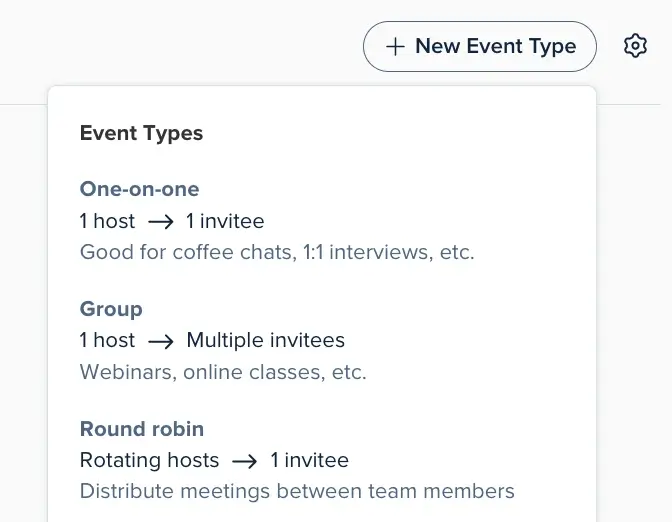
Calendly offers four primary event types, each designed for specific scheduling needs:
One-on-one events
One-on-one events connect just two people: you and one guest. These represent the most common meeting format and work well for:
- Initial consultation calls
- Job interviews with individual candidates
- Regular check-ins with clients
- Coaching or mentoring sessions
- Coffee chats or networking meetings
When setting up a one-on-one event type, you define the duration, location (physical or virtual), and availability windows. Once someone books this event type, it appears on both of your calendars automatically.
Group events
Group events allow multiple people to book the same time slot with you. These function as one-to-many events where you host several attendees simultaneously. For group events, you typically set a maximum number of participants per session.
These event types work perfectly for:
- Webinars or online workshops
- Training sessions or classes
- Campus or property tours
- Information sessions
- Group fitness or coaching sessions
Round robin events
Calendly round robin distributes meetings among team members based on specific rules. When someone books a round robin event, they get assigned to one team member according to availability and distribution settings.
This approach works excellently for:
- Sales teams handling inbound leads
- Support teams managing customer inquiries
- Professional services firms allocating new clients
- Medical practices distributing patient appointments
How does round robin Calendly event distribution work?
The round robin Calendly option distributes incoming meetings across a team, matching bookers with just one team member rather than the entire group. Let's explore how this works in practice.
Calendly offers two primary methods for distributing round robin meetings:
1. Maximize for availability
This setting prioritizes booking meetings over equal distribution. The system shows all time slots when at least one team member is available. If multiple team members can take the same slot, Calendly uses priority settings to determine who gets assigned.
With this method:
- Any time slot when at least one person is available will be offered to bookers
- Team members with higher priority stars get assigned first when multiple people are available
- If team members have the same priority, the person with fewer recent meetings gets priority
- If everything else is equal, a random selection occurs
This approach works best when your top priority is scheduling as many meetings as possible, regardless of how evenly they're distributed.
2. Optimize for equal distribution
This setting focuses on fair workload distribution, even if it means fewer available meeting slots. Calendly tracks how many round robin meetings each person has had and prevents anyone from getting too far ahead of others.
With this method:
- The system hides availability for team members who are more than three meetings ahead of others
- Once meeting counts become more balanced, availability opens up again
- If you add or remove someone from the event type, meeting counts reset to zero
This approach works best when fair distribution matters more than maximizing the number of bookings.
👉 Learn more about Calendly round robin meetings.
How to set up and customize Calendly event types
Creating effective event types requires attention to several key settings. Let's walk through the process of setting up and customizing Calendly event types.
Basic event type setup
To create a new event type in Calendly:
- Go to your Scheduling page > Event types tab
- Click the "+ Create" button
- Choose which type of event you want to host (one-on-one, group, round robin, etc.)
- Configure the basic settings:
- Event name (what your guests will see)
- Duration (how long the meeting will last)
- Location (where you'll meet – in person, phone, video call, etc.)
- Availability (when people can book this event type)
- Host(s) (who will participate from your side)
- Click "Create" to save your new event type
After setting up these basics, you can access more detailed options by selecting "More options" at the bottom of the event type editor.
Advanced customization options
For more tailored event types, Calendly lets you adjust these advanced settings:
- Description: Add details about what attendees should expect
- Limits and buffers: Set maximum meetings per day/week and add buffer time between appointments
- Free/busy rules: Determine which calendar events can be booked over
- Booking page options: Customize your event link and start time increments
- Invitee form: Add custom questions to gather information before meetings
- Payment: Connect payment processors to charge for bookings
- Notifications: Configure confirmation emails, reminders, and follow-ups
- Confirmation page: Customize what guests see after booking
These settings let you create highly specialized event types for different meeting purposes, which can enhance both your productivity and your guests' experience.
Implementing Calendly event types in the workflow
If you're ready to implement event types in your scheduling workflow, here's a simple process to get started:
- Identify your meeting types: List the different categories of meetings you regularly conduct
- Define settings for each: Determine duration, location, and availability for each meeting type
- Create custom questions: Design forms to gather necessary information before meetings
- Set up notifications: Configure confirmation emails and reminders
- Test your booking flow: Go through the booking process as if you were a guest
- Share your booking links: Add them to your email signature, website, and social profiles
Whether you choose Calendly or Zeeg, taking the time to properly configure your event types will save you countless hours and create a more professional experience for everyone who books time with you.
Calendly event types: More ways to meet
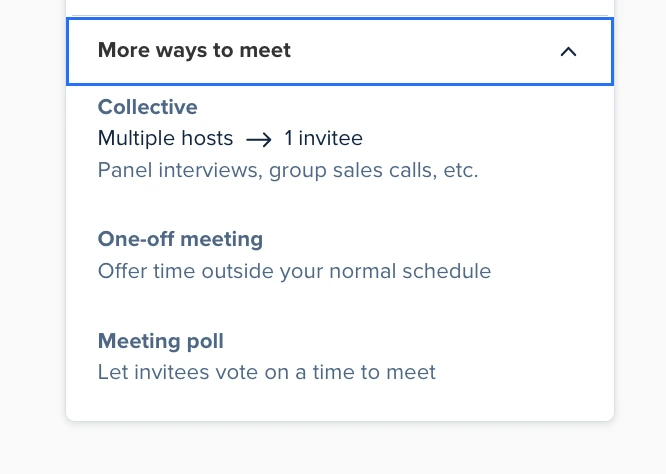
Besides the common ways to meet that we've read about, there's a few more things you can try:
Collective scheduling events
Collective scheduling enables multiple hosts to meet with one guest. The system automatically finds times when all hosts are available and presents only those options to the booker.
Calendly collective scheduling works particularly well for:
- Panel interviews with multiple interviewers
- Sales calls needing both an account executive and specialist
- Client onboarding requiring multiple team members
- Complex support issues needing different experts
Collective scheduling eliminates the notorious email chains typically needed to coordinate multiple busy calendars.
One-off meetings
One-off meetings in Calendly let you offer time slots outside your regular availability. This feature is perfect for occasional meetings that don't fit your standard schedule, like after-hours client calls, weekend consultations, or special events. Unlike regular event types, one-off meetings don't require creating a permanent schedule—you simply select specific dates and times to offer on a case-by-case basis.
Meeting polls
Finally, there's also Calendly meeting polls. These are basically a collaborative scheduling option where invitees vote on their preferred meeting times. Instead of offering your available slots directly, you suggest multiple options and let participants indicate which times work best for them. It's a great way to find the best time for all participants. The system then identifies the most popular option based on everyone's votes. This approach works well for coordinating meetings with multiple attendees who have complex schedules or when you need group consensus on the best meeting time.
Calendly event type description examples
The description field in your event types helps set expectations and provides context for people booking time with you. Here are some effective Calendly event description examples for different scenarios:
For a sales demo:
"During this 30-minute call, I'll show you how our platform can help solve your specific challenges. Please come prepared to discuss your current processes so I can tailor the demonstration to your needs."
For a job interview:
"This is a first-round interview to discuss your background, experience, and interest in the position. Please be prepared to talk about relevant projects and have questions ready about the role and our company."
For a consulting session:
"This 45-minute strategy session will focus on addressing your most pressing business challenges. Before our call, please think about your top 3 priorities so we can make the most of our time together."
For office hours:
"These 15-minute slots are for current students to ask questions about course material, assignments, or career advice. Please come prepared with specific questions to maximize our limited time."
Good Calendly event descriptions set clear expectations, highlight necessary preparation, and explain what will happen during the meeting.
Can Calendly book multiple appointments at the same time?
One common question is whether Calendly can handle multiple events at the same time. The answer depends on which event type you're using:
For one-on-one events:
By default, Calendly prevents double-booking for individual users. When someone books a one-on-one event with you, that time slot becomes unavailable for other one-on-one bookings.
For group events:
Calendly allows multiple people to book the same time slot until reaching the maximum participant limit you've set. This is perfect for webinars, classes, or other one-to-many events.
For collective scheduling:
Calendly multiple events at same time can be tricky with collective scheduling, as it requires all hosts to be available. If any host already has an appointment, that time slot won't be offered unless you adjust the free/busy rules.
For round robin events:
Calendly can book multiple appointments at the same time with different team members, as long as they have available slots. This allows for maximum meeting coverage across your team.
If you need to manage Calendly multiple events at the same time more flexibly, you can adjust the "free/busy" rules to allow bookings during certain types of calendar events.
Calendly event name examples: Best practices for naming
Creating clear event names helps both you and your guests understand the purpose of each meeting. Here are some effective Calendly event name examples:
- "30-Minute Product Demo"
- "15-Minute Quick Consultation"
- "Initial Project Discovery Call"
- "Monthly Client Check-in"
- "Job Candidate Interview – Round 1"
- "Group Training Session: Beginner Level"
- "Weekly Team Standup Meeting"
- "Customer Onboarding Call"
The best event names are:
- Descriptive of the meeting purpose
- Clear about the meeting format
- Concise enough to display well on calendar views
- Professional and aligned with your brand voice
Avoid vague names like "Meeting" or "Call" that don't provide context about the meeting's purpose.
Can Calendly handle multi-person scheduling effectively?
Calendly offers several options for multi-person scheduling, but they come with certain limitations. Let's look at how Calendly handles different multi-person scenarios:
Calendly group meetings
Group meetings in Calendly allow multiple attendees to book the same time slot with one host. This works well for webinars, classes, and other one-to-many events where the same content is delivered to everyone simultaneously.
However, group events in Calendly have some restrictions:
- Calendar invitations aren't supported (only email confirmations)
- Once someone books a group event, you can't change the language or duration
- The "event scheduled" workflow trigger isn't available for group events
Calendly multi-person scheduling with the collective option
The collective scheduling feature lets multiple hosts meet with one attendee. Calendly finds times when all hosts are available and only shows those options to the booker.
This approach works well for panel interviews or meetings requiring multiple team members. However, coordinating multiple busy calendars often means fewer available time slots for attendees to choose from.
Zeeg: A better alternative for event types and round robin scheduling

While Calendly offers solid functionality for event types and round robin scheduling, Zeeg provides a better, privacy-focused alternative with all the same capabilities and some important advantages.
Affordable pricing
Zeeg offers great value at every price point:
- Starter Plan: Free forever, includes two scheduling pages (compared to Calendly's single page limit)
- Professional Plan: €10/$10 per month (billed annually) or €12/$12 (billed monthly)
- Business Plan: €16/$16 per month (billed annually) or €20/$20 (billed monthly)
Full GDPR compliance
For businesses working with European clients or data, Zeeg offers complete GDPR compliance. While Calendly can be configured for GDPR, it requires extra setup and stores data on US servers, creating potential compliance issues.
Apple Calendar integration
Unlike Calendly, which discontinued Apple Calendar integration for new users in 2024, Zeeg maintains full iCloud Calendar integration. Apple users who need their scheduling tool to work with their existing calendar system can connect Zeeg quickly in a few steps and start optimizing and automating their scheduling immediately.
Advanced scheduling features
Zeeg matches all of Calendly's event types while adding enhanced functionality:
- Round robin scheduling: Distribute meetings fairly across your team with advanced routing options
- Group scheduling: Host multiple attendees with customizable capacity limits
- Collective scheduling: Coordinate meetings with multiple team members automatically
- Custom routing forms: Qualify leads and direct them to the right person based on their responses
- Automated workflows: Send customized reminders and follow-ups to reduce no-shows
Conclusion: Making the most of Calendly event types
Using Calendly event types effectively can transform how you manage your meetings and optimize your schedule. By creating specialized event types for different meeting purposes, you gain better control over your calendar while providing a seamless booking experience for others.
Remember these key practices when setting up your Calendly event types:
- Create distinct event types for different meeting purposes rather than using a one-size-fits-all approach
- Write clear descriptions that set expectations and explain what attendees should prepare
- Set appropriate buffer times between meetings to prevent back-to-back scheduling fatigue
- Use round robin distribution for team scheduling to balance workloads fairly
- Configure collective scheduling for meetings that require multiple team members
- Regularly review and optimize your event types based on actual usage patterns
While Calendly offers solid functionality for managing different event types, those looking for a more affordable and privacy-focused alternative should consider Zeeg. With comparable features, Apple Calendar integration, and full GDPR compliance, Zeeg provides all the benefits of sophisticated event type management without the drawbacks of Calendly's downsides.
Frequently Asked Questions
What are the different event types in Calendly?
Calendly offers four primary event types: One-on-One, Group, Round Robin, and Collective. Each is designed for a different scheduling scenario — from individual meetings to team-wide distribution and multi-host sessions.
Can I change the event type in Calendly once it's created?
No. Once you create an event type in Calendly, the meeting type itself cannot be changed. If you need a different type, you'll need to create a new event type from scratch and reconfigure your settings. It's worth planning your event types carefully before setting them up.
Can Calendly book multiple appointments at the same time?
It depends on the event type. One-on-one events prevent double-booking by default. Group events allow multiple people to book the same slot up to a set participant limit. Round robin events can handle simultaneous bookings across different team members.
How does round robin scheduling work in Calendly?
Round robin distributes incoming bookings across team members based on availability and priority. You can either maximize for availability — filling as many slots as possible — or optimize for equal distribution, which balances workload across your team.
What is collective scheduling in Calendly?
Collective scheduling allows multiple hosts to meet with one guest. Calendly automatically finds time slots when all required hosts are available and only shows those options to the person booking.
Zeeg is Europe's leading AI voice agent and appointment scheduling software in one solution — GDPR-compliant, made in Germany. Start for free →


