
Attio CRM Review: Features, Pricing, and Pros & Cons


If you’re looking for a customizable CRM that adapts to your business, Attio has been gaining attention. The tool is, all-in-all, quite flexible, when we compare it to other customer relationship management software.
In this review, we'll examine Attio CRM's features, pricing structure, and how it basically works. Hopefully that will determine if it's the right solution for your business needs. We'll also cover Zeeg, the leading AI voice agent and scheduling tool in the European market, that is made in Germany and puts scheduling at the center of your lead acquisition strategy.
What is Attio CRM?
Attio is a quite modern and highly customizable CRM, made with flexibility at its core. While many CRMs have rigid structures, Attio lets businesses create custom objects and attributes that match their specific workflows. In a way, the interface resembles Notion a bit, providing a familiar feel for teams that want a clean, spreadsheet-style layout with lots of relationship capabilities.
The main idea is that the tool will adapt to the businesses, and not the other way around.
Attio CRM features overview

Attio delivers a range of capabilities designed to help businesses manage their customer relationships effectively. Here's a detailed look at the key features that make this platform stand out:
Customizable data model
At the heart of Attio's value proposition is its flexible data model that lets you:
- Create custom objects beyond standard contacts and companies
- Define custom attributes and fields to track exactly what matters to your business
- Build relationships between different data types
- Design custom pipelines tailored to your sales process
The platform allows you to build a CRM that perfectly matches your workflow, whether you're tracking sales opportunities, managing recruiting processes, or handling customer support tickets.
Contact and account management
Attio excels at managing customer information with capabilities that include:
- Real-time contact syncing with email accounts
- Automatic data enrichment to fill in company and contact details
- Unified view of all customer interactions across channels
- Custom relationship attributes to track important connections
These features earned Attio a 95% satisfaction rating for contact and account management according to G2 reviews, making it one of the strongest aspects of the platform.
Sales pipeline and opportunity management
For sales teams, Attio provides robust tools for tracking deals:
- Customizable sales stages and pipelines
- Visual deal tracking with drag-and-drop functionality
- Probability and value forecasting
- Activity tracking tied to opportunities
G2 reviewers gave Attio's opportunity and pipeline management a 96% satisfaction score, indicating strong performance in this critical area.
Email integration and communication tools
Attio integrates deeply with your communication channels:
- Email sync with Gmail and Outlook
- Automatic logging of all email conversations
- Email templates and scheduling
- Email sending limits that vary by plan (from 200 to unlimited)
- Bulk email capabilities for outreach
The platform's Chrome extension also allows you to save LinkedIn contacts directly to your CRM, though some users note its capabilities could be expanded beyond basic contact capture.
Read more about the best CRMs with appointment scheduling.
Automation and workflow capabilities
Attio provides workflow automation features to help reduce manual tasks:
- Custom workflow creation
- Automated data entry and updates
- Integration blocks for connecting with other tools
- Automation credits (varying by plan from 250 to 10,000+ monthly)
These automation capabilities received a 91% satisfaction rating from reviewers, showing strong performance in helping teams work more efficiently.
Reporting and analytics
Attio's reporting functionality includes:
- Custom report creation (limited by plan tier)
- Real-time dashboards
- Funnel analysis (on Plus plans and above)
- Advanced reporting options including historical attributes and time comparisons (Pro and Enterprise only)
While basic reporting is available across all plans, the more powerful analytical features are reserved for higher-tier subscriptions.
Attio CRM features by plan
Making sense of Attio's pricing plans
Analyzing Attio's feature matrix reveals a thoughtful tiering strategy that balances accessibility with business sustainability.
The free plan offers useful functionality for small teams and solopreneurs, and not just a stripped-down teaser—accommodating up to 3 users with 50,000 records is generous by industry standards.
The most significant jump in capabilities occurs between Plus and Pro plans, where advanced customization features like custom objects, relationship attributes, and sophisticated reporting become available. This indicates Attio's strategic focus on serving growing businesses that need increasingly complex data models.
For scaling companies, the Pro plan represents the sweet spot, unlocking key advanced features like email sequences, historical reporting, and call intelligence. While the pricing increases substantially from Plus to Pro, the feature set expansion justifies the investment for businesses with sophisticated workflow needs.
Finally, Enterprise customers gain more security and administration controls with SAML integration and advanced admin tools—critical requirements for larger organizations with complex compliance needs. The customization level at this tier allows Attio to compete with more established enterprise CRM platforms.
Attio CRM pricing plans
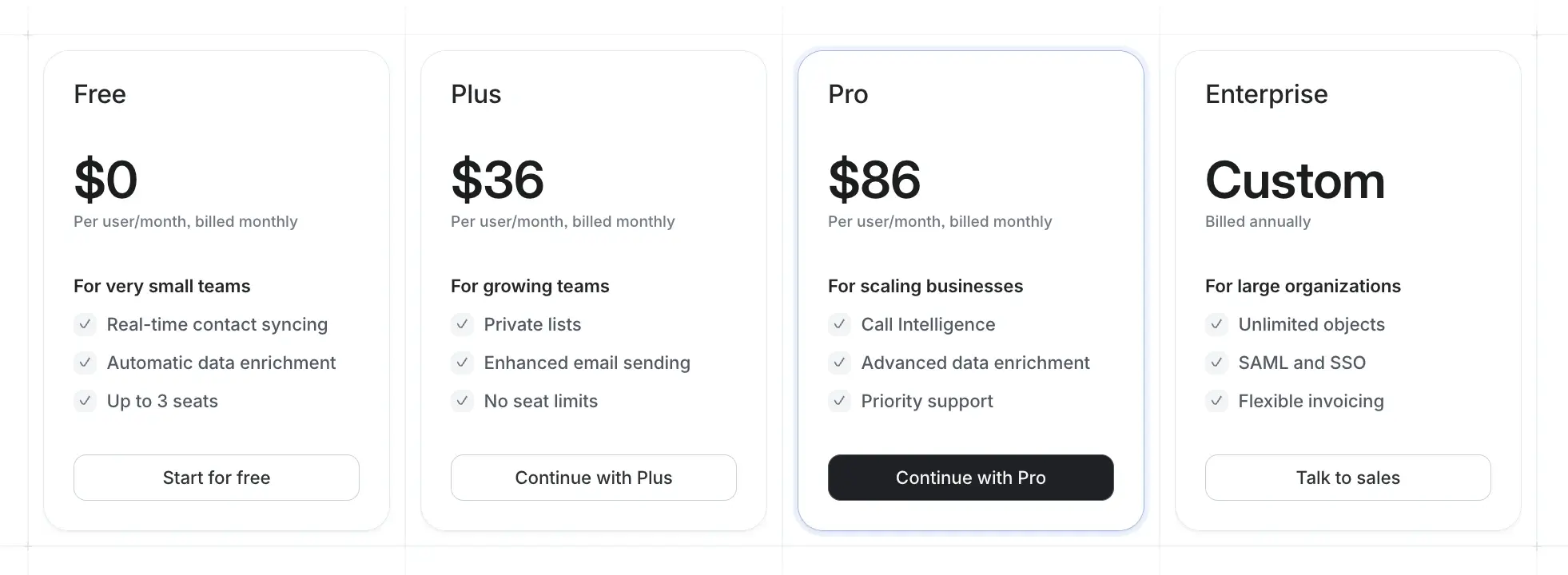
Attio offers four distinct pricing tiers to accommodate businesses at different stages of growth. Let's break down what each plan includes and who it's best suited for:
Free plan
The Free plan costs $0/month and includes:
- Up to 3 users
- Up to 3 objects
- 50,000 record limit
- Real-time contact syncing
- Automatic data enrichment (essential level)
- 1 email account per user
- 200 email sends per month
- Up to 3 reports
- Basic collaboration features
This plan works well for solopreneurs or very small teams just getting started with CRM implementation who want to test Attio's capabilities without financial commitment.
Plus plan
The Plus plan costs $36/user/month billed monthly or $29/user/month billed annually and includes:
- Unlimited users
- Up to 5 objects
- 250,000 record limit
- Private lists
- Standard data enrichment
- 1 email account per user
- 1,000 email sends per month
- Up to 15 reports
- Funnel reports and segmentation options
- 1,500 automation credits monthly
This tier is ideal for growing businesses that need more customization options and have outgrown the constraints of the Free plan.
Pro plan
The Pro plan costs $86/user/month billed monthly or $69/user/month billed annually and includes:
- Unlimited users
- Up to 12 objects
- 1,000,000 record limit
- Custom objects and relationship attributes
- Advanced data enrichment
- 2 email accounts per user
- Unlimited email sends
- Up to 100 reports
- Advanced reporting capabilities
- Call Intelligence features
- 10,000 automation credits monthly
- Priority support
This is Attio's most popular plan, designed for scaling businesses that need comprehensive CRM functionality and more sophisticated automation and reporting.
Enterprise plan
The Enterprise plan requires custom pricing and includes:
- Unlimited users
- Unlimited objects
- Custom record limits
- All Pro features plus:
- Advanced admin tools
- SAML and SSO
- Flexible invoicing
- 3+ email accounts per user
- 100+ reports
- Custom automation credits
- Dedicated migration assistance
This tier is built for large organizations with complex needs, security requirements, and multiple departments using the CRM.
Attio CRM pricing considerations
When evaluating Attio's pricing against your budget, consider these factors:
- Annual vs. monthly billing: Choosing annual billing saves approximately 20% compared to monthly payments.
- Team scaling: As your team grows, costs increase linearly with each user. This predictable model helps with budgeting but can become substantial for larger teams.
- Additional costs: Factor in potential integration expenses if you need to use Zapier or other third-party connectors to bridge functionality gaps.
- Value assessment: Compare the time saved through automation and enrichment features against the subscription cost to determine ROI.
- Free tier viability: For very small teams or solo entrepreneurs, the free plan offers substantial functionality without any cost, making it an excellent starting point.
Attio CRM cost per month scenarios
Here's a breakdown of Attio CRM pricing for different team sizes, showing both monthly and annual billing options with the monthly savings:
Note: Free plan remains $0/month for up to 3 users regardless of billing cycle. Enterprise plan pricing is custom and requires contacting sales.
Attio CRM features and benefits for specific business needs
Different businesses have different requirements from their CRM. Here's how Attio meets the needs of various business types:
Attio CRM for small businesses
Small businesses often need flexibility without complexity, and Attio delivers through:
- Intuitive, Notion-like interface that requires minimal training
- Free plan to get started without financial commitment
- Automatic data enrichment to save time on manual data entry
- Basic email integration for tracking customer communications
- Customizable pipelines that adapt to evolving sales processes
The ability to start small and scale up makes Attio an appealing option for small businesses that anticipate growth but don't want to overinvest in complex systems initially.
Attio CRM for startups
Startups face unique challenges that Attio addresses with:
- Highly customizable objects and fields to match innovative business models
- Real-time collaboration features for fast-moving teams
- Modern interface that integrates with tools startups already use
- Scaling capability from seed stage to growth phase
- Data enrichment to enhance lead information automatically
For startups looking to establish efficient sales and customer management processes from the beginning, Attio provides the flexibility to evolve as the business model crystallizes.
Attio collaborative CRM features
Team collaboration is central to Attio's design with features like:
- Real-time updates visible to all team members
- Shared access to customer records and communications
- Custom permissions and visibility settings
- Activity tracking to see who's engaged with which accounts
- Team-based reporting and analytics
These collaborative elements earned Attio a 94% satisfaction rating for user, role, and access management in G2 reviews, highlighting the platform's strength in supporting team-based work.
Here's the updated version with uncolored check marks (✓) before the pros and uncolored crosses (✗) before the cons:
Key benefits of using Attio CRM
Based on user feedback and feature analysis, here are the most significant advantages Attio offers:
✓ Highly customizable data model
Attio allows for unlimited custom objects, fields, and workflows without coding. Users can model their exact business processes instead of adapting to rigid structures—a significant advantage over many traditional CRMs. This flexibility is particularly valuable for companies with unique workflows or those in niche industries.
✓ User-friendly interface
The Notion-inspired design features a clean, spreadsheet-style layout that most users find intuitive. According to G2 reviews, many teams report quicker adoption compared to more complex CRMs like Salesforce. This reduces the learning curve and helps drive adoption across teams that might otherwise resist using a CRM.
✓ Effective automatic data enrichment
The system automatically populates company and contact details like employee counts, social profiles, and location information, reducing manual data entry considerably. This enrichment works particularly well for B2B contexts and saves significant time on research and data maintenance.
✓ Collaborative environment
The platform shows changes in real-time, with clear activity tracking and communication features like comments and @mentions built directly into records. This centralization reduces the need for separate communication tools and provides valuable context for each customer interaction.
✓ Accessible free tier
With support for up to 3 users, 50,000 records, and core functionality, Attio's free plan offers more capabilities than many competitors. This makes it particularly valuable for small teams and startups with limited budgets who need to establish CRM practices.
Limitations to consider
While Attio offers many strengths, there are some limitations to be aware of:
✗ Integration limitations
With fewer native connections than established platforms, many users need to rely on Zapier as a workaround. This adds complexity and potential additional costs ($19.99+/month for Zapier premium features). The limited ecosystem of third-party applications may be a significant drawback for businesses with complex tech stacks.
✗ Underdeveloped mobile experience
The current mobile functionality is basic, with no dedicated iOS app yet available. Users needing to manage their CRM on the go may find this restrictive compared to competitors with robust mobile offerings. For sales teams that work primarily in the field, this could be a significant limitation.
✗ Time investment for full customization
While the interface is straightforward, setting up complex custom objects and relationships requires significant initial configuration time. Some users report spending several days getting their ideal setup right. The learning curve for maximum benefit is steeper than it initially appears, particularly for advanced use cases.
✗ Less mature reporting capabilities
The analytics and reporting features lag behind established CRMs. Advanced visualizations, cross-object reporting, and predictive analytics are still developing compared to platforms like HubSpot or Salesforce. Businesses relying heavily on data-driven decisions may find these limitations frustrating.
✗ Different conceptual approach
The database-oriented model without standard "transaction" objects represents a departure from traditional CRM structure. Users accustomed to conventional CRMs may need time to adjust to this different paradigm. This can create initial confusion for teams migrating from more traditional systems.
✗ Price scaling concerns
While the free tier is generous, costs increase significantly as teams grow. At $36/user/month (monthly billing) or $29/user/month (annual), a 10-person team would pay $3,600-$4,320 annually, which smaller businesses might find substantial.
Attio reviews websites: What's the rating?
- Producthunt: 5.0
- G2: 4.2
- Capterra: 4.2
- Software Advice: 4.2
Who should use Attio CRM?
Based on its features, pricing, and user feedback, Attio is particularly well-suited for:
Teams seeking customization: if your business has unique processes that don't fit neatly into standard CRM models, Attio's flexible data structure provides the adaptability you need.
Growing businesses: organizations that are expanding quickly will appreciate Attio's ability to scale from basic contact management to sophisticated sales and marketing operations.
Collaborative workplaces: teams that emphasize collaboration and transparency will benefit from Attio's real-time updates and shared access to customer information.
Data-driven organizations: businesses that value rich customer data and insights will find value in Attio's automatic enrichment and analytics capabilities, especially at the Pro level and above.
Zeeg: The scheduling-first platform that transforms lead management

In this comprehensive review of Attio CRM, we've explored how its customizable data model and modern interface can benefit various business types. While Attio offers solid CRM functionality, businesses seeking a more specialized solution that places appointment scheduling at the heart of customer acquisition should consider Zeeg.
Why Zeeg stands out in the CRM landscape
Zeeg differentiates itself with a powerful scheduling-first approach that connects your booking process directly to your contact database. This integration creates a seamless pathway from initial appointment to closed deal without the manual data transfer other systems require.
- Automatic lead capture: Every appointment booked instantly creates a lead in your database without requiring manual entry
- Permanent conversation linking: Meeting notes remain connected to customer records for complete context
- Follow-up automation: Trigger appropriate actions based on appointment outcomes
- Full conversion tracking: Monitor the journey from initial booking through to completed deal
For businesses that rely on scheduled appointments to generate leads, this interconnected approach eliminates the data silos that typically separate booking tools from customer management.
Powerful features for customer acquisition
Zeeg combines scheduling functionality with robust contact management capabilities to create a complete customer acquisition system:
- Multi-service booking pages: Create customized booking experiences for different service offerings
- Team calendar management: Coordinate appointments across your entire team with native Exchange and Apple Calendar support
- Custom pipeline creation: Design sales processes that match your specific business workflow
- Campaign attribution tracking: Identify which marketing channels are driving successful appointments and deals
- White-label experience: Present a consistent brand experience with your own logo and colors
- Custom objects without Enterprise pricing: Create additional data structures without the premium costs typical of other CRMs
Conclusion: Is Attio CRM worth it?
Attio CRM stands out with its unique combination of flexibility, modern interface, and collaborative features. For businesses that value customization and need their CRM to adapt to their processes rather than the reverse, Attio presents a compelling option.
The free plan offers a no-risk way to test the platform, while the scaling paid tiers accommodate growing needs. However, businesses should consider the learning curve associated with full customization and the current limitations in mobile functionality and native integrations.
For organizations seeking a fresh approach to CRM that breaks away from rigid traditional systems, Attio is certainly worth consideration—especially for teams already comfortable with modern, collaborative tools like Notion.
To maximize your customer relationship management, consider pairing Attio with Zeeg's scheduling capabilities for a complete solution that handles both appointment booking and ongoing relationship management seamlessly.
FAQs about Attio CRM
What makes Attio different from other CRMs?
Attio's key differentiator is its highly flexible data model that allows businesses to create custom objects and attributes that precisely match their processes, combined with a modern, Notion-like interface that feels familiar to many users.
Is Attio suitable for enterprise use?
Yes, Attio offers an Enterprise plan with advanced security features, unlimited objects, and custom record limits that can accommodate large organization needs, though companies with very complex requirements should evaluate carefully.
How difficult is it to set up Attio CRM?
Basic setup is straightforward, but fully leveraging Attio's customization capabilities requires some time investment. The platform's similarity to familiar tools like Notion helps reduce the learning curve.
Can Attio integrate with my email and calendar?
Yes, Attio integrates with Gmail and Outlook for email synchronization and logging. Calendar integration is also available, with different levels of functionality based on your plan tier.
Does Attio offer automation features?
Yes, Attio includes workflow automation capabilities with "automation credits" that vary by plan tier, from 250 on the Free plan to 10,000+ on Pro and Enterprise plans.
What kind of support does Attio provide?
All plans include access to the help center and chat/email support. Priority support is available on Pro and Enterprise plans, while migration assistance requires discussion with the sales team.
What are the limitations of Attio's free plan?
While generous, the free plan is limited to 3 users, 3 objects, and 50,000 records. It includes only basic data enrichment, 200 email sends per month, and up to 3 reports. Free users also have more limited automation capabilities (250 credits) and fewer integration options. For growing teams or those needing advanced features, upgrading to a paid plan will eventually become necessary.
How secure is my data in Attio?
Attio prioritizes security with encrypted data storage, regular security audits, and compliance with standards like GDPR. The platform offers role-based permissions to control access to sensitive information. Enterprise customers get additional security features like SAML SSO. Data is stored on secure AWS servers with appropriate backup protocols.
Can I use Attio on mobile devices?
While Attio's web application is responsive and works on mobile browsers, the mobile experience is currently limited compared to the desktop version. There is no dedicated iOS app yet, which may be restrictive for teams that need to manage their CRM primarily on the go. Mobile functionality improvement is reportedly on the company's roadmap.
Zeeg is Europe's leading AI voice agent and appointment scheduling software in one solution — GDPR-compliant, made in Germany. Start for free →


