Settings Overhaul: A New Home for Your Preferences
February 17, 2025
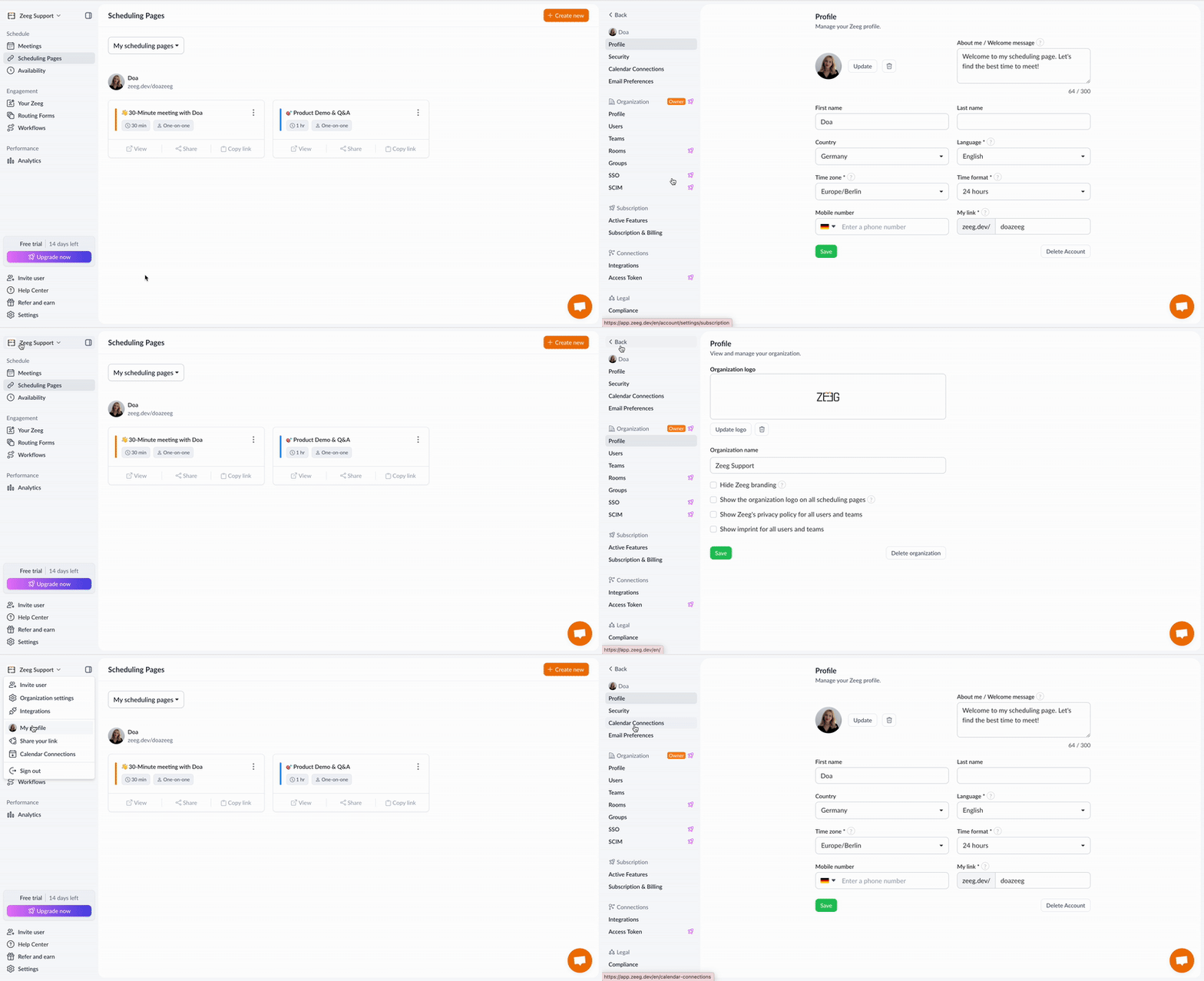
You know that feeling when you're looking for something in your house and can't remember which drawer you put it in? That's kind of how our settings menu felt before. Settings were scattered across different places, making it a bit of a treasure hunt to find what you needed. Well, we fixed that.
What's New
Unified Settings Menu: We've brought all settings together in one place. Whether you're connecting your calendar, tweaking your profile, or managing integrations - everything's now neatly organized and easy to find.
Smooth Navigation: We've added a handy sidebar that stays with you while you browse different settings, making it quick to jump between sections.
Keyboard Shortcuts: Love keyboard shortcuts? Just hit Command + . (Mac) or Windows + . (PC) to open the sidebar navigation menu from anywhere in the app.
Where to Find It
You can access settings in two ways:
Click on your name or organization name at the top of the screen
Look for the settings icon in the bottom left of your sidebar
Availability
This update is now live for all Zeeg users, making settings management simpler for everyone.