SimplyBook.me Pricing, Features & Limits [2026]


Picking the right appointment scheduling software often comes down to understanding the numbers, and SimplyBook.me pricing follows a model few competitors use, charging by booking volume and provider count instead of a flat per-user fee. That approach can suit smaller teams, but it also introduces caps that busier businesses hit fast.
This guide walks through every SimplyBook.me plan, what each tier includes, and where those limits start to matter. As a different path, Zeeg, an AI voice agent and scheduling software made in Germany and GDPR-compliant, has no booking ceilings to plan around.
Skip booking caps and feature slots: get unlimited bookings, an AI phone bot and online booking pages in one platform.
Sign up for freeHow SimplyBook.me's pricing model and limits work
At a first glance, SimplyBook.me might not look expensive. You might see it as one of its advantages. But if you pay some attention to it, you might find that SimplyBook.me has pros and cons.
There are volume limits. Most scheduling platforms charge per user—add another team member, pay another monthly fee. But SimplyBook.me charge based on booking volume. The Free plan handles 50 monthly bookings, Basic handles 100, Standard manages 500, and Premium accommodates 2,000. So the question is more "how many appointments are we scheduling?"
This creates interesting trade-offs. A solo practitioner with heavy booking volume might need a higher tier, while a business with moderate scheduling could work fine on a lower plan. Your pricing depends on appointment volume, not team size.
User limits still apply. While pricing focuses on bookings, each plan also caps how many providers you can manage. Providers are the staff members or facilities whose schedules are getting booked. Free allows 1, Basic supports 5, Standard handles 15, and Premium manages 30.
So you're dealing with two constraints: monthly booking capacity and provider count. Both need to fit your operation, not just one or the other.
Custom features system. Instead of bundling features into "this tier has X, that tier has Y," they give you a certain number of "custom feature slots" and let you pick what matters.
Free plans get 1 slot, Basic gets 3, Standard gets 8, and Premium gets unlimited. Many advanced capabilities—payment processing, calendar sync, HIPAA compliance, marketing tools—each consume one of these slots. You decide which features your business needs most and enable them within your available slots.
This way there's some flexibility, but requires planning. And you might end up needing an expensive upgrade just because of one feature you want. So, before choosing a plan, list out which features are non-negotiable. Count how many of those are "custom features." Make sure your chosen tier has enough slots. Running out of slots while having unused booking capacity feels frustrating—you've got room for more appointments but can't enable the features needed to manage them properly.
How much does SimplyBook.me cost per month?
The monthly cost depends on whether you're willing to commit to a full year or prefer paying month-to-month.
If you go monthly, you're looking at $9.90 for Basic, $29.90 for Standard, and $59.90 for Premium.
If you want to pay annually, that saves you 17% across the board. That brings Basic down to $8.25 monthly, Standard to $24.90, and Premium to $49.90.
But let's talk with real numbers. Say you're running a small practice and need the Standard plan. Monthly billing costs you $358.80 per year. Pay upfront for the year? You're down to $298.80, meaning $60 back in. And for the Premium tier, savings would amount to $120 annually. Not massive money, but enough to matter when you're watching your budget.
SimplyBook.me pricing plans overview
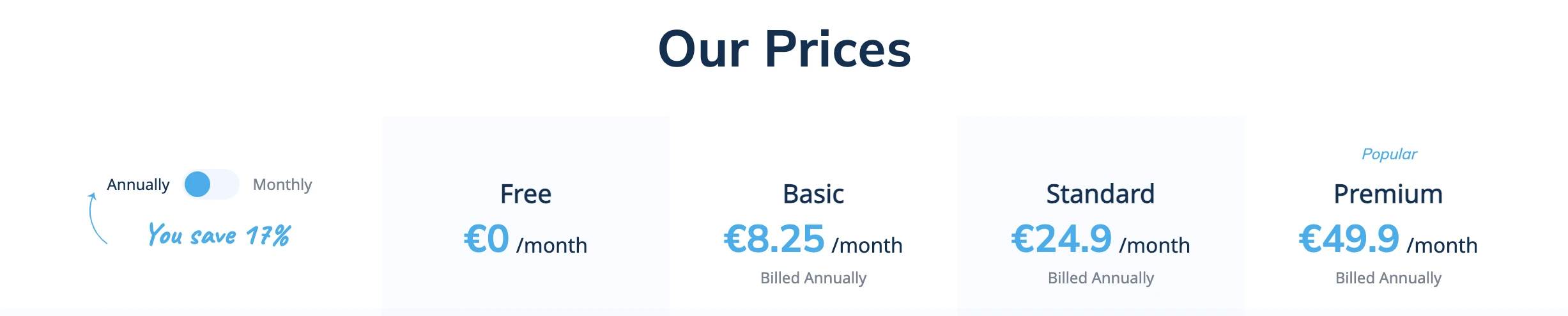
Understanding how SimplyBook.me structures its plans takes a bit of mental adjustment. Rather than bundling everything into tiers like most scheduling software, they use a "custom features" approach. Certain capabilities eat up one of your feature slots, and you need to decide which ones matter most.
Plus, instead of charging per user like other tools, they charge based on how many bookings you can handle and how many providers you need. This structure works great for some businesses but can feel limiting for others. If you're averaging just a few appointments daily, you might hit those booking caps faster than you'd expect.
Free plan: Ok for testing
The free tier gives you just enough to see if online booking works for your business. You get 50 bookings monthly, space for one provider, and a single custom feature slot. The essentials are there—booking website, widget for your site, admin app, basic notifications.
But here's the reality: those limits arrive quickly. Managing just one staff member's schedule? Fine. Needing payment processing or to sync with calendar apps? That's your one custom feature gone. Hitting 50 bookings? You're stuck until next month or forced to upgrade. So, for just testing the platform, it works. For actually running a business, you'll probably outgrow this within weeks.
Basic plan: For small teams on a small budget
Jumping to Basic at $8.25 monthly (annual billing) or $9.90 gives you meaningful improvements. Your booking capacity doubles to 100 monthly appointments. You can now manage up to 5 providers, which covers most small teams. Those 3 custom feature slots open up real possibilities.
This is where you can start building something functional. You can enable payment processing to collect money upfront, add the client app so customers can manage their own bookings, throw in the point-of-sale system if you sell products alongside services, etc. But you're still making trade-offs—if you want calendar sync too, that's another feature slot, and suddenly you're back to juggling priorities.
The Basic plan might have enough scheduling for small businesses. But just maybe. Reality also might prove that wrong, as the 100-booking limit might sound like plenty until you do the math. That's roughly 3-4 appointments per day. A busy salon or active coaching practice will bump against that ceiling faster than expected.
Standard plan: Some more room to breathe
Standard at $24.90 monthly (paid yearly) or $29.90 changes the game with 500 bookings per month and space for 15 providers. Those 8 custom feature slots mean you can stop constantly prioritizing which features to sacrifice. This tier also brings HIPAA compliance and SAML/SSO security—important if you're handling sensitive information or need enterprise-grade access controls.
For medium-sized operations, this could be the sweet spot. Managing a team of 15 covers a substantial operation. So, with 8 feature slots, you can enable payment processing, calendar sync, marketing tools, and still have room for specialized features.
But there's a catch. Even 500 bookings might not be enough for high-volume businesses. That's about 16-17 appointments daily. A medical practice with multiple providers running all day (let's say 10 or 15) could hit those limits easily. And while 15 providers sounds generous, larger clinics or service centers might need more.
Premium plan: Full access
Premium costs $49.90 monthly on annual billing or $59.90 month-to-month. This tier gives you 2,000 bookings per month, 30 providers, and unlimited custom features. You also get white-label options to remove SimplyBook.me branding entirely, plus integrations with QuickBooks, FreshBooks, and Xero for accounting.
For established businesses with substantial booking volume, this makes sense. No need to choose between features, there's accounting integrations to streamline your financial tracking, and more white-label options to maintain your brand identity throughout the booking experience.
But even here, you're capped at 30 providers and 2,000 monthly bookings. That's about 65 appointments daily. Large operations, multi-location businesses, or enterprises might still find themselves constrained. At this price point, some businesses start looking at whether they need multiple accounts or entirely different solutions.
Read more: SimplyBook.me: 10 alternatives
See how Zeeg and SimplyBook.me stack up on bookings, features and price, side by side.
See the comparisonSimplyBook.me features and pricing
Let's dig into what you actually get with each plan across different areas. SimplyBook.me offers substantial functionality, but understanding what's included versus what requires feature slots matters for budgeting.
Main scheduling capabilities
Every plan includes scheduling fundamentals. You can customize wording, manage employee schedules, link specific services to particular providers, set service durations and buffer times, establish pricing, control capacity limits, handle recurring appointments, and manage event bookings. Like most scheduling tools, basically.
Whether you're on Free or Premium, these core tools work identically. The difference isn't in capability—it's in capacity. How many bookings can you handle? How many providers can you manage? Those are the real limitations.
Your booking website and client-facing features
Every SimplyBook.me user gets a dedicated booking website—even free plan users. It's mobile-responsive, customizable, and can be embedded on your existing site via iframe. Clients can see reviews, your business appears in the Booking.page directory, and you can link from your Facebook page.
The booking site automatically adjusts to each client's time zone, which prevents the "wait, what time is that for me?" confusion. If you'd rather not use the standalone site, disable it and just use the widget integration on your own website.
Client apps become available starting with Basic plans, though Standard and Premium users get branded versions. This matters if you want the app to feel like part of your business rather than a third-party tool. Only Premium users can remove SimplyBook.me's footer branding entirely with white-label options.
*Client App counts as a custom feature
Managing your operations
Admin tools work consistently across all tiers. The iOS and Android apps let you manage everything from your phone. You get calendar views with filtering options, straightforward cancellation and rescheduling, multiple user accounts with role assignments, Zapier integration for connecting other tools, client history tracking, and booking notes.
These management capabilities don't change based on your plan. A free user has the same admin interface as a Premium subscriber. Your constraints are purely about volume and team size, not functionality.
Payment processing and commerce
This is where the custom feature system really comes into play. Payment processing eats up one feature slot but enables pricing, transaction tracking, and connections to various payment processors. Deposits—asking for partial payment upfront—require their own separate slot.
Want to sell service packages? That's another feature. Memberships for recurring access? Another feature. Gift cards and coupons? Yet another. The point-of-sale system for handling in-person transactions? Also a feature slot.
Here's what that means practically: on the Basic plan with 3 slots, enabling payments, packages, and gift cards uses everything. No room left for calendar sync, marketing tools, or anything else. You're forced to prioritize. Standard's 8 slots give you breathing room to enable multiple commerce features alongside other capabilities.
*Each payment feature counts as a separate custom feature
Marketing tools for client retention
SimplyBook.me offers several features aimed at bringing clients back. Their loyalty system (requires a custom feature slot) lets clients accumulate points with each booking, then redeem those points for future services. It's essentially a built-in rewards program.
Coupons and gift cards give you promotional flexibility—percentage discounts, seasonal offers, digital gift certificates. These tools help during slow periods or when launching new services. Again, this requires a feature slot.
The waiting list feature helps capture demand during busy times. When you're fully booked, interested clients can join the list. If someone cancels, waiting list members get automatic notifications about the opening. This prevents lost opportunities when schedules change.
Communication systems
Basic email notifications come with every plan—confirmations, reminders, cancellation notices, rescheduling updates. Clients can add appointments to their personal calendars easily. Everything adjusts to appropriate time zones automatically.
The custom email feature (consumes a slot) unlocks a drag-and-drop HTML editor. This lets you create branded email templates instead of using SimplyBook.me's default designs. If maintaining consistent visual identity across all client touchpoints matters to you, this feature becomes necessary.
WhatsApp notifications go beyond email by sending messages directly to clients' phones. You purchase credits separately, but the immediacy of WhatsApp can improve show-up rates compared to emails that might get overlooked.
Integration with other tools
Calendar synchronization requires feature slots. Google Calendar sync is one slot. Outlook Calendar sync is another. These two-way connections prevent double-booking by blocking your personal calendar events from showing as available booking times.
Google Meetings integration automatically generates video conference links for online appointments. Facebook and Instagram booking features let clients book directly through your social media pages—useful if you're active on those platforms.
Reserve with Google makes your services bookable straight from search results. When potential clients search for services like yours, they can book immediately without visiting your website first. This requires a feature slot but can substantially increase visibility.
*Most integrations count as custom features
Security and compliance options
Healthcare providers or businesses dealing with sensitive data need HIPAA compliance, which becomes available on Standard and Premium plans. This isn't just a checkbox—it involves proper data handling, encrypted communications, and documentation to prove compliance. Naturally, it requires a custom feature slot.
SAML/SSO authentication shows up starting with Standard plans. This lets larger organizations manage SimplyBook.me access through their existing identity systems rather than creating separate passwords. It improves security and simplifies user management, though it also consumes a feature slot.
Premium subscribers get accounting software integrations with QuickBooks, FreshBooks, and Xero. These connections sync booking data with financial records automatically, reducing manual entry and keeping everything synchronized.
*Security features count as custom features
Specialized scheduling capabilities
Intake forms (requiring a feature slot) collect necessary information when clients book. A therapist might need medical history. A consultant might want to understand the client's situation before meeting. These forms gather that information automatically during booking.
The "Make me look busy" feature helps new businesses by limiting displayed availability. Instead of showing every empty slot all week, you show just a few openings per day. This creates perceived demand while you build your client base.
Custom interval settings control booking windows per service. Maybe consultations can be booked 48 hours in advance, but routine appointments need a week's notice. These rules help manage your schedule without manual oversight.
Client tags let you categorize and filter customers. Tag by service type, frequency, special needs, or any criteria that matters. Use these tags for targeted marketing, custom reports, or calendar filtering. It's simple but becomes valuable as your database grows.
Zeeg: AI voice agents and advanced scheduling, no booking limits
SimplyBook.me's booking caps and custom features limits might work for some businesses, but certainly not if you have a lot of meetings. Zeeg doesn’t have those issues—no booking limits on any plan, no choosing between essential features. And built-in contact management captures every appointment automatically, in case you want it too. Let’s see the pros:
True unlimited scheduling. While SimplyBook.me restricts you to 50 bookings on their free plan and caps paid tiers at 100-2,000 monthly appointments, Zeeg offers unlimited bookings across all plans. Your business can scale without hitting arbitrary volume ceilings or forced upgrades.
AI voice agents. Some customers and leads don't want to book their meetings online, they call your office and have to wait on hold because you're busy. Zeeg solves this issue by offering AI voice agents that take your incoming calls 24/7, have natural conversations, answer questions and book meetings in the call.
Advanced scheduling capabilities without the feature slot puzzle. Round-robin distribution, smart routing based on custom criteria, and multi-person coordination. No need to sacrifice payment processing just to enable calendar sync or marketing tools. Zeeg includes routing forms that qualify leads and direct them to the right team members automatically—capabilities that SimplyBook.me simply doesn't offer.
Contact management that connects to your appointments. Every booking and call creates or updates a contact record in Zeeg, and automation ensures no lead disappears between booking, reminders and follow-ups.
Full calendar connection. Besides Google Calendar and Outlook, you can also connect Zeeg to Apple Calendar or Microsoft Exchange. In every plan. Might look like some small extras, but for some they might be essential.
Transparent pricing that scales predictably. Zeeg has a free forever Starter plan, a Professional plan at $10/month per user, Business at $16/month per user and Scale at $30/month per user (billed annually). The AI voice agent is sold separately in monthly minute packages from $49 for 250 minutes, with no scheduling plan required.
For businesses tired of capacity limits and feature compromises, Zeeg offers an easy and complete alternative, built around AI phone booking and advanced scheduling.
Move your booking pages and calendars to Zeeg and add AI phone calls on top. Every new account gets a 14-day free trial of online scheduling and 5 AI minutes.
Get started
Sources: all prices were last checked on 29 December on Simplybook pricing page, and can change over time.
Zeeg is Europe's leading AI voice agent and appointment scheduling software in one solution — GDPR-compliant, made in Germany. Start for free →
Frequently Asked Questions
Which payment processors are supported?
The platform works with major processors like Stripe, PayPal, and Square, among others. Available processors might vary depending on your location. To use payments at all, you'll need to enable the online payment custom feature, which uses one of your plan's feature slots.
Does this work for international bookings?
SimplyBook.me handles international scheduling well. Time zones convert automatically, so clients see appointment times in their local time. The booking website supports multiple languages. If you're serving clients across different regions or countries, the platform adapts without requiring manual adjustments.
How do custom features actually work?
Custom features are the features you choose to have in your subscription. Your plan includes a certain number — 1 for Free, 3 for Basic, 8 for Standard, unlimited for Premium. Many advanced capabilities like payment processing, calendar sync, or HIPAA compliance each consume one slot. You pick which features matter most and enable them. If you need more features, you have to upgrade to a plan with additional slots.
Can I switch plans mid-subscription?
Switching plans is easy, and upgrading gives you immediate access to more capacity and features. Downgrading takes effect next billing cycle. Just remember that downgrading might force you to disable some custom features if your new plan doesn't have enough slots for everything you've enabled.
What happens when I hit my booking limit?
Each plan caps monthly bookings — 50 for Free, 100 for Basic, 500 for Standard, 2,000 for Premium. Approach that limit and you'll need to upgrade or wait for next month. The system won't overcharge you or accept bookings beyond your limit. It just stops new bookings until you upgrade or your allowance resets.
Can I try SimplyBook.me before paying?
Yes, there's a 14-day free trial for all paid plans. You get complete access to whichever tier you choose, letting you test custom features, set up payment processing, and see how team management works. When the trial ends, either subscribe to keep the features or drop back to the free plan.