Pipedrive Leads vs Deals: Differences and Complementarity


Managing your sales pipeline effectively starts with understanding how Pipedrive organizes your opportunities. The platform uses two main categories - leads and deals - and getting confused between them is pretty common when you're starting out. The truth is, these aren't just arbitrary labels. They show different stages of your sales process and knowing when to use each one can make or break your pipeline organization.
This guide breaks down everything you need to know about leads vs deals in Pipedrive. We'll walk through what makes them different, when you should convert between them, and how both work together to keep your sales process running smoothly. We'll also show where Zeeg, an AI voice agent and scheduling software, fits in once leads start calling or booking meetings.
Zeeg's AI voice agent logs each caller, transcript and booking automatically, with no manual data entry.
Sign up for freeWhat are leads in Pipedrive?
Think of leads as the people who've raised their hand but haven't committed to anything yet. Maybe they downloaded your ebook, filled out a contact form, or dropped their business card at your booth during a trade show. The reality is, you don't know much about them apart from their basic contact info. You just know that you want to generate more leads—hopefully qualified leads.
Your Leads inbox becomes the holding area for these early-stage contacts. Here's what makes leads special - they can't move through your sales pipeline stages. That might seem limiting, but it's actually brilliant design. You don't want unqualified contacts cluttering up your active deals, making it harder to focus on real opportunities.
So, Pipedrive lets you categorize leads as hot, warm, or cold based on their behavior or source. A hot lead might be someone who requested a demo, while a cold lead could be a name from a purchased contact list. This classification helps your team prioritize follow-up efforts without getting overwhelmed by every single contact.
However, don't expect leads to do much beyond sitting in their inbox. They're essentially waiting for you to decide whether they deserve more attention or should be archived.
What are deals in Pipedrive?
Deals are where the real action happens. These represent qualified opportunities that you're actively pursuing through your sales process. Once someone becomes a deal, they enter your pipeline and can progress through stages like "Initial Contact," "Needs Assessment," "Proposal Sent," and "Negotiation."
Unlike leads, deals come packed with functionality. You can assign monetary values, set probability percentages, and establish expected close dates. All your sales activities - calls, emails, meetings, proposals - get logged against the deal record, creating a complete history of your interactions.
The flexibility here is interesting. Pipedrive custom fields let you track industry-specific information, competitor details, decision-maker roles, or technical requirements. Every piece of data that helps you close the sale can find a home in the deal record.
But here's the thing - deals require more maintenance than leads. You need to keep them moving, update their status, and manage all those activities. That's why conversion from lead to deal should only happen when you're confident there's real potential.
👉 Read more: Does Pipedrive have custom objects?
Key differences between leads and deals in Pipedrive
Getting clear on Pipedrive leads vs deals requires understanding their fundamental purposes. The differences go way beyond just naming conventions.
The qualification level is key to understand the differences. So, basically, leads represent raw interest without any verification of fit, budget, or timeline. Deals, on the other hand, have passed through some kind of screening process. You've determined they're worth active pursuit.
Resource allocation differs dramatically between the two categories. Leads typically receive automated nurturing - maybe a welcome email series or periodic check-ins. Deals warrant your best sales efforts: personalized demos, custom proposals, and direct phone calls.
The forecasting impact tells the whole story. Your revenue projections should only include deals, not leads. Including unqualified leads in your forecast is like counting chickens before they hatch. Deals have enough substance to contribute meaningful data to your sales predictions.
👉 Read more:
- How to generate and qualify B2B leads
- 7 ways to qualify inbound leads
- Lead qualifying questions
When to convert a lead to a deal
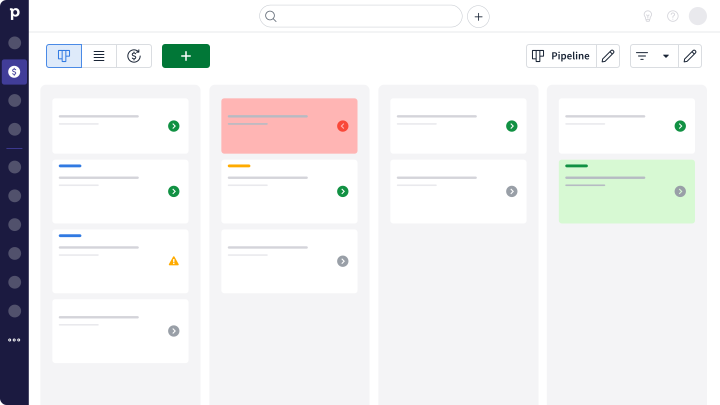
Timing this conversion correctly can make the difference between an organized pipeline and a chaotic mess. Most successful teams establish specific criteria that must be met before making the transition.
Budget discussions often signal conversion readiness. When a prospect moves beyond general interest to talking about specific dollar amounts or confirming they have allocated funds, they're demonstrating serious intent. This doesn't mean they need to reveal their exact budget, but some acknowledgment that money is available makes a huge difference.
Timeline urgency provides another strong indicator. Prospects with vague "someday we might need this" timelines rarely convert quickly. But when someone mentions specific deadlines, upcoming projects, or current pain points that need immediate attention, they're ready for deal status.
Decision-maker access proves crucial for conversion. If you're still talking to someone who "needs to run this by their boss," you might want to wait. However, once you've identified and gained access to the actual decision-maker, the lead has much higher potential for successful closure.
Many teams base their conversion criteria on pipeline design. If your first stage is "Initial meeting scheduled," then any lead who agrees to a meeting should probably be converted and placed in that stage. This approach keeps your criteria simple and aligned with your sales process.
👉 Concepts to understand:
How to convert leads to deals in Pipedrive
The actual conversion process is straightforward once you've decided a lead meets your criteria.
- Navigate to your Leads inbox and click on the specific lead you want to promote.
- Inside the lead detail view, look for the "Convert to Deal" button - you'll find it in the bottom left corner. Clicking this opens a form where you can specify important deal details like which Pipedrive pipeline to use, estimated value, and expected close date.
- All existing lead information automatically transfers to the new deal record. You won't lose any of the contact details, notes, or activity history you've already captured. This way you keep your records complete and save time on re-entry.
The newly converted deal appears in your chosen pipeline at whatever stage you specified. From there, it can progress through your normal sales process stages as the opportunity develops.
👉 Read more: How to generate more sales leads
Converting deals back to leads
Sometimes opportunities cool off unexpectedly. Budget approval gets delayed, priorities shift, or the prospect simply stops responding. When this happens, converting the deal back to lead status helps keep your active pipeline focused on real opportunities.
Access the deal detail view and look for the options menu in the top right corner. Select "Convert to Lead" to move the record back to your Leads inbox. This backward conversion preserves all the data and activity history, so you maintain complete visibility into the relationship.
The beauty of this system is that nothing gets lost. Whether a lead becomes a deal or a deal becomes a lead, all your hard work - notes, emails, call records - stays intact. This historical data becomes valuable when the prospect re-engages months later.
Converting stalled deals to leads also improves your forecasting accuracy. Deals that aren't progressing can artificially inflate your pipeline projections. Moving them to lead status gives you cleaner data for revenue predictions.
Best practices for managing both leads and deals
Success with leads and deals requires clear processes that everyone on your team understands. Start by defining specific qualification criteria for lead-to-deal conversion. Document these standards and train your team to apply them consistently.
Regular pipeline reviews keep everything organized. Schedule weekly sessions to evaluate leads for conversion potential and deals for continued progression. These reviews prevent opportunities from stagnating in inappropriate categories and help identify patterns in your sales process.
Automation can handle much of the routine maintenance. Use Pipedrive's workflow features to trigger follow-up activities, send nurturing emails to leads, or alert team members when specific conditions are met. This automation ensures nothing falls through the cracks while freeing your team for higher-value activities.
Lead scoring adds another layer of organization (and you can use Pipedrive lead scoring feature). Assign point values to different behaviors like email opens, website visits, or content downloads. Leads with higher scores probably deserve faster conversion to deal status, while low-scoring leads might need more nurturing time.
Don't neglect your leads while chasing active deals. Both categories need attention, just at different intensity levels. Leads require consistent nurturing to stay engaged until they're ready for serious sales conversations. Ignoring them completely wastes all the effort you put into generating them initially.
Bridge the scheduling gap with Zeeg
Managing leads and deals becomes much smoother when your booking system actually talks to your CRM. Pipedrive's scheduling limitations force you to patch together multiple tools, but Zeeg does things differently: its AI voice agent answers and books calls, its booking pages handle online scheduling, and contact management is built around every appointment.
The difference shows up immediately when leads start calling or booking meetings. Instead of manually creating deal records after every appointment, Zeeg automatically captures booking details and pre-meeting qualification responses, and assigns the right team member based on expertise and availability. Every conversation note stays permanently linked to the contact record, and follow-up sequences trigger without manual intervention.
Key advantages over separate tools:
- AI voice agent - answers inbound calls, asks your qualifying questions and books the meeting on the spot
- Native calendar integration - Google, Outlook, Exchange, and Apple Calendar sync seamlessly
- Smart routing forms - qualify leads before they book, making conversion decisions easier
- Team coordination - automatically distribute meetings based on skills and schedule availability
- Competitive pricing - a free Starter plan, paid plans from $10 per user/month (billed annually), and the AI voice agent sold separately in monthly minute packages from $49 for 250 minutes
Whether you're converting warm leads to deals or managing complex multi-person interviews, Zeeg handles the calls and the scheduling complexity while your pipeline stays organized in Pipedrive. The platform integrates directly with Pipedrive, so you keep your existing workflow while gaining phone and online booking that actually work together with it.
👉 Integrate Zeeg with Pipedrive to keep your pipeline and bookings in sync.
Use Zeeg to answer calls, book meetings and push every new contact into Pipedrive, before it ever becomes a deal.
Try it freeOptimizing your sales process
Understanding the differences between leads and deals in Pipedrive sets the foundation for better sales organization. But the real improvements come from analyzing your conversion patterns and adjusting your process based on what you learn.
Track conversion rates from leads to deals over time. Low conversion rates might indicate you're being too lenient with lead-to-deal transitions, while extremely high rates could mean you're missing opportunities by being too restrictive. Finding the right balance takes experimentation and data analysis.
Monitor how long leads spend in your inbox before conversion or disqualification. Leads that sit for months without action represent missed opportunities, while very quick conversions might indicate certain lead sources could skip the leads stage entirely.
Use Pipedrive's reporting to identify your most successful lead sources. Understanding which channels produce the highest-value deals helps optimize your marketing spend and lead generation efforts. Not all leads are created equal, and your data will reveal which sources deserve more investment.
The relationship between leads and deals creates a complete opportunity management system. When managed properly, leads provide a steady flow of potential while deals drive your active revenue generation. This two-tier approach helps teams stay organized as they scale, preventing good opportunities from getting lost in the chaos of growth.
Getting this system right takes practice, but the payoff in pipeline organization and sales predictability makes the effort worthwhile.
Zeeg is Europe's leading AI voice agent and appointment scheduling software in one solution — GDPR-compliant, made in Germany. Start for free →