Pipedrive Lead Scoring: Guide to Qualify Better Prospects


Sales teams face this challenge very often - they're drowning in leads but starving for qualified prospects. Your pipeline might be full, but how many of those contacts are actually ready to buy? Most sales reps waste precious time chasing cold leads while hot prospects slip through the cracks. That's where Pipedrive lead scoring can come in. This is what helps you identify which prospects deserve your immediate attention and which ones need more nurturing.
We'll walk you through everything you need to know about setting up effective lead scoring in Pipedrive. Plus, we'll show you how Zeeg, an AI voice agent and scheduling software, can qualify leads right from the first call or booked meeting.
Use Zeeg to answer calls, book meetings and push every new contact into Pipedrive.
Try it freeWhy lead scoring changes everything for sales teams
Before getting to the how-to section about Pipedrive, let's talk a bit about lead scoring.
We should be honest about something most sales managers won't admit - without proper lead qualification, your team is basically playing darts blindfolded. They're spending equal energy on someone who barely remembers visiting your website and someone actively comparing your pricing with competitors.
So, the psychology behind effective lead scoring is fascinating. When sales reps know which prospects are genuinely interested, their confidence increases. They approach calls differently, ask better qualifying questions, and close deals faster. Meanwhile, marketing teams get clearer feedback about which campaigns generate quality leads versus mere website traffic.
But here's what really matters - alignment between teams. Ever experienced that awkward moment when marketing celebrates generating 500 new inbound leads while sales complains about lead quality? Lead scoring gets rid of this tension by creating shared definitions of what constitutes a qualified prospect. Both teams work toward the same goal using the same measurements.
The numbers tell the story too. Companies using lead scoring see conversion rates improve significantly because representatives focus their efforts where success is most likely. Instead of making 50 cold calls to lukewarm prospects, they make 20 targeted calls to engaged prospects and achieve better results.
Read more:
- Lead generation strategies
- Generating and qualifying more B2B leads
- How to generate more sales leads
- How to qualify inbound leads
Lead scoring in Pipedrive
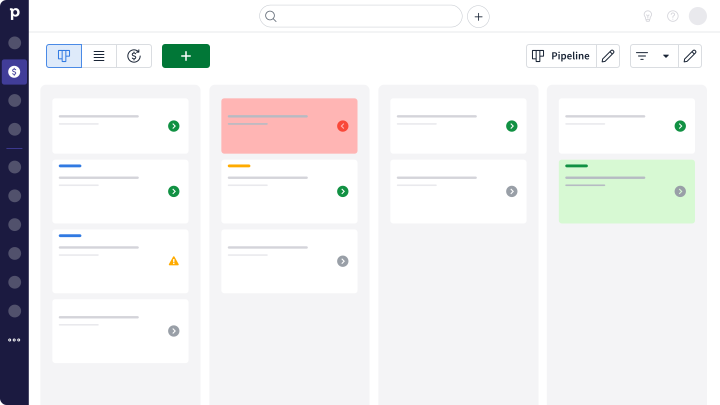
So here's how the Pipedrive lead scoring feature actually functions. Not only can you use Pipedrive to generate more leads, the system can also evaluate prospects using multiple data streams - website behavior, email interactions, form submissions, and custom field information all contribute to each prospect's overall score. Think of it like a credit score for buying intent.
The dynamic nature of this system sets it apart from static qualification methods. Scores update automatically as prospects take new actions. Download a case study? Score goes up. Visit the pricing page three times this week? Bigger score increase. Haven't opened an email in two months? Score starts declining.
This brings us to time decay - one of Pipedrive's smartest features. Lead scoring without time considerations creates a misleading picture. Someone who showed intense interest six months ago but has gone silent shouldn't rank higher than someone actively engaging with your content today. The system gradually reduces scores for inactive prospects, keeping your priority lists current and actionable.
But make no mistake - the fact that this is multi-dimensional is what provides depth that single-metric systems can't match. A prospect might have a high email engagement score but low website activity, or strong demographic fit but minimal behavioral signals. Pipedrive's scoring considers all these factors together, creating more accurate qualification assessments.
Read more: Pipedrive leads vs deals
How to set up your Pipedrive lead scoring
1. First, build your scoring foundation
Before you touch any settings in Pipedrive, you need to understand what buying behavior looks like for your specific business. This means analyzing your recent customers and identifying patterns in their pre-purchase activities.
Start with your last 20-30 customers. What actions did they take before buying? Which demographic characteristics do they share? How long was their typical journey from first contact to purchase? These insights reveal the behaviors and attributes worth tracking in your scoring model.
Create two categories: demographic criteria and behavioral signals. Demographics might include job title, company size, industry, and location. Behaviors could encompass website visits, email engagement, content downloads, and event attendance. The key is identifying factors that genuinely correlate with purchase likelihood rather than vanity metrics.
Assigning point values requires careful consideration. High-intent actions like demo requests might earn 50 points, while blog visits might earn 5 points. The specific numbers matter less than their relative proportions - just ensure your scale makes sense for how you want to prioritize prospects.
2. Configure the technical setup
Now for the actual configuration in Pipedrive. Access your lead scoring settings through the administration panel - you'll find it under Settings, then Lead Scoring in the menu.
Creating your first rule is straightforward. Click "Add New Rule" and give it a descriptive name that clearly indicates what you're measuring. "Pricing Page Visit - High Intent" works better than "Rule 1" when you're troubleshooting later.
Select your specific criteria carefully. Pipedrive offers scoring based on custom field values, activity types, email interactions, and web behavior. Choose criteria that match your identified buying signals, not just what's easy to measure.
Setting point values requires strategic thinking. Remember that these points accumulate, so consider how multiple rules might affect the same prospect. If someone can trigger five different rules in a single session, ensure their total score reflects appropriate interest levels.
Most effective models include 10-15 different rules covering both demographic fit and behavioral signals. Start with fewer rules and add complexity as you learn what works for your prospects.
3. Test and refine your system
This is where many teams stumble - they set up scoring rules then never look back. The truth is that lead scoring requires ongoing attention and refinement based on real-world results.
Test your initial model against existing prospects in your database. Look at scores assigned to known customers and qualified opportunities. Do the results make sense? If recent customers have low scores, your model might miss important buying signals. If cold prospects score high, you're probably overvaluing certain activities.
Watch for outliers that reveal model weaknesses. The prospect who purchased despite a low score might have taken actions your model doesn't capture. The high-scoring prospect who never responded might be triggered by vanity metrics rather than genuine buying signals.
Adjust point values and criteria based on these observations. Lead scoring isn't set-it-and-forget-it - it's an evolving system that improves as you learn more about your prospects' behavior patterns.
Core Pipedrive lead scoring features you need to know
Smart Contact Data
This is where things start to get interesting. Pipedrive's Smart Contact Data feature works like having a research assistant who never sleeps. The system automatically enriches prospect profiles with publicly available information from LinkedIn, company websites, and other sources. This happens without you lifting a finger.
Why does this matter for lead scoring? Because demographic data provides crucial context for behavioral signals. A marketing director downloading your enterprise guide carries different weight than an intern doing the same action. Company size, industry, and job titles all factor into qualification decisions, but only if you have that information.
The real-time nature of this enrichment creates immediate value. New prospects entering your system get complete profiles instantly, letting you create sophisticated scoring rules that account for multiple variables. You're not waiting days for manual research or incomplete data to make qualification decisions.
Activity-based scoring
The most powerful lead scoring models combine demographic information with behavioral data, and this is where Pipedrive really shines. Email opens, link clicks, website visits, and form submissions each tell part of the story about prospect interest levels.
But there's a nuance - not all activities indicate the same level of intent. Someone who opens every email but never clicks through shows different behavior than someone who occasionally opens emails but always visits your pricing page afterward. Pipedrive lets you assign different point values to different activities, creating more accurate interest assessments.
Consider the prospect journey too. Early-stage activities like downloading industry reports indicate research behavior, while later-stage activities like attending product demos suggest active evaluation. Your scoring model should reflect these differences, awarding more points for high-intent actions that typically occur closer to purchase decisions.
Time-sensitive qualification
Ever notice how some prospects seem hot for weeks then suddenly go cold? The time decay functionality in the Pipedrive lead scoring feature addresses exactly this challenge. Without time considerations, prospects who showed initial interest but haven't engaged recently maintain artificially high scores.
You can customize how quickly scores decay and which activities trigger updates. Some businesses prefer gradual decay over several months, especially for longer sales cycles. Others want scores dropping quickly if prospects haven't engaged recently, particularly for shorter sales cycles or highly competitive markets.
Advanced lead qualification techniques
Using negative scoring for better accuracy
Want to know something many teams overlook? The fact that not every prospect action means buying interest. Some behaviors suggest a prospect probably won't purchase, and negative scoring helps your model account for these disqualifying signals.
Consider deducting points for actions like unsubscribing from emails, repeatedly downloading free resources without further engagement, or visiting competitor career pages. These behaviors might indicate the prospect isn't a good fit for your solution or isn't in a buying mindset.
Negative scoring prevents prospects from gaming the system through high-volume, low-intent activities. Someone who visits your blog daily but shows no interest in product pages might accumulate moderate scores without negative scoring. With negative signals considered, they receive more accurate lower scores that reflect their actual buying potential.
The key is identifying genuinely negative signals rather than just absence of positive ones. A prospect who hasn't opened recent emails isn't necessarily disqualified - they might just be busy. But a prospect who unsubscribed, then visited competitor websites, then downloaded resources from three different vendors probably isn't ready to buy from anyone.
Connecting scoring with marketing automation
Integration between your Pipedrive lead scoring and marketing automation creates powerful qualification workflows. When prospects reach certain score thresholds, automated sequences can nurture them with appropriate messaging and timing.
High-scoring prospects deserve immediate sales attention and personalized outreach sequences. These are your hot leads who might be ready to purchase soon. Medium-scoring prospects benefit from educational nurture campaigns designed to build interest over time. They need more information before they're ready for sales conversations.
Low-scoring prospects receive less frequent, more general content. They're early in their research process or might not be good fits for your solution. Automated workflows can continue nurturing them without consuming sales resources until their scores improve.
This creates seamless handoffs between marketing and sales based on actual prospect behavior rather than arbitrary rules. Marketing maintains responsibility for nurturing until prospects demonstrate genuine buying signals, then sales takes over when conversion probability is highest.
Account-based considerations for complex sales
If you're selling to larger organizations, individual contact scores might not tell the complete story. Multiple decision-makers influence purchasing decisions, so you need account-level scoring that aggregates activity across all contacts at target companies.
Account-based scoring requires creating custom fields in Pipedrive to track company-level engagement. Multiple contacts at the same organization contribute to overall account scores, providing more complete pictures of organizational buying intent.
That works particularly well for complex B2B sales where single contacts rarely make independent purchasing decisions. A highly engaged contact might not be sufficient for a sale, but multiple moderately engaged contacts across different departments could indicate strong organizational interest.
Consider weighting different contacts based on their likely influence over purchasing decisions. A VP of Engineering engaging with your content might deserve more account points than a junior developer showing similar interest levels.
Supercharging Pipedrive with specialized lead scoring tools
While Pipedrive's native capabilities handle most businesses' lead scoring needs effectively, some situations benefit from specialized third-party solutions offering advanced functionality.
MadKudu
MadKudu doesn't do the typical rule-based scoring. Instead of assigning points based on predetermined rules, their machine learning algorithms analyze your historical data to identify patterns that predict conversion likelihood.
The platform integrates directly with Pipedrive, providing real-time predictions about which prospects will most likely convert. This often identifies buying signals that manual scoring rules might miss, especially subtle combinations of behaviors that humans wouldn't naturally connect.
MadKudu also offers segmentation capabilities, not just basic scoring. The platform identifies characteristics shared by your best customers, then finds new prospects matching those profiles. This goes beyond individual lead scoring to help you understand what types of companies and contacts represent your best opportunities.
Salespanel
Now Salespanel. This tool fills a gap that lead scoring systems sometimes overlook - anonymous website visitor behavior. The platform identifies companies visiting your website before they provide contact information, tracking their complete journey through your content.
When these anonymous visitors eventually convert to known leads, Salespanel retroactively applies all their historical website behavior to their lead scores in Pipedrive. This creates more complete pictures of prospect interest levels from their very first website visit.
The platform also provides real-time notifications when high-scoring prospects return to your website. This enables timely sales outreach when prospects are actively researching your solution, significantly improving connection rates and conversation quality.
Outfunnel
One challenge with lead scoring in CRMs is getting complete data about prospect interactions across all marketing channels. Outfunnel automatically syncs campaign data, email engagement metrics, and web analytics to Pipedrive.
Email marketing engagement, social media interactions, and advertising campaign responses all contribute to prospect scores through this integration. The comprehensive data collection creates more accurate qualification models that account for prospect behavior across your entire marketing ecosystem.
Outfunnel also provides attribution reporting showing which marketing activities generate the highest-scoring leads. This feedback helps optimize lead generation efforts toward channels and campaigns that produce genuinely qualified prospects rather than just high volumes.
Measuring success and optimizing performance
Tracking the right metrics for lead scoring success
The most important question about any lead scoring system is simple - do higher-scoring prospects actually convert at higher rates? Track conversion rates by score range to verify your model's accuracy.
Monitor time from lead creation to qualification across different score ranges. Effective scoring should help you identify ready-to-buy prospects faster than manual qualification methods. If high-scoring prospects take just as long to convert as low-scoring ones, your criteria might need adjustment.
Sales team productivity deserves attention too. Compare activity levels and conversion rates before and after implementing lead scoring. Representatives should spend more time on high-potential opportunities and achieve better results per hour invested.
Don't forget to measure the quality of sales conversations. Are representatives having more meaningful discussions with scored leads? Do they feel more confident approaching high-scoring prospects? These qualitative improvements often matter as much as quantitative metrics.
Regular model refinement keeps scoring accurate
Schedule monthly reviews of your scoring model performance. Analyze prospects who converted despite low scores and those with high scores who didn't convert. These outliers reveal opportunities for model improvement.
Survey your sales team regularly about lead quality. Their feedback identifies when models need adjustment based on real-world selling experiences. If representatives consistently find value in prospects the system scores low, investigate what signals you might be missing.
Update scoring rules as your business evolves. New product launches, market changes, and customer behavior shifts require corresponding model adjustments. What indicated buying intent last year might not be relevant today.
Testing different approaches for optimization
Run parallel scoring models on similar prospect segments to identify the most effective methods. Compare performance over time to determine which criteria and point values produce the most accurate qualification.
Experiment with different point assignments for the same activities. Small adjustments to point values sometimes significantly improve qualification accuracy. Test higher and lower values systematically to find optimal settings.
Time decay settings deserve experimentation too. Different businesses benefit from different decay rates depending on typical sales cycle lengths and prospect engagement patterns. Test various decay speeds to find what works best for your specific situation.
Turn your qualified leads into booked meetings with Zeeg
Lead scoring identifies your hottest prospects, but what about the first steps when you get your first meeting with a prospect? Did you know that it's common for sales teams to lose qualified leads in the scheduling process? Maybe you've invested energy into sophisticated lead scoring, but you're actually not doing it well from the first booking. That's where Zeeg comes in.
Zeeg solves this moment between getting a meeting booked and qualifying it. Its AI phone assistant and online booking pages capture every qualified lead from the first call or booking with you or your team. So, when your lead scoring identifies hot prospects, Zeeg makes it effortless for them to schedule conversations while their interest peaks, online or by phone.
The best part? New bookings and calls land in Zeeg's contact management automatically, or create a new lead in Pipedrive when you connect the two tools.
Here's what makes the difference:
- AI voice agent that books callers - Answers inbound calls, qualifies the caller with your questions and books the meeting while interest is high
- A contact record from every booking - Each appointment and call creates or updates the contact record, with notes and follow-up automation attached
- Pipedrive sync - Send new contacts and meetings to Pipedrive so your scoring rules have the data they need
- Advanced scheduling - Routing incoming meetings to the most relevant team/agent based on custom questions
Instead of losing qualified prospects in scheduling delays, you get them into meetings while their interest peaks.
Pricing is transparent: a free Starter plan, then Professional, Business and Scale at $10, $16 and $30 per user/month billed annually ($12, $20 and $40 billed monthly). The AI voice agent is sold separately in monthly minute packages from $49 for 250 minutes, no scheduling plan required.
Let Zeeg qualify leads by phone or online and hand them over with the full contact history.
Book a demoZeeg is Europe's leading AI voice agent and appointment scheduling software in one solution — GDPR-compliant, made in Germany. Start for free →