Zeeg AI Voice Agent: From First Call to Confirmed Booking


Most AI voice agent tools do one thing: answer the call. What happens next, the qualification, the booking, the CRM record, is left to you or a fragile stack of automations you hope holds up.
That's the gap Zeeg closes as Europe's leading AI voice agent and appointment scheduling software in one solution, GDPR-compliant and made in Germany. The calling, the scheduling, and the contact management run on the same platform, so a lead who calls doesn't get a message and a link. Before the call ends, the agent books the appointment, and here's exactly how that works.
What Zeeg's AI voice agent actually is
Zeeg is an AI voice agent and scheduling software with built-in contact management functionality. Not bolted on. Not connected via an integration. The same system that holds your calendar, your routing rules, and your contact records is the same system the AI agent runs on.
That distinction matters more than it sounds. When the calling layer and the booking layer are separate tools — like pairing a standalone voice platform with a scheduling tool — they have to communicate through APIs or webhooks. Data can get lost. Confirmations arrive late. Leads fall through gaps that nobody notices until they check the CRM and find an empty record where a booking should be.
When they're the same product, none of that applies. The agent has live access to your calendar from inside the conversation. It can offer a specific time slot and confirm it while the caller is still on the phone. The booking and the contact record exist the moment the call ends — no sync required, no manual entry needed.
Read more: If you want to understand the technology behind this in more depth, how AI appointment booking works covers the full mechanics — including why native integration converts at a higher rate than post-call booking links.
Setting up a Zeeg AI agent: three steps
There's no developer work involved. Setting up a Zeeg AI agent takes three steps.
Step 1: Write a prompt. This is the instruction your agent follows on every call. You write it in plain language — your business name, how the agent should introduce itself, what tone to use, what it should and shouldn't handle. A law firm might write: "You are Sofia, the virtual receptionist at Müller & Partner. Greet callers professionally, ask whether they are an existing or new client, and offer an initial consultation for new clients." That's the full configuration for the agent's persona and behaviour.
Step 2: Choose a phone number. You can purchase a new local number directly inside Zeeg — German, Austrian, and other European numbers are available — or import an existing number via SIP trunk if you want to keep your current business line. Either way, the number is live within minutes.
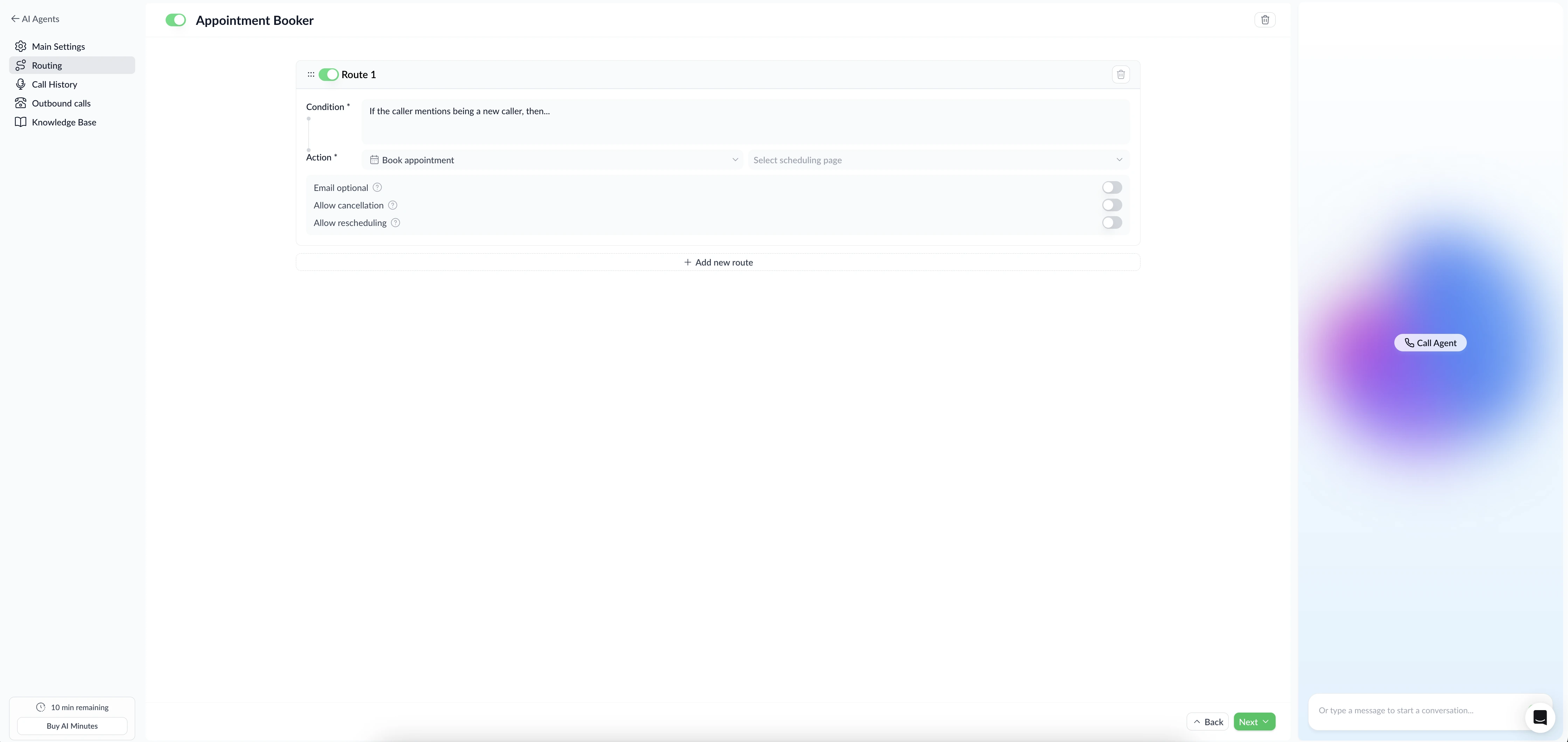
Step 3: Set routing rules in plain language. Routing rules tell the agent what to do based on what the caller says. A rule might read: "If the caller is a new client, book a 30-minute Onboarding call with the sales team. If the caller mentions an existing case, transfer to the client support line." The agent interprets these rules during the conversation and acts accordingly. No decision trees to build, no flowchart software required.
Once those three steps are done, the agent is live. You can test it from a browser using Zeeg's built-in Test Agent panel before going live — call the agent yourself, run through different scenarios, and adjust the prompt until the behaviour is right.
What happens when a call comes in
This is the full sequence, step by step, for a standard inbound call handled by Zeeg's AI agent.
The call comes in. Zeeg's AI receptionist answers immediately — no hold music, no voicemail, no ring that goes unanswered. It doesn't matter whether it's 2pm on a Tuesday or midnight on a Sunday. Every call gets picked up.
The agent greets the caller. It introduces itself using your configured prompt — your business name, the persona you defined, the tone you set. To the caller, it sounds like reaching a professional receptionist. The conversation begins in natural language; the caller can respond however they want, not by pressing numbered options.
The agent asks qualifying questions. Based on your routing rules, the agent asks the questions it needs to route the call correctly. Is this a new or existing client? What type of service are they enquiring about? Are they calling about a specific team member or department? The agent listens to the answers, understands context even when callers phrase things differently than expected, and adjusts accordingly.
The agent offers time slots during the conversation. Not after. Not via a follow-up SMS. During the call, the agent checks real-time availability across your calendar or your team's — enabled by Zeeg's native online scheduling system — and says something like: "I have availability on Thursday at 10am or Friday at 2pm — which works better for you?" The caller picks a time. The agent confirms it.
The booking is confirmed before the call ends. The calendar event is created. A confirmation is sent to both the caller and the relevant team member. The caller hangs up with a meeting already on their calendar. They don't need to click a link, check an email, or do anything else.
The contact management record is created automatically. Everything from the call is logged: the caller's name and contact details, the call duration, the meeting that was booked, and the full transcript with timestamps. The record is created or updated instantly — nothing waits for a nightly sync or a manual update.
The entire sequence runs without any human on your team getting involved. This is what separates Zeeg from the broader category of AI scheduling assistants — most of which stop at the calendar and never touch the phone.
The difference between Zeeg and standalone voice AI tools
Tools like Retell AI, Vapi, and Bland AI are great at the voice layer. They handle natural conversations, they're configurable, and they're used by engineering teams to build sophisticated calling workflows. The limitation is that they're infrastructure — they don't include a native scheduling system or features for contact management. Connecting them to a booking tool and a contact database means Zapier flows, webhooks, or custom API work. That stack can be made to work, but it adds cost, maintenance, and a failure point to every conversion.
For businesses that need a working system without a developer, native integration is the best choice.
Read more: For a full breakdown of what those platforms cost when you stack all the components, the AI voice agent pricing guide covers the major platforms side by side. And if you're evaluating the broader field of AI voice bots, it's worth understanding how much engineering overhead each approach requires before committing to a stack.
Who gets the most out of Zeeg's AI voice agent
The value scales directly with how much inbound calling your business handles and how important it is that every call turns into a booked appointment.
Solo practitioners and small practices — lawyers, tax advisors, coaches — use Zeeg as an always-on receptionist. Nobody needs to be at the desk. The agent answers every call, qualifies the caller, and books the right appointment type automatically. The calendar fills itself, including outside business hours. That's no small share: about a third of Zeeg bookings land outside office hours.
Sales teams with high inbound volume use Zeeg as the first layer of their pipeline. Every inbound lead gets qualified immediately — the agent asks the right questions, routes to the right rep via round-robin scheduling if needed, and puts a confirmed meeting on the rep's calendar before the rep is even aware of the lead. Research from MIT and Harvard Business Review shows the odds of qualifying a lead fall sharply within minutes of first contact — an agent that acts instantly, on every call, eliminates that decay entirely. Teams looking for a broader view of scheduling tools purpose-built for sales should read our guide on sales appointment scheduling.
Accounting firms and insurance businesses handle high volumes of inbound enquiries where first-contact experience directly affects whether a prospect becomes a client. An AI agent that qualifies the caller — new client vs. existing, type of service, urgency — and books the right appointment type without a receptionist is a direct operational efficiency gain.
Service businesses in trades miss calls constantly when technicians are on a job. Every missed call is a lost booking from a customer who will simply call the next number on their list. Zeeg covers those calls around the clock without adding headcount. If you want to understand where Zeeg sits in the broader landscape of appointment scheduling apps, that comparison covers 20 tools across different use cases.
European businesses with GDPR obligations get an additional layer of value. Because Zeeg is a single platform with all data hosted on German servers, call data, booking data, and contact records never leave EU territory. There's no per-vendor compliance exercise for each tool in the stack. One platform, one DPA, one set of data residency guarantees.
Read more: For the technical and legal specifics, Zeeg's GDPR compliance page covers what that means in practice. And if you're specifically evaluating Zeeg as a GDPR-compliant Calendly alternative, that's the right place to start.
Outbound calls
Zeeg's AI agent handles outbound as well as inbound. You can configure agents to follow up with leads who submitted a form but didn't book, confirm appointments before they happen, or reach out to prospects as part of a campaign. Outbound calls run on the same prompt-based setup as inbound — define what the agent says, when it should offer to book, and how it should handle different responses.
Inbound calls cost approximately $0.07 per minute. Outbound calls cost approximately $0.19 per minute. Both are billed on a credits model, and the exact cost of every call is logged inside the record.
What the system captures from every call
The record that Zeeg creates after a call is more than a contact entry. It contains:
- Caller name, phone number, and any details you want to match your contact management systems custom objects
- The full call transcript with timestamps
- The meeting that was booked, including type, time, and assigned team member
- Call duration and per-minute cost
- Workflow automations triggered by the agent — follow-up reminders, confirmation emails, internal notifications
Over time, that data has strategic value beyond individual calls. You can see which call flows convert to bookings at the highest rate, which caller types consistently route incorrectly, and where calls end without a confirmed meeting. Those patterns let you refine your routing rules and agent prompts based on real outcomes — not assumptions.
For teams already using HubSpot, Pipedrive, or other CRMs, this is also where the CRM with scheduling angle becomes relevant. Because Zeeg's integrations push booking and contact data to your existing system automatically, so nothing needs to be entered twice. If you're exploring the broader category of AI-powered CRMs, Zeeg fits into that landscape as the only one where the AI calling layer is native rather than added on.
Getting started with Zeeg's AI voice agent
1. Create your agent. From the AI Agents section, click + Agent. Give it a name — this is your internal label, not what callers hear.
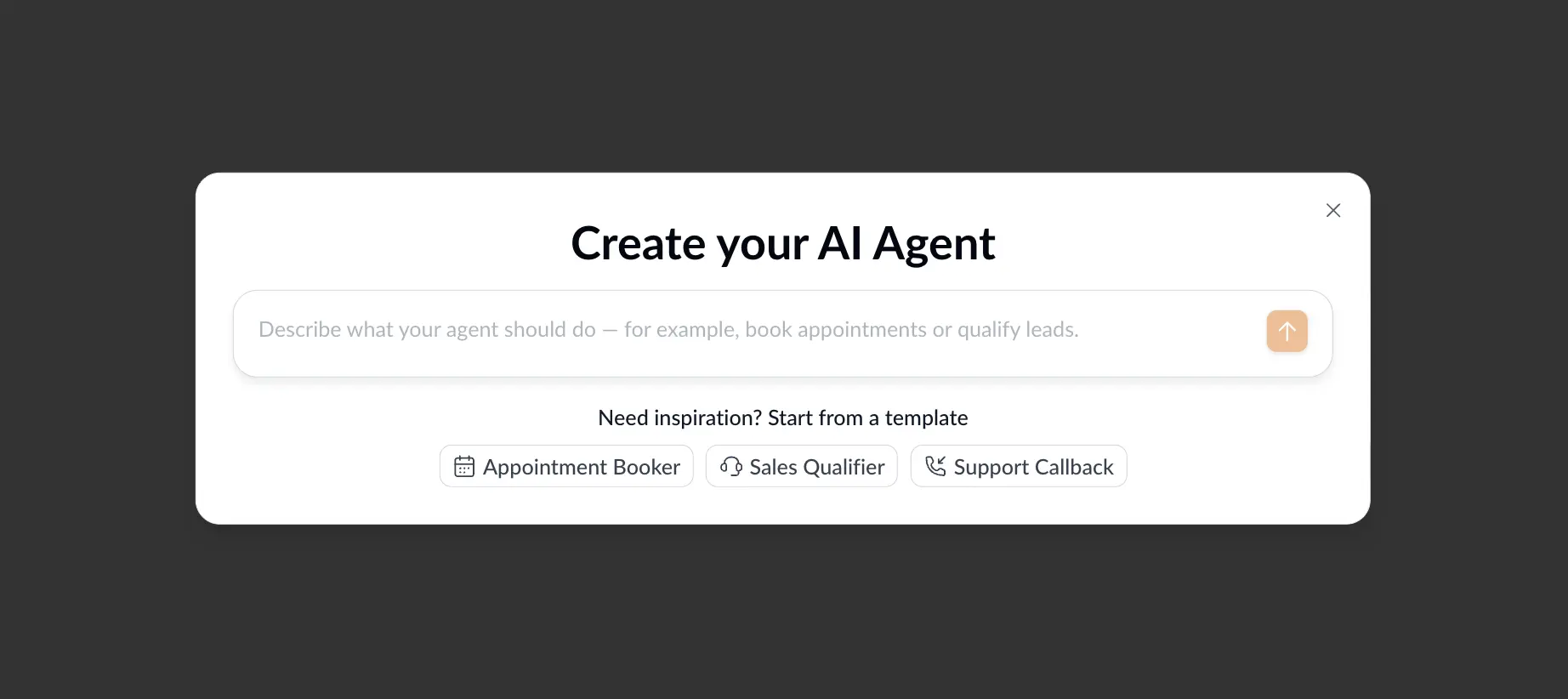
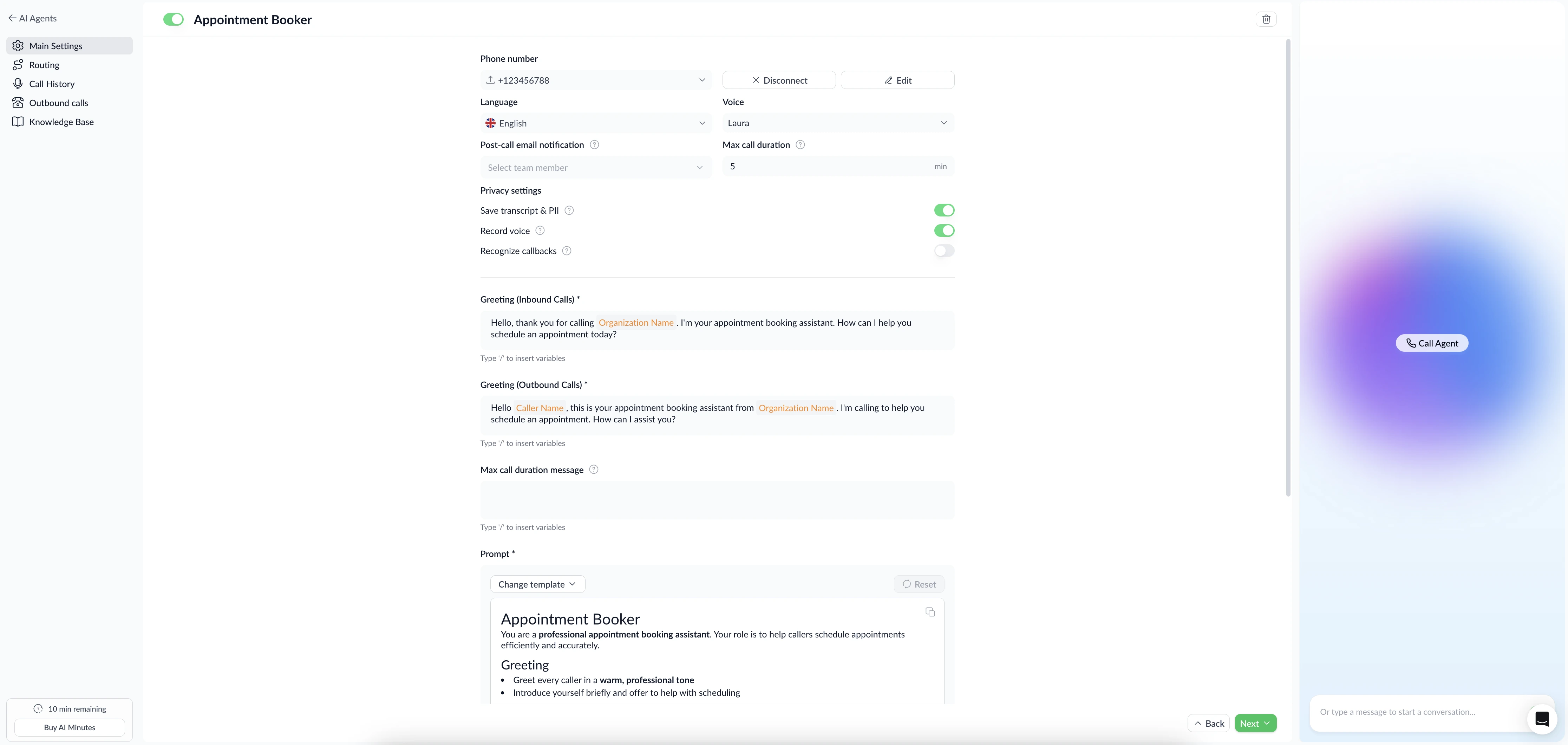
2. Configure main settings. Choose your phone number (purchase a new local number directly inside Zeeg, or connect an existing one via SIP trunk), set the language and voice, and configure privacy settings — including whether to save transcripts, record voice, and recognise callbacks. Then write your Greeting for inbound and outbound calls using plain-language variables like Organization Name and Caller Name. Finally, write your Prompt — the full instruction set your agent follows on every call. Zeeg provides templates to get you started, covering greeting style, appointment flow, and rules like "never invent availability.
3. Set routing rules. Under Routing, define what the agent does based on what the caller says. Each route has a plain-language Condition (e.g. "If the caller mentions being a new customer") and an Action — such as booking an appointment on a specific scheduling page, with optional controls for cancellations and rescheduling. It's worth switching rescheduling on: invitees reschedule almost as often as they cancel, so an agent that can move a booking keeps meetings you'd otherwise lose. Add as many routes as your call flows require.
4. Test it live. Before going live, use the Call Agent button inside the platform to run a real conversation from your browser. Adjust the prompt and routing until the behaviour is right, then toggle the agent on.
You can also configure outbound calls — set voicemail detection behaviour, retry settings, and import contact lists via CSV to run campaigns from the same agent.
Zeeg is Europe's leading AI voice agent and appointment scheduling software in one solution — GDPR-compliant, made in Germany. Start for free →
Frequently Asked Questions
Which Zeeg plan includes the AI voice agent?
The AI agent is available from the Professional plan ($10/month per user on annual billing) and above. Usage is billed separately on a credits model.
Does the agent work outside business hours?
Yes. The agent operates 24/7. You can configure time-based routing rules if you want different behaviour outside certain hours — for example, taking a message rather than booking after 10pm.
How long does it take to set up a working agent?
Most businesses have a working agent configured and tested within an hour. The three-step setup — prompt, phone number, routing rules — is designed to be completed without technical help.
Is the call data GDPR compliant?
Yes. All data — call transcripts, contact records, booking data — is stored on servers in Germany operated by Deutsche Telekom's Open Telekom Cloud. A Data Processing Agreement is available for all business customers.
Can I use my existing phone number with Zeeg?
Yes. You can import an existing business number via SIP trunk, or purchase a new local number directly inside Zeeg.
What happens if a caller asks something the agent can't handle?
You define escalation behaviour in your routing rules. If a caller asks something outside the agent's scope, you can configure it to transfer the call to a human, take a message, or offer a callback. The agent doesn't guess — it follows the rules you set.
Can the agent handle multiple languages?
Yes. Zeeg's AI agent supports multiple languages, including German and English. You can configure the agent to respond in the caller's language or operate in a fixed language depending on your use case.
Does Zeeg's AI voice agent require developer setup?
No. Configuration is done through plain-language prompts and routing rules inside the Zeeg interface. No API knowledge, coding, or external integrations are required. If you need API access for custom workflows, the Developer Hub covers that separately.