
Sugar CRM's $52-per-user monthly starting price has many businesses seeking alternatives. Whether you're dealing with performance issues, feature overload, or budget constraints, there are better options available. In this guide, we will have a look at the top 13 Sugar CRM alternatives, from budget-friendly Zoho CRM to enterprise-grade Salesforce to help you find the right fit for your team. We'll also show how Zeeg's scheduling features integrate with any CRM platform you choose with Zeeg being the leading European AI voice agent and appointment scheduling software that is made in Germany and GDPR-compliant.
Why consider alternatives to Sugar CRM?
Yes, Sugar CRM is a capable customer relationship management platform; but it's not the ideal solution for every organization. There are several points that drive businesses to search for Sugar CRM alternatives.
Cost considerations often top the list. Sugar CRM is a bit pricey, especially for small to medium-sized businesses. With plans starting at $52 per user monthly for Sugar Professional and reaching $1,000 monthly for Sugar Market, the total cost inflates as teams grow.
User experience challenges also prompt organizations to seek alternatives. Some users find Sugar CRM's interface cluttered and navigation unintuitive. The learning curve can be a bit steep, especially for teams without too much CRM experience. Also, certain modules like email management can feel a bit too complicated for everyday use.
There are performance issues too (sometimes!), with users reporting slower response times during peak usage periods. This can impact productivity when teams need quick access to customer data during important sales conversations.
Feature gaps may not align with specific business requirements. While Sugar CRM offers extensive customization options, some organizations need specialized functionality that requires significant configuration or isn't available at all.
Integration limitations can also drive the search for alternatives. Businesses that use specific tools or platforms may find that Sugar CRM doesn't connect with their existing tech stack, which automatically distrupts workflow.
Best Sugar CRM alternatives: An overview
Top Sugar CRM alternatives in detail
1. Zeeg, the scheduling-first platform
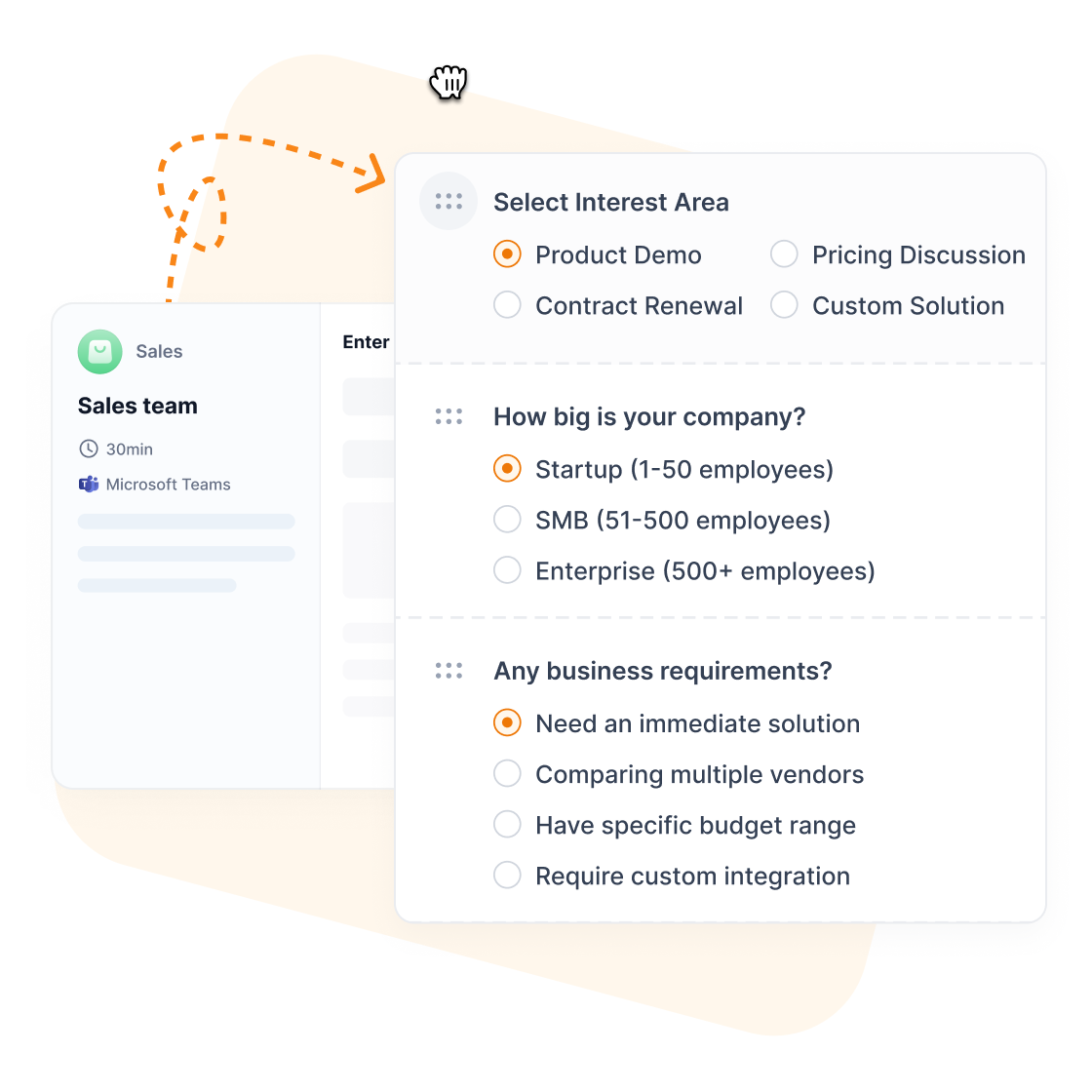
Most Sugar CRM alternatives treat appointment scheduling as an afterthought, creating gaps where leads get lost between booking and customer management. Zeeg solves this by building contact management functionality into the appointment process, ensuring every scheduled meeting automatically becomes a qualified lead with complete conversation history.
When prospects book appointments through Zeeg, they're instantly captured in your database with automated follow-up sequences that trigger based on meeting outcomes. This integration eliminates manual data transfer while providing complete visibility from initial booking through deal closure. Sales teams finally understand which marketing channels generate actual meetings, not just form submissions.
Key features that address Sugar CRM's limitations:
- Advaned appointment scheduling - Native booking functionality that Sugar CRM lacks, without expensive add-ons
- Automatic lead capture - Every appointment becomes a contact with full context
- Transparent pricing - No extra costs or expensive module upgrades like Sugar CRM's complex pricing structure
- Custom objects without barriers - Create any data structure freely, unlike Sugar CRM's customization requirements
- GDPR-compliant hosting - German servers ensure EU data compliance without complex legal reviews
Zeeg pricing:
- Starter: Free forever for individual users
- Professional: $10/month per user ($12 monthly) for advanced features
- Business: $16/month per user ($20 monthly) for team collaboration
- Scale: $30/month per user ($40 monthly) for maximum functionality
2. HubSpot CRM as Sugar CRM alternative

HubSpot CRM is a decent solution for businesses that are seeking growth through inbound marketing and sales alignment. HubSpot combines customer relationship management with content creation, email marketing, and analytics tools, which makes it a compelling Sugar CRM alternative for organizations wanting an all-in-one approach.
Key features
HubSpot's strength lies in its integrations. The contact management system automatically captures lead information from website forms, social media interactions, and email campaigns. Deal tracking offers visual pipeline management with customizable stages that reflect your sales process. Marketing automation capabilities include email sequences, lead scoring, and behavioral triggers that nurture prospects based on their actions.
The reporting dashboard offers real-time insights into sales performance, marketing campaign effectiveness, and customer interactions. Team collaboration features allow multiple users to access shared contact records, leaving notes and tracking communication history. The platform also includes a ticketing system for customer service management.
HubSpot vs Sugar CRM
HubSpot differentiates itself from Sugar CRM through its freemium model and marketing-focused approach. While Sugar CRM asks you to pay for basic functionality, HubSpot has a free tier that includes contact management, deal tracking, and basic reporting for unlimited users.
The user interface is also simple. Where Sugar CRM can feel overwhelming with numerous configuration options, HubSpot prioritizes ease of use with intuitive navigation and clean design. However, this simplicity can become limiting for organizations that need advanced customization capabilities.
Integration capabilities favor HubSpot's ecosystem approach. In addition to popular tools, the platform also works with its own marketing, sales, and service tools to create unified customer experiences. Sugar CRM offers more third-party integrations but may require additional configuration to achieve similar cohesion.
Pros and cons
✓ Generous free plan with unlimited users
✓ Strong marketing automation capabilities
✓ Intuitive interface with minimal learning curve
✓ Comprehensive reporting and analytics
✓ Regular feature updates and improvements
✗ Limited customization compared to Sugar CRM
✗ Higher costs for advanced features
✗ Email deliverability challenges for some users
✗ Storage limitations on lower-tier plans
HubSpot offers a freemium pricing structure:
- Free: Contact management, deals, and basic reporting
- Starter: $45/month for enhanced features and branding removal
- Professional: $1,600/month for advanced automation and analytics
- Enterprise: $4,000/month for custom reporting and advanced permissions
User reviews
Capterra: 4.5/5
“We have had a great streak of success working HubSpot CRM and it has helped us streamline our operations in customer support services, sales and marketing management. With HubSpot CRM, we are able to keep a close contact with our customers and leads which helps us to run more successful marketing campaigns and close more sales deals.” V.M.
“Very good all-rounder, enabling us to operate efficiently across all areas of our GTM function (marketing, sales, customer success). The product feels like it is constantly being updated and improved, and is a very powerful CRM.” O.L.
3. Salesforce

Salesforce is the world's leading CRM platform with its extensive functionality and its very own marketplace. For organizations that need enterprise-grade capabilities and unlimited customization options, Salesforce is a powerful Sugar CRM alternative with proven scalability.
Key features
Salesforce's architecture supports complex business processes through its object-oriented CRM database structure. Lead management includes automatic assignment rules, scoring mechanisms, and conversion tracking. Opportunity management gives you forecasting tools, stage progression analysis, and win/loss reporting.
The AppExchange marketplace offers thousands of third-party applications that offer you more than just core functionality. Custom object creation allows businesses to track any type of data beyond standard contacts and deals. Workflow automation handles routine tasks like follow-up reminders, email notifications, and data updates.
Einstein AI provides predictive analytics, next-best-action recommendations, and automated data entry. The platform supports multiple currencies, languages, and territorial management for global operations.
Salesforce vs Sugar CRM
Salesforce surpasses Sugar CRM in scalability and marketplace ecosystem. While Sugar CRM works well for mid-sized organizations, Salesforce handles enterprise requirements with unlimited customization possibilities (if you want to use Salesforce as a small business, though, here's a guide). The AppExchange marketplace provides solutions for virtually any business need, whereas Sugar CRM relies more heavily on native functionality.
Complexity levels differ between the platforms. Salesforce requires dedicated administration resources and ongoing training investments. Sugar CRM offers a more manageable learning curve for smaller teams without dedicated CRM administrators.
Pricing structures reflect these differences. Salesforce costs start lower but increase rapidly with advanced features and user counts. Sugar CRM provides more predictable pricing but with fewer customization options at each plan.
Pros and cons
✓ Unmatched customization capabilities
✓ Extensive third-party marketplace
✓ Strong enterprise security features
✓ Comprehensive mobile applications
✓ Advanced analytics and AI capabilities
✗ Complex implementation and maintenance
✗ Expensive for small to medium businesses
✗ Steep learning curve for new users
✗ Limited storage on basic plans
Salesforce has multiple pricing plans:
- Essentials: $25/user/month for basic CRM functionality
- Professional: $75/user/month with advanced automation
- Enterprise: $150/user/month including advanced customization
- Unlimited: $300/user/month with unlimited support and storage
User reviews
Capterra: 4.4/5
“I was on the team that helped implement Salesforce as our primary sales CRM for multiple markets over a decade ago. For the last seven years, I have managed team that supports the sales team so we use it for researching accounts, activities and orders.” N.S.
“Overall, my organization found SalesForce adequate and efficient for a team of our size. It significantly increased our organization and ultimately drove client retention, providing us the most value through retargeted customers.” B.C.
4. Pipedrive
Pipedrive focuses specifically on sales pipeline management, which makes it an ideal Sugar CRM alternative for teams that prioritize deal progression and sales performance. The platform's visual approach to pipeline management helps sales representatives stay organized and focused on closing opportunities.
Key features
The visual sales pipeline is Pipedrive's centerpiece. Deals appear as cards that move through customizable stages, and give you immediate visibility into sales progress. Activity reminders make sure that follow-up tasks don't fall through cracks. Email integration captures communication history automatically when connected to Gmail or Outlook.
Sales reporting includes conversion rates by stage, average deal size analysis, and individual performance metrics. The goals feature allows managers to set targets and track progress against quotas. Mobile applications provide full functionality for field sales teams.
Automation capabilities handle routine tasks like follow-up scheduling, deal progression notifications, and lead assignment. The recently added AI features suggest next actions based on deal characteristics and historical data.
Pipedrive vs Sugar CRM
Pipedrive's focused approach contrasts with Sugar CRM's extensive functionality. While Sugar CRM attempts to address marketing, customer service, and sales management, Pipedrive concentrates solely on sales pipeline optimization. This specialization results in superior sales-specific features but limited capabilities in other areas.
User experience favors Pipedrive's simplicity. The interface prioritizes visual clarity over feature density, which makes it easier for sales teams to adopt and use consistently. Sugar CRM provides more configuration options but requires more time to master effectively.
Integration philosophy differs between the platforms. Pipedrive connects with specialized tools for marketing, customer service, and accounting rather than providing built-in alternatives. Sugar CRM includes more native functionality but may require additional modules for comparable capabilities.
Pros and cons
✓ Intuitive visual pipeline interface
✓ Strong mobile applications
✓ Excellent email integration capabilities
✓ Affordable pricing for sales teams
✓ Regular feature updates and improvements
✗ Limited marketing automation features
✗ Basic customer service functionality
✗ Fewer customization options than Sugar CRM
✗ No built-in project management capabilities
Pipedrive offers four pricing tiers with annual billing discounts:
- Lite: €14/user/month (billed annually) for basic pipeline management
- Growth: €39/user/month (billed annually) with automation and email sync
- Premium: €49/user/month (billed annually) including AI-powered tools and enhanced customization
- Ultimate: €79/user/month (billed annually) with maximum usage limits and advanced security
All plans include a free 14-day trial with no credit card required. The annual billing saves you a lot of money compared to monthly payments.
User reviews
Capterra: 4.5/5
“We love the automations. It keeps our business running so smoothly and ensures that we never miss anything for our clients.” K.H.
“Pipedrive has become an essential part of my daily work and I find it extremely useful. I would highly recommmend it to a sales/marketing user looking to streamline products and have one useful dashboard.” Verified Reviewer
👉🏻 You don't like Pipedrive but still need pipeline management CRMs? Here's a guide
5. Zoho CRM

Zoho CRM appeals to cost-conscious organizations looking for more functionality without enterprise-level pricing. As part of the broader Zoho system, it integrates naturally with productivity, accounting, and project management applications, and creates a unified business platform.
Key features
Contact management includes social media profile integration, communication history tracking, and custom field creation. Lead scoring uses both demographic and behavioral data to prioritize prospects. The sales pipeline supports multiple processes for different product lines or territories.
Zia AI assistant provides predictive analytics, anomaly detection, and natural language query processing. Workflow automation handles lead assignment, follow-up scheduling, and data updates based on customizable triggers. Email marketing capabilities include template creation, campaign management, and deliverability tracking.
Blueprint feature guides sales processes through standardized steps, ensuring consistency across team members. Territory management allows geographic or account-based assignment rules. The platform supports multiple currencies and languages for international operations.
Zoho CRM vs Sugar CRM
Zoho CRM offers comparable functionality to Sugar CRM at significantly lower price points. Both platforms offer extensive customization options, workflow automation, and third-party integrations. But Zoho's pricing structure makes advanced features accessible to smaller organizations that might find Sugar CRM cost-prohibitive.
The user interface reflects different design philosophies. Zoho emphasizes clean, modern layouts with intuitive navigation. Sugar CRM gives you more configuration options but can feel cluttered for users who don't need too much customization.
Ecosystem integration favors Zoho's all-in-one suite approach. Organizations that use Zoho Books for accounting, Zoho Projects for project management, or Zoho Mail for email benefit from data sharing (if you use other tools, though, no problem: Zoho integrates with popular tools). Sugar CRM requires third-party integrations for similar functionality.
Pros and cons
✓ Competitive pricing with generous free tier
✓ Strong AI capabilities with Zia assistant
✓ Comprehensive Zoho ecosystem integration
✓ Multiple customization options
✓ Good mobile application functionality
✗ Learning curve for advanced features
✗ Limited third-party integrations compared to competitors
✗ Occasional performance issues with large databases
✗ Customer support quality varies by plan level
Pricing
Zoho CRM has scalable pricing options:
- Free: Up to 3 users with basic functionality
- Standard: $14/user/month with automation and integrations
- Professional: $23/user/month including advanced analytics
- Enterprise: $40/user/month with custom functions and validation
- Ultimate: $52/user/user/month featuring advanced AI and permissions
User reviews
Capterra: 4.3/5
“Decent software for the pricing. Works well for small and medium sized teams looking to get daily work done effectively. Ease of use, and traceability Account Management is decent.” F.J.
“Zoho CRM has helped us to realize an upward trajectory in interacting with our customers and has made it easily possible for us to build lasting relationships with them. We have had an amazing experience with Zoho CRM and has really benefitted from its incredible functions. We owe our success in customer operations greatly to Zoho CRM.” Z.R.
6. Freshsales

Freshsales is an AI-powered CRM solution that helps sales teams work more intelligently rather than just harder. The platform combines traditional CRM functionality with machine learning capabilities that provide insights and automate routine tasks.
Key features
The lead scoring system uses machine learning to evaluate prospect quality based on demographics, behavior, and engagement patterns. Deal insights predict closure probability and suggest optimal next actions. Email tracking gives you open rates, click-through data, and response timing analytics.
Built-in phone system allows click-to-call functionality with automatic call logging and recording capabilities. Email sequences automate follow-up communications based on prospect behavior and predetermined schedules. The territory management feature assigns leads and accounts based on geographic or other criteria.
Freddy AI is a virtual assistant that offers you deal recommendations, contact insights, and performance analytics. The platform also includes chat functionality for website visitor engagement and support ticket management for customer service needs.
Freshsales vs Sugar CRM
Freshsales differentiates itself through AI-powered insights and built-in communication tools. While Sugar CRM requires third-party integrations for phone systems and advanced analytics, Freshsales includes these capabilities natively. This integration creates smoother workflows but may limit flexibility for organizations preferring specialized tools.
Pricing structures favor Freshsales for smaller teams. The platform offers a functional free tier and affordable paid plans, which makes it accessible to organizations that find Sugar CRM's pricing prohibitive. However, Sugar CRM gives you more extensive customization options for complex business processes.
User experience emphasizes simplicity in Freshsales, with modern interface design and intuitive navigation. Sugar CRM offers more configuration possibilities but requires more time investment to optimize effectively.
Pros and cons
✓ AI-powered insights and recommendations
✓ Built-in phone and email capabilities
✓ Affordable pricing with free tier
✓ Modern, intuitive user interface
✓ Good integration with Freshworks suite
✗ Limited customization compared to Sugar CRM
✗ Fewer third-party integrations available
✗ AI features require paid plans
✗ Customer support quality varies by plan level
Pricing
Freshsales has tiered pricing:
- Free: Basic CRM for unlimited users with limited features
- Growth: $15/user/month with email integration and basic automation
- Pro: $39/user/month including phone integration and advanced reporting
- Enterprise: $69/user/month with AI insights and territory management
User reviews
Capterra: 4.5/5
“Overall experience is great. it is providing efficient services by automation our sales. I also appreciate the way it lets us track the sales activities.” R.F.
“The system itself is very good, and the company are willing to create special features if needed, and are happy to work with our system manager to ensure it meets the needs of our business. There is a lot of potential to the Freshsales system that our team are looking to utilise, especially around automations. Sometime the customer service they offer through their instant chats does not always lead to a solution. I found the chatbot that offers suggestions for help rarely comes up with the answers to my queries - then their is usually a language barrier when conversing with their overseas customer service operatives who manage the chat one you get past the chatbot - their team often help with a solution, but it can take some time.” E.T.
7. Monday CRM
.webp)
Monday CRM brings the project management platform's visual approach to customer relationship management. For organizations that already use Monday.com for project tracking, the CRM module lets you integrate with existing workflows and familiar interface design.
Key features
Visual boards display deals, contacts, and activities using customizable columns and color coding. Automation recipes handle routine tasks like status updates, assignment changes, and follow-up reminders. The timeline view shows deal progression and milestone tracking in Gantt chart format.
Email integration captures communication history and allows direct sending from contact records. Form creation enables lead capture from websites with automatic data population into the CRM. Dashboard widgets provide real-time visibility into sales metrics and team performance.
Project integration allows linking CRM deals to delivery projects, creating unified visibility from initial contact through project completion. The platform supports file sharing, commenting, and collaboration features that extend beyond traditional CRM functionality.
Monday CRM vs Sugar CRM
Monday CRM's visual approach differs from Sugar CRM's traditional database interface. The board-based layout appeals to teams accustomed to project management tools but may feel unfamiliar to users expecting conventional CRM navigation.
Integration capabilities favor organizations already using Monday.com's ecosystem. The platform provides natural connections between sales, project management, and team collaboration. Sugar CRM offers broader third-party integrations but requires separate tools for project management functionality.
Customization approaches reflect different philosophies. Monday CRM uses template-based setup with drag-and-drop modifications, while Sugar CRM provides more granular configuration options through traditional CRM settings.
Pros and cons
✓ Visual, project-management-style interface
✓ Strong collaboration and file sharing features
✓ Good integration with Monday.com ecosystem
✓ Flexible automation capabilities
✓ Modern, intuitive design
✗ May feel unfamiliar to traditional CRM users
✗ Limited third-party integrations
✗ Higher pricing for advanced features
✗ Less specialized CRM functionality than dedicated platforms
Pricing
Monday CRM pricing follows the platform's structure:
- Basic: $12/user/month for essential CRM features
- Standard: $17/user/month with timeline view and calendar integration
- Pro: $28/user/month including advanced automation and reporting
- Enterprise: Custom pricing for advanced security and governance
User reviews
Capterra: 4.6/5
“10 out of 10. They have a ton of support articles, a great online community, quick support when you contact them. They're wonderful!” A.B.
“The experience with monday.com has been very successful. It has helped us to consolidate our project activities making it easy to collaborate in and manage our projects with ease. monday.com has enabled us to strategically plan for our tasks including setting up due dates which allows us to finish our projects in time.” C.V.
8. ActiveCampaign

ActiveCampaign combines CRM functionality with advanced marketing automation, which makes it a Sugar CRM alternative for organizations prioritizing customer journey management and email marketing integration.
Key features
Behavioral automation creates customer journeys based on website activity, email engagement, and purchase history. Lead scoring incorporates both demographic information and behavioral data to identify sales-ready prospects. The CRM includes deal tracking, contact management, and sales pipeline visualization.
Email marketing capabilities include template creation, A/B testing, and deliverability optimization. Site tracking monitors visitor behavior and triggers automated responses based on page visits and time spent. SMS marketing adds text messaging to email campaigns for multi-channel communication.
Machine learning optimizes send times, predicts customer behavior, and recommends next actions. The platform supports e-commerce integration with popular platforms like Shopify, WooCommerce, and BigCommerce, part of the Commerce portfolio, for unified customer data.
ActiveCampaign vs Sugar CRM
ActiveCampaign's marketing automation capabilities surpass Sugar CRM's built-in functionality. While Sugar CRM focuses mainly on sales process management, ActiveCampaign emphasizes customer journey orchestration from initial awareness through post-purchase engagement.
Integration approaches differ between the platforms. ActiveCampaign specializes in marketing technology connections, which offers deep integration with email platforms, e-commerce systems, and web analytics tools. Sugar CRM offers more business application integrations but may require additional tools for comparable marketing automation.
Pricing models reflect different value propositions. ActiveCampaign charges based on contact count rather than user licenses, making it cost-effective for organizations with large databases but small teams. Sugar CRM's per-user pricing works better for teams with moderate contact volumes.
Pros and cons
✓ Advanced marketing automation capabilities
✓ Excellent email deliverability rates
✓ Machine learning optimization features
✓ Strong e-commerce platform integrations
✓ Behavioral tracking and segmentation
✗ Limited traditional CRM functionality
✗ Complex setup for non-marketing users
✗ Pricing increases significantly with contact growth
✗ Learning curve for automation features
Pricing
ActiveCampaign pricing depends on contact count:
- Lite: $29/month for 1,000 contacts with basic automation
- Plus: $49/month including CRM and landing pages
- Professional: $149/month with advanced reporting and integrations
- Enterprise: $259/month featuring custom reporting and dedicated support
User reviews
Capterra: 4.6/5
“I used ActiveCampaign extensively for a long time and heavily relied on its advanced automations, dual taxonomy system, and versatile API. It was a powerful tool that offered great flexibility and helped manage complex workflows effectively. However, over time, the pricing became steep, and the platform felt slower and more complicated to navigate. While it served me well for years, I eventually felt a sense of relief after switching to a simpler, more efficient solution. ActiveCampaign is undoubtedly powerful, but for me, its complexity and cost eventually outweighed its benefits.” M.H.
ActiveCampaign have inceased the price on us almost 100% over the past 3 years. I just took the time to have a Zoom call and calmly lay out why this doesn't work for us. Their response - to offer us a lower level of service for almost the same price. So if we downgrade, we get less for the same price. If we switch to monthly (so we can leave if we want to without being tied in for a year - there are no refunds) - you guessed it - we pay even more. I feel like we are being backed into a corner with the choice of pay up or change provider. The choice is not going to be to pay up. I have no confidence that prices won't continue to increase. This feels like classic VC ownership - squeeze more out of the customers and don't worry if they leave. Which is fine if their objective is to have a handful of customers left paying a small fortune. Do you want to be one of those customers? Trust has been damaged and becaues of that we now have to figure out where to move next, rather than focussing on our business. If I could give no stars, I would.” D.E.
9. Keap
Keap targets small businesses that are looking for sales and marketing automation in a single platform. Formerly known as Infusionsoft, the platform combines CRM functionality with marketing automation, e-commerce capabilities, and customer management tools.
Key features
Campaign automation creates multi-step sequences based on customer behavior, purchase history, and engagement patterns. Contact management includes detailed customer profiles, interaction history, and custom field creation. E-commerce integration handles payment processing, subscription management, and product delivery.
Lead capture forms integrate with websites and social media platforms for automatic data collection. Sales pipeline management provides visual deal tracking with customizable stages and probability weighting. Appointment scheduling allows customers to book consultations directly through branded calendar links.
Quote and invoice generation creates professional proposals with electronic signature capabilities. The platform includes basic project management features for service-based businesses managing client deliverables.
Keap vs Sugar CRM
Keap's all-in-one approach contrasts with Sugar CRM's modular structure. While Sugar CRM requires third-party integrations for e-commerce, payment processing, and appointment scheduling, Keap includes these capabilities natively. This integration simplifies setup but may limit flexibility for organizations preferring specialized tools.
Target market focus differs between the platforms. Keap specifically addresses small business needs with simplified interfaces and pre-built automation templates. Sugar CRM targets larger organizations requiring extensive customization and complex business process support.
Pricing structures reflect these different approaches. Keap charges flat monthly rates regardless of user count, which makes it cost-effective for small teams. Sugar CRM's per-user pricing becomes more economical for larger organizations.
Pros and cons
✓ Comprehensive small business automation
✓ Built-in e-commerce and payment processing
✓ Appointment scheduling integration
✓ Flat-rate pricing regardless of user count
✓ Good customer support and training resources
✗ Limited scalability for larger organizations
✗ Higher starting price than some alternatives
✗ Complex feature set may overwhelm simple CRM needs
✗ Less customization flexibility than Sugar CRM
Pricing
Keap offers three pricing tiers:
- Lite: $249/month for 2 users and 1,500 contacts
- Pro: $299/month for 3 users and 2,500 contacts
- Max: $449/month for 5 users and 5,000 contacts
All plans include CRM, marketing automation, and e-commerce capabilities.
User reviews
Capterra: 4.1/5
“Pretty good for the cost, and custom options. The UI doesn't look that modern, but it works well. Their integration team is good.” Verified Reviewer
“Customer activities are processed and mapped. Processing and the interface to the backend are optimized. A faithful companion in everyday life.” G.V.
10. Insightly

Insightly combines CRM functionality with project management capabilities, which makes it a pretty solid choice for service-based businesses that need to manage both sales processes and project delivery. The platform bridges the gap between customer acquisition and service fulfillment.
Key features
Project management includes task assignment, milestone tracking, and resource allocation features integrated with customer records. CRM functionality covers contact management, opportunity tracking, and sales pipeline visualization. Email integration captures communication history and enables direct messaging from contact records.
Workflow automation handles lead assignment, project creation, and status updates based on customizable triggers. Custom fields and objects allow businesses to track industry-specific information beyond standard CRM data. Reporting capabilities include sales performance, project profitability, and team productivity metrics.
Mass email capabilities support customer communication and marketing campaigns. The platform includes basic invoice creation and time tracking features for project-based billing.
Insightly vs Sugar CRM
Insightly's project management integration distinguishes it from Sugar CRM's traditional sales focus. While Sugar CRM requires third-party tools for project tracking and resource management, Insightly provides native integration between sales opportunities and project delivery.
Customization approaches differ between the platforms. Sugar CRM offers more extensive configuration options for complex business processes, while Insightly focuses on service business workflows with pre-built templates and simplified setup.
Pricing models reflect different target markets. Insightly's per-user pricing includes both CRM and project management functionality, providing value for service businesses. Sugar CRM charges separately for different modules, which may be more cost-effective for organizations not requiring project management.
Pros and cons
✓ Integrated CRM and project management
✓ Good value for service-based businesses
✓ Intuitive interface with reasonable learning curve
✓ Strong email integration capabilities
✓ Mobile applications for field teams
✗ Limited marketing automation features
✗ Fewer customization options than Sugar CRM
✗ Project management features are basic compared to dedicated tools
✗ Customer support quality varies by plan level
Pricing
Insightly offers scalable pricing:
- Plus: $29/user/month for basic CRM and project features
- Professional: $49/user/month with advanced automation and reporting
- Enterprise: $99/user/month including advanced customization and security
A free plan supports up to 2 users with limited functionality.
User reviews
Capterra: 4/5
“Good for small company but not scaling tech companies!" P.W.
“I love it. If not for Insightly I'd be using spreadsheets and going crazy trying to track my long list of clients that includes boiler system bids, direct commercial and industrial system sales, building and maintaining relationships with mechanical engineers and architects, and a good number of residential boiler prospects.” J.W.
11. SuiteCRM
SuiteCRM is an open-source alternative to Sugar CRM that gives you similar functionality without licensing costs. Based on Sugar CRM's earlier open-source version, it offers CRM capabilities for organizations with technical resources to manage self-hosted solutions.
Key features
Contact and account management includes detailed customer profiles, interaction history, and relationship mapping. Sales automation handles opportunity tracking, quote generation, and workflow management. Marketing capabilities include campaign management, email marketing, and lead nurturing sequences.
Customer service features provide case management, knowledge base integration, and support ticket tracking. Reporting tools generate sales performance, marketing effectiveness, and customer service metrics. The platform supports multiple languages and currencies for international operations.
Customization capabilities allow complete modification of fields, layouts, workflows, and business logic. API access enables integration with external systems and custom application development.
SuiteCRM vs Sugar CRM
SuiteCRM provides similar core functionality to Sugar CRM without licensing costs, making it attractive for organizations with limited budgets but available technical expertise. Both platforms share common architectural foundations, resulting in comparable feature sets and customization capabilities.
Support models differ significantly between the platforms. Sugar CRM includes vendor support, regular updates, and professional services as part of subscription costs. SuiteCRM relies on community support and optional commercial services, requiring organizations to manage updates and maintenance internally.
Hosting responsibilities distinguish the solutions. Sugar CRM offers cloud hosting with managed infrastructure and security updates. SuiteCRM requires organizations to provide their own hosting, security management, and backup systems.
Pros and cons
✓ No licensing costs for core functionality
✓ Complete source code access for unlimited customization
✓ Large community of developers and users
✓ Compatible with Sugar CRM modules and extensions
✓ Full control over data and hosting environment
✗ Requires technical expertise for installation and maintenance
✗ Limited professional support options
✗ Organizations responsible for security updates and patches
✗ Hosting and infrastructure costs not included
Pricing
SuiteCRM offers multiple options:
- Open Source: Free download with community support
- OnDemand Starter: £95/month for hosted solution with 5 users
- OnDemand Business: £332.50/month for 15 users with enhanced features
- OnDemand Premium: £475/month for 25 users with advanced functionality
User reviews
Capterra: 4.2/5
“It is a software that helped us tracking all the customers and deals in the startup period, without losing anything. So thanks suitecrm. When things began to grow, we had to change because too many things were unsupported or not working. But export worked well so we were able to import into another product, odoo, that is by far more stable, and since it is written only in python more robust and with less interdependence on other pieces of software.” M.A.
“Overall, if you want a free application that will do the job, then this is it. But first you have to spend all your time learning how to use it, configure it, figure out the bugs, and then say goodbye to the high standards you once held, because the bare essentials will have to be good enough.” Verified Reviewer
12. Copper
Copper (formerly ProsperWorks) specializes in Google Workspace integration, which makes it an ideal Sugar CRM alternative for organizations heavily invested in Google's productivity suite. The platform is easy to use and automatically captures data from Gmail and other Google apps.
Key features
Gmail integration automatically captures email communications and creates contact records without manual data entry. Google Calendar synchronization shows meetings and appointments within customer timelines. Contact management leverages Google Contacts for unified address book functionality.
Sales pipeline management offers visual deal tracking with customizable stages and automated progression rules. Lead tracking captures prospect information from Google Forms and website interactions. Task management integrates with Google Tasks for unified productivity workflows.
Reporting capabilities include sales performance metrics, pipeline analysis, and individual team member productivity tracking. Mobile applications provide full functionality for field sales teams using Android or iOS devices.
Copper vs Sugar CRM
Copper's Google integration provides workflows for organizations using Google Workspace, whereas Sugar CRM requires third-party connectors for comparable functionality. The automatic data capture from Gmail eliminates manual contact creation and communication logging that Sugar CRM typically requires.
Customization capabilities favor Sugar CRM's extensive configuration options. While Copper offers clean simplicity, Sugar CRM is more flexible for complex business processes and industry-specific requirements.
Target market positioning differs between the platforms. Copper focuses on small to medium businesses seeking simple CRM functionality with Google integration. Sugar CRM addresses larger organizations requiring comprehensive customization and advanced feature sets.
Pros and cons
✓ Seamless Google Workspace integration
✓ Automatic data capture from Gmail
✓ Intuitive interface with minimal training required
✓ Good mobile applications
✓ Reasonable pricing for small teams
✗ Limited functionality outside Google ecosystem
✗ Fewer customization options than Sugar CRM
✗ Basic marketing automation capabilities
✗ No free plan available
Pricing
Copper provides three pricing tiers:
- Basic: $25/user/month for essential CRM features
- Professional: $59/user/month with automation and reporting
- Business: $119/user/month including advanced customization and security
User reviews
Capterra: 4.4/5
“Copper has been a great solution for our smaller company (13 FT employees). We can track notes on our clients, organize new inquiries for our services, and increase communication between team members as a result. We use Google Workspace, and the integration has been seamless, especially regarding our calendar sync. The connection to everyone's email is a huge time-saver, and it's extremely helpful to review something in my inbox and have their Copper profile pop up on the screen.” R.D.
“Overall, I enjoy Copper much more than many of the other CRMs. In addition to the typical CRM features and functions, it performs better and faster. Although there are less features available (for my package), Copper serves my purpose for the team moment.” M.W.
13. Nimble
Nimble is a social CRM that aggregates contact information from multiple sources including social media, email signatures, and business card scanning. The platform emphasizes relationship building through advanced contact intelligence and social engagement tracking.
Key features
Contact intelligence automatically enriches customer profiles with social media information, company details, and public profile data. Social media integration tracks interactions across LinkedIn, Twitter, Facebook, and other platforms. Email integration captures communication history from multiple email accounts.
Pipeline management provides visual deal tracking with customizable stages and probability weighting. Task management includes follow-up reminders, activity scheduling, and team collaboration features. Group messaging enables bulk communication while maintaining personalization.
Mobile applications provide full functionality including business card scanning, contact creation, and deal management. The platform supports integration with popular business applications through Zapier connections.
Nimble vs Sugar CRM
Nimble's social media focus creates extensive contact profiles that surpass Sugar CRM's standard data collection. The automatic profile enrichment provides sales context that requires manual research or third-party tools with Sugar CRM.
Customization approaches differ between the platforms. Sugar CRM offers extensive configuration options for complex business processes, while Nimble emphasizes out-of-the-box functionality with simplified setup and maintenance.
Pricing structures reflect different market positioning. Nimble charges a flat per-user rate with most features included, making costs predictable for growing teams. Sugar CRM's modular pricing allows organizations to select specific functionality but may increase total costs for comprehensive features.
Pros and cons
✓ Automatic social media profile enrichment
✓ Comprehensive contact intelligence
✓ Simple setup and intuitive interface
✓ Good mobile applications with business card scanning
✓ Unified inbox for multiple email accounts
✗ Limited customization compared to Sugar CRM
✗ Basic reporting and analytics capabilities
✗ Fewer third-party integrations available
✗ No free plan option
Pricing
Nimble offers straightforward pricing:
- Nimble Business: $19/user/month with all features included
A 14-day free trial allows evaluation without commitment.
Capterra: 4.4/5
“Overall, Nimble is a straightforward CRM tool that helps designers manage client relationships and communication easily, but it may not provide all the advanced functionalities needed for larger, multi-faceted design projects or extensive collaboration. It’s best suited for designers who prefer simplicity and efficiency over complex project management features.” Verified Reviewer
“Everything has been perfect, my experience has been one of good performance, improvement of my work and better ideas of capturing new clients.” A.R.
How to choose the right Sugar CRM alternative
Choosing the optimal Sugar CRM alternative requires careful evaluation of your organization's specific requirements, budget constraints, and growth plans. Consider these key factors when making your decision.
Business size and complexity
Small businesses often benefit from platforms like Zoho CRM or HubSpot that offer generous free tiers and simplified interfaces. Medium-sized organizations may require the customization capabilities of Salesforce or the specialized features of platforms like ActiveCampaign for marketing automation.
Large enterprises typically need comprehensive solutions like Salesforce or Copper that can handle complex business processes, multiple user roles, and extensive integration requirements.
Industry requirements
Service-based businesses may prefer Insightly's project management integration or Keap's comprehensive automation features. Technology companies might benefit from Copper's Google Workspace integration or Monday CRM's project-oriented approach.
Organizations with significant marketing requirements should consider ActiveCampaign or HubSpot for their automation capabilities. Companies prioritizing social media engagement may find Nimble's social CRM features valuable.
Budget considerations
Organizations with limited budgets can explore SuiteCRM's open-source option or platforms with generous free tiers like HubSpot and Zoho CRM. Growing businesses should consider scalable pricing models that won't become prohibitively expensive as teams expand.
Enterprise organizations may find value in comprehensive platforms like Salesforce despite higher costs, as the total cost of ownership may be lower than managing multiple specialized tools.
Integration requirements
Companies using Google Workspace should seriously consider Copper for its native integration capabilities. Organizations invested in project management tools might prefer Monday CRM or Insightly for unified workflows.
Businesses requiring extensive third-party connections should evaluate Salesforce's AppExchange marketplace or platforms with strong API capabilities for custom integrations.
Team technical expertise
Organizations with limited technical resources should prioritize user-friendly platforms like HubSpot, Pipedrive, or Freshsales that require minimal configuration and maintenance.
Companies with dedicated IT teams might consider SuiteCRM for complete customization control or Salesforce for extensive configuration possibilities.
Bottom line
The CRM landscape offers numerous compelling Sugar CRM alternatives, each with distinct advantages for different organizational needs. HubSpot provides excellent value for growing businesses seeking integrated marketing and sales functionality. Salesforce remains the enterprise standard for organizations requiring unlimited customization and scalability.
Pipedrive focuses specifically on sales pipeline optimization, while Zoho CRM delivers comprehensive functionality at competitive prices. Specialized solutions like ActiveCampaign excel in marketing automation, while Insightly bridges CRM and project management needs.
The key to selecting the right Sugar CRM alternative lies in honestly assessing your organization's current requirements, growth projections, and technical capabilities. Consider starting with free trials of multiple platforms to evaluate user experience and feature alignment before making final decisions.
Remember that effective customer relationship management extends beyond software selection. Proper implementation, team training, and ongoing optimization remain critical success factors regardless of which platform you choose. Additionally, complementing your CRM with specialized tools like Zeeg for appointment scheduling can create more efficient workflows and improved customer experiences.
Take time to involve key stakeholders in the evaluation process, document your decision criteria, and plan for adequate training and change management resources. The right CRM platform can transform your customer relationships and drive significant business growth when implemented thoughtfully and used consistently.
Frequently asked questions
What makes Sugar CRM expensive compared to alternatives?
Sugar CRM's pricing starts at $52 per user monthly for the Professional plan, with higher tiers reaching $1,000 monthly for Sugar Market. Many alternatives like Zoho CRM ($14/user/month) or HubSpot (free tier available) offer comparable functionality at significantly lower costs, making them attractive options for budget-conscious businesses.
Can I migrate my data from Sugar CRM to another platform?
Yes, most modern CRM platforms support data migration from Sugar CRM. Tools like HubSpot, Salesforce, and Zoho CRM offer migration services or detailed guides to help transfer contacts, deals, and historical data. However, custom fields and workflows may require manual reconfiguration in your new system.
Which Sugar CRM alternative works best for small businesses?
Zoho CRM and HubSpot stand out for small businesses. Zoho CRM offers a free plan for up to 3 users and affordable paid plans starting at $14/user/month. HubSpot provides a robust free tier with unlimited users and basic CRM functionality, making it ideal for startups and growing companies.
Do these alternatives integrate with existing business tools?
Most Sugar CRM alternatives offer extensive integration capabilities. Salesforce leads with over 7,000 AppExchange applications, while HubSpot integrates seamlessly with popular marketing and sales tools. Copper provides native Google Workspace integration, and Pipedrive connects with 500+ business applications through direct integrations and Zapier.
How long does it typically take to implement a new CRM?
Implementation time varies by platform complexity and business size. Simple solutions like HubSpot or Pipedrive can be operational within days or weeks. More comprehensive platforms like Salesforce may require 1-3 months for full implementation, including data migration, customization, and team training.
What happens to my Sugar CRM subscription if I switch?
Most CRM providers offer month-to-month or annual contracts. Check your Sugar CRM agreement for cancellation terms and notice requirements. Some providers may offer pro-rated refunds for unused time, while others require full contract completion. Plan your transition timing accordingly to minimize overlap costs.
Can I use multiple CRM platforms simultaneously during transition?
Yes, running parallel systems during migration is common practice. This approach allows gradual data transfer, team training, and process refinement without disrupting business operations. However, maintain data consistency by designating one system as the primary source during the transition period.
Which alternatives offer the best customer support?
Support quality varies significantly among providers. HubSpot and Salesforce offer comprehensive support resources including documentation, training, and community forums. Keap provides dedicated onboarding assistance, while Freshsales includes AI-powered support features. Consider support availability, response times, and included training when evaluating options.
Are there industry-specific Sugar CRM alternatives?
Several platforms cater to specific industries. ActiveCampaign works well for e-commerce businesses with its marketing automation focus. Insightly suits service-based companies with project management integration. Copper appeals to creative agencies using Google Workspace, while Nimble serves businesses emphasizing social media engagement.
How do I ensure data security when switching CRM platforms?
Choose providers with strong security certifications like SOC 2, ISO 27001, or GDPR compliance. Verify data encryption standards, backup procedures, and access controls. Review their data retention and deletion policies. For highly regulated industries, consider platforms offering specific compliance features like HIPAA support in Freshsales or advanced security in Salesforce Enterprise plans.