
Is Pipedrive Free To Use? What You Need to Know


Many sales teams hunting for CRM software want to know if they can use Pipedrive without opening their wallets. Let's get straight to it - Pipedrive doesn't offer a permanently free version, but they do provide a 14-day trial that lets you test the waters. Understanding what you actually get for free and what happens when the meter starts running helps you decide if this CRM fits your budget.
We’ll show you the truth about Pipedrive’s options, the free trial, what you can and cannot do with a lower budget, and where Zeeg, an AI voice agent and scheduling software made in Germany and GDPR-compliant, fits in.
Qualify, route and book leads by phone or online with Zeeg, and send every new contact to Pipedrive. No card details needed.
Sign up for freePipedrive free version? There’s no such thing

This is what confuses many people: while you'll find plenty of people asking for a "Pipedrive free plan", there’s no such thing. Pipedrive operates on a paid subscription model exclusively. No forever-free tier exists like you might find with some competitors.
But you can still try it for free. Every new account gets access to Pipedrive's complete platform through their trial period. Unlike some software companies that limit trial features to push upgrades, Pipedrive opens the entire toolbox. You can explore advanced automation, test integrations, and build out your sales pipeline without restrictions.
After those 14 days end, you'll need to choose a paid plan to keep your data and continue working. It’s less of a free Pipedrive demo, but more of a full test drive, where you get to experience everything before committing.
And as your Pipedrive free trial period winds down, the platform starts sending reminders about choosing a plan. Miss the deadline, and your account enters a grace period where you can still access your data but can't add new information or use most features. Your carefully configured pipelines and uploaded contacts remain safe - Pipedrive won't delete anything immediately.
Breaking down Pipedrive's pricing structure
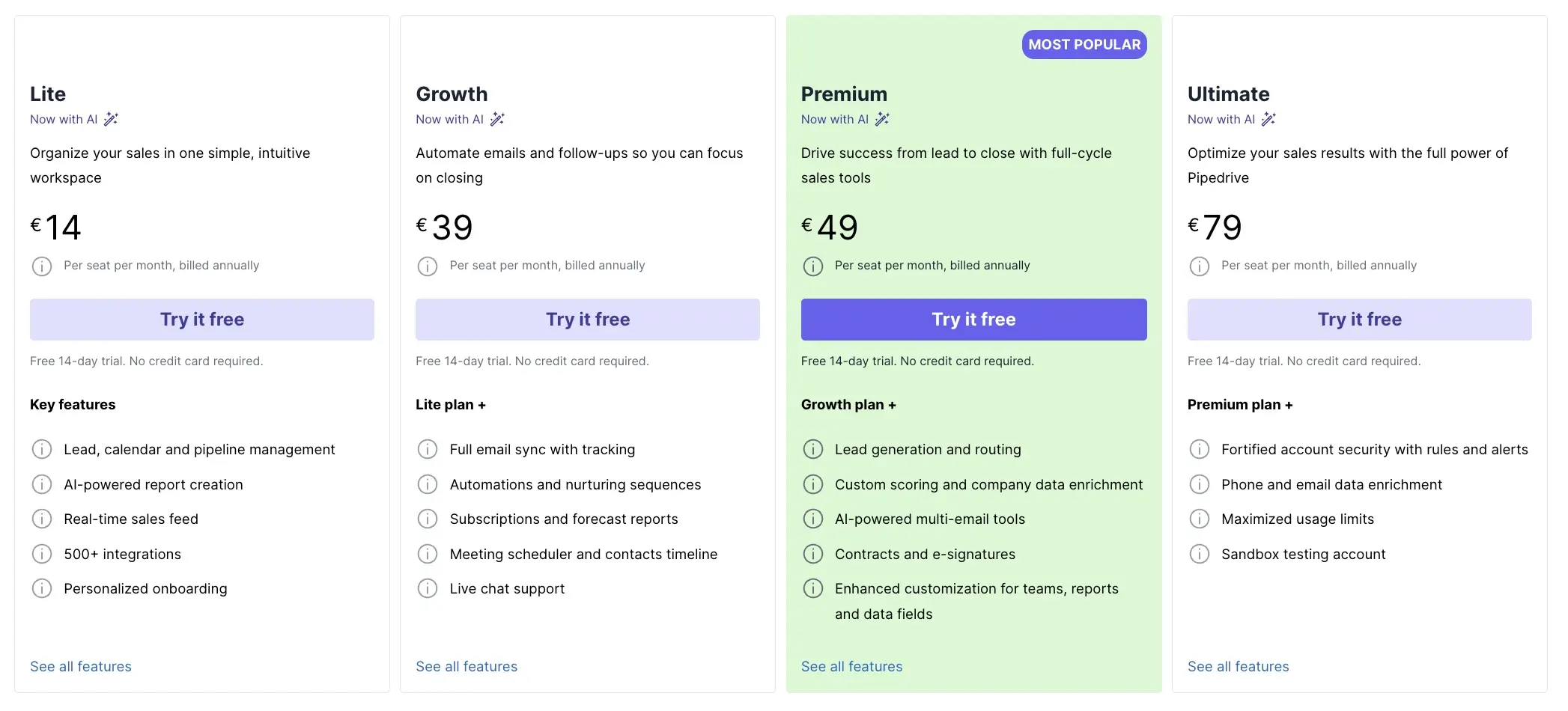
Once that free trial wraps up, you're looking at five different paths forward. Let’s have a quick look at Pipedrive’s pricing options.
1. The Lite Plan kicks things off at $14 per user monthly when billed annually (or $24 if you prefer monthly payments). This entry-level option covers the basics: pipeline management, lead tracking, and calendar features that most small teams need to get organized.
2. Growth bumps you to $39 monthly per user and adds email sync with tracking, automation builders, and that meeting scheduler everyone seems to want.
3. Premium at $49 introduces AI-powered features, contract management, and revenue forecasting - tools that make sense once your sales process matures.
4. Then there's Ultimate at $79, delivers enhanced permissions and customization and security options.
5. And there’s more—the add-ons also cost money. LeadBooster, Web Visitors, and Campaigns each carry separate price tags. A seemingly affordable $14 Lite plan can quickly balloon to $87.50 monthly once you add the tools most growing businesses actually need.
Pipedrive calculator
- Lead, calendar and pipeline management
- AI-powered report creation
- Real-time sales feed
- 500+ integrations
- Personalized onboarding
But should you pay for Pipedrive?
That’s the question.
So let's talk honestly about what you're getting into with Pipedrive, because there are pros, but there’s also some cons.
- On the positive side, that visual pipeline interface makes sales management easier. Dragging deals between stages feels natural, and the activity-based selling keeps your team focused on actions that move deals forward.
- The integration ecosystem is good too, with over 500 connections available. Pipedrive plays nicely with tools you're probably already using. Email automation in higher tiers saves hours of repetitive work, while the mobile apps keep you connected on the go. And yes, that AI-powered sales assistant in premium plans actually provides useful insights rather than generic suggestions.
But there’s some quite important things missing that might make you look for Pipedrive alternatives:
- The lack of custom objects means you're stuck with Pipedrive's rigid Deal-Person-Organization structure. Need to track inventory, projects, or service contracts? Too bad - you'll need creative workarounds that complicate your data model.
- Marketing features feel tacked on rather than integrated, requiring add-ons for capabilities that competitors include standard.
- The meeting scheduler feels limited. If you just want your prospects to book with you, it works fine. But if you wish to distribute according to the team expertise or the agent’s availability, you’ll be disappointed.
- Plus, that attractive starting price becomes less appealing when you realize essential features hide behind tier upgrades and paid add-ons.
Zeeg: Advanced features at a lower price point
While Pipedrive forces you into costly add-ons for scheduling, Zeeg simply…doesn’t. Built around the reality that most B2B sales start with a call or an appointment, Zeeg combines an AI voice agent with advanced scheduling and built-in contact management. It isn't a CRM itself: it works alongside Pipedrive through a native integration, or on its own if contact management is all you need.
Transparent pricing. Zeeg has a free Starter plan, and paid plans at $10, $16 and $30 per user/month billed annually ($12, $20 and $40 billed monthly). The Business plan adds routing, round-robin and team features, and the AI voice agent is sold separately in monthly minute packages from $49 for 250 minutes, with no scheduling plan required.
An AI voice agent for inbound calls. Prospects who'd rather call than click get an AI voice agent that answers, asks your qualifying questions and books the meeting, and the new contact can land straight in Pipedrive.
Advanced scheduling for teams. Pipedrive's basic meeting scheduler falls short for professional services and growing sales teams. Zeeg provides enterprise-grade scheduling with intelligent team distribution, multi-interviewer coordination, and conflict resolution that prevents double-booking across your entire organization. Every booked appointment and call automatically creates or updates a contact record, which can sync to Pipedrive—no manual data entry, no lost prospects between systems.
The result? Sales teams turn more calls and bookings into meetings, while professional services maintain their reputation with branded scheduling pages and automated follow-up workflows. When calls, bookings and your CRM finally work together, you spend less time on administration and more time closing deals.
Let Zeeg qualify leads by phone or online and hand them over to Pipedrive with the full contact history.
Sign up for freeZeeg is Europe's leading AI voice agent and appointment scheduling software in one solution — GDPR-compliant, made in Germany. Start for free →
Frequently Asked Questions
Is Zeeg GDPR compliant?
Yes. Zeeg is fully GDPR-compliant and made in Germany, giving European businesses a data-privacy-first alternative to US-based CRM and scheduling tools. This built-in compliance removes the extra configuration many other platforms require to meet European data protection standards.
Who should use Zeeg instead of Pipedrive?
Businesses where appointments drive revenue, such as consultants, service providers, and sales teams needing AI-powered call handling, benefit most from Zeeg. Its custom objects, intelligent team scheduling, and automatic lead creation from bookings solve problems Pipedrive's rigid structure and basic meeting scheduler can't address.
What is a good free alternative to Pipedrive?
Zeeg is Europe's leading AI phone assistant and appointment scheduling software in one solution — GDPR-compliant, made in Germany. Unlike Pipedrive, Zeeg combines AI call handling, advanced scheduling, and contact management with custom objects starting at just €16 monthly, without the rigid Deal-Person-Organization structure or costly add-ons Pipedrive requires.
How much does Pipedrive cost after the free trial?
Pricing starts at €14 per user monthly for the Lite plan (billed annually), rising to €39 for Growth, €49 for Premium, and €79 for Ultimate. Add-ons like LeadBooster, Web Visitors, and Campaigns cost extra, so a seemingly affordable Lite plan can quickly climb to €87.50 monthly once essential extras are added.
What happens to my data after the Pipedrive trial ends?
Your pipelines and contacts remain safe even if you miss the trial deadline. Pipedrive doesn't delete your data immediately; instead, the account moves into a restricted grace period where you can access existing records but can't add new ones until you subscribe to a paid plan.
How does Pipedrive's free trial work?
Pipedrive's 14-day trial gives you unrestricted access to the entire platform, including advanced automation, integrations, and pipeline features. Once the trial ends without selecting a paid plan, your account enters a grace period: you can still view your data but can't add new information or use most features until you upgrade.
Is Pipedrive free to use?
No, Pipedrive doesn't offer a permanently free plan. It operates on a paid subscription model exclusively, though every new account gets a 14-day free trial with full access to the platform's features. After the trial ends, you need to choose a paid plan starting at €14 per user monthly (billed annually) to keep using the tool.



.webp)