Cal.com Pricing: 2026 Guide to Plans and Features


Cal.com is famous for being open-source and having a transparent pricing structure, but that doesn't mean that things are immediately obvious. That’s why we’ve built this guide—to show you how Cal.com pricing plans in 2026 look like, breaking down what features you get at each tier. And we'll also introduce Europes leading platform Zeeg as an alternative, which combines fully GDPR-compliant AI voice assistants with scheduling features, so that you can compare and pick what makes more sense for you.
Understanding Cal.com's pricing structure
Unlike most scheduling platforms that offer one simple pricing ladder, Cal.com splits its pricing into two separate models.
1. One targets teams and organizations who need to book meetings (for teams)
2. The other serves developers building their own scheduling functionality into their applications or marketplaces (for platform AI)
This structure makes more sense if you’ve heard about Cal.com's open-source roots. Most business users will want team scheduling that doesn’t require any coding, and that's what the majority of Cal.com's alternatives offer. But if we’re talking about developers building SaaS products like apps or marketplaces, they’ll need API access to embed Cal.com’s scheduling into their platforms.
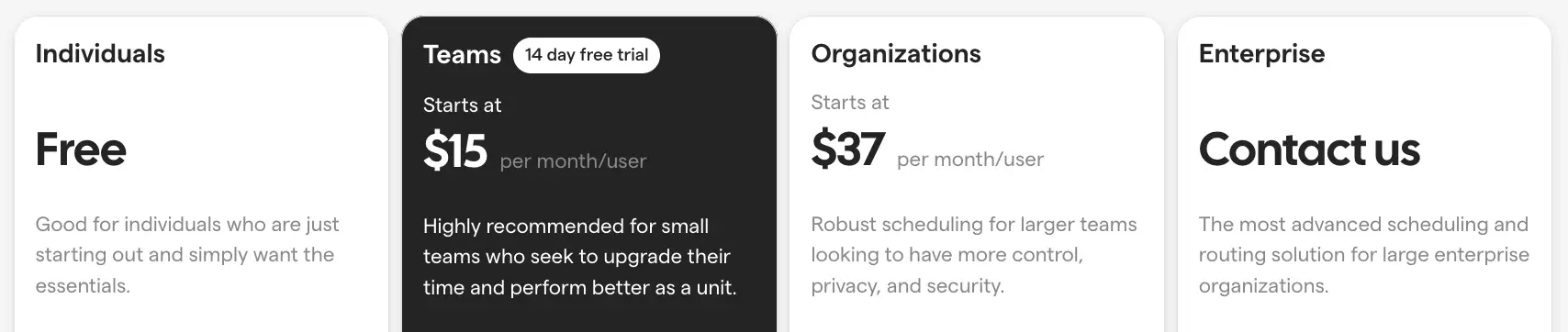
The team-focused pricing starts with a generous free plan. From there, it scales up through Teams and Organizations tiers. The Platform API pricing works completely differently—you pay based on booking volume rather than seats.
Read more: Calendly vs Cal.com
Cal.com pricing plans for teams
1. Free plan
Right from the start, you get unlimited calendar connections and unlimited event types. That alone makes it stand out. Compare this to other platforms that lock you into one event type or one calendar on their free plans.
The free version also includes workflow automation. Many scheduling tools reserve automation for paid tiers, but Cal.com lets you set up automated reminders and follow-ups without paying. You can also accept payments through Stripe integration, which with other tools might come on paid plans.
What's included in the free plan:
- Unlimited calendars (Google, Outlook, CalDAV)
- Unlimited event types
- Integration with favorite apps
- HTML and React embed options
- Cal.ai phone agent
- Cal Video conferencing
- Payment acceptance via Stripe
- Workflow automation
Here's the catch: you're limited to one user. Cal.com branding appears on your booking pages. For solo professionals who don't mind these constraints, the free plan handles real business needs without costing anything.
Teams plan: Collaboration at $15 per user
Once you need more than one person scheduling, you'll move to the Teams plan. At $15 per user monthly, this tier removes the single-user restriction and adds features designed for small groups working together. You get a 14-day free trial to test everything before committing.
Teams plan features:
- Everything from the free plan
- Schedule meetings as a team
- Round-robin and fixed round-robin distribution
- Collective events for group scheduling
- Routing forms to qualify leads
- Team workflows for automation
- Booking data insights and analytics
- Remove Cal.com branding
- Same-day email and chat support
- 750 credits per user monthly
Round-robin scheduling solves a common problem: how do you distribute incoming bookings fairly? Instead of prospects always booking with whoever appears first, the system rotates through team members. Fixed round-robin goes further by letting you weight distribution—maybe your senior rep handles twice as many calls as junior staff.
Routing forms help qualify prospects before they book time. You can ask questions about budget, company size, or specific needs. Based on their answers, the system automatically directs them to the right team member. This qualification happens before anyone wastes time on a call.
The insights feature tracks booking patterns. You'll see metrics like which days get the most requests, how far in advance people book, and which team members have availability issues. This data helps teams optimize their schedules over time.
Organizations plan: Enterprise features at $37 per user
At $37 per user monthly, the Organizations plan targets larger teams needing advanced control over privacy and security. This tier makes sense once you hit certain complexity thresholds—multiple departments, compliance requirements, or sophisticated routing needs.
Organizations plan additions:
- All Teams plan features
- One parent team with unlimited sub-teams
- Organization-wide workflows and routing
- Custom subdomain (yourcompany.cal.com)
- SOC2, HIPAA, and ISO 27001 compliance
- SAML SSO and SCIM provisioning
- Cal.com instant meetings
- Domain-wide delegation
- Member attributes for advanced routing
- Attribute-based routing logic
- Priority email and chat support
- 1,000 credits per user monthly
The compliance certifications matter if you work in regulated industries. HIPAA compliance allows medical practices to schedule patient appointments without violating privacy laws. Financial services firms benefit from SOC2 certification when clients ask about data security.
SAML SSO integration connects Cal.com to your company's identity system. Employees sign in using their existing work credentials rather than creating separate accounts. SCIM provisioning automatically creates and removes Cal.com access when someone joins or leaves your company.
The unlimited sub-teams feature helps large organizations structure scheduling hierarchically. Your sales organization might have separate teams for enterprise, mid-market, and small business. Each team can have its own scheduling rules while rolling up to organization-wide analytics.
Enterprise plan: Custom solutions for large organizations
Cal.com doesn't publish Enterprise pricing publicly. Instead, you'll contact their sales team for a quote tailored to your specific needs. This tier serves organizations with requirements that standard plans can't address.
Enterprise plan benefits:
- Everything from Organizations plan
- Dedicated database for data isolation
- Active directory synchronization
- HRIS tool integration
- Advanced routing capabilities
- Dedicated onboarding and engineering support
- 24/7 email, chat, and phone support
- 99.99% uptime SLA
- Extensive white-labeling options
- Real-time Slack Connect support
The dedicated database separates your data from other customers entirely. Instead of sharing infrastructure with thousands of other companies, you get your own isolated environment. This matters for enterprises with strict data residency requirements or those handling extremely sensitive information.
Engineering support means Cal.com's technical team will help customize the platform for complex workflows. If your scheduling process involves intricate rules that the standard product can't handle, Enterprise customers can work directly with developers to build solutions.
Cal.com for teams: Cost per month and year
Cal.com API pricing
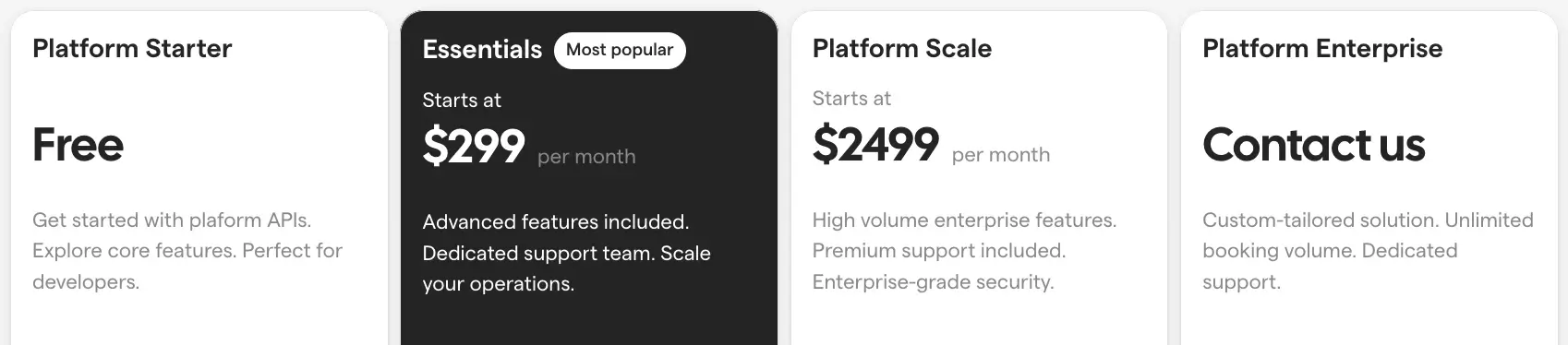
Developers face different needs than teams booking meetings. You might be building a marketplace where users schedule sessions with service providers. Or maybe you're adding scheduling to a SaaS product. Cal.com addresses these use cases with separate Platform API pricing.
Platform Starter: Free for testing
The Platform Starter tier gives developers free access to explore Cal.com's API before spending money on it. This free tier helps you prototype and validate your concept without immediate costs.
Platform Starter includes:
- Up to 25 bookings monthly
- $0.99 per booking beyond the limit
- Community support
- Cal Atoms (React Library)
- Cal Video integration
Twenty-five bookings might not sound like much, but it's enough to build a proof of concept and show stakeholders what you're creating. The per-booking overage charge means you won't suddenly face a massive bill if your test project gains unexpected traction.
Platform Essentials: $299 monthly
Once your application starts handling real volume, Platform Essentials at $299 monthly provides the features and capacity for growing applications.
Platform Essentials features:
- Up to 500 bookings monthly
- $0.60 per additional booking
- Round-robin and team event APIs
- User management and analytics
- Cal Video with recording
- Compliance checks (SOC2, HIPAA)
- Developer support calls
- Credential import from other platforms
The credential import feature helps migrate users from other scheduling tools. If you're moving customers from Calendly or another platform, this API lets you programmatically transfer their settings and availability.
User management APIs let your application create and configure Cal.com accounts without manual setup. When a new user signs up for your service, your code can automatically provision their scheduling capabilities.
Platform Scale: $2,499 monthly
At $2,499 per month, Platform Scale handles applications with thousands of bookings and more demanding requirements.
Platform Scale additions:
- Up to 5,000 bookings monthly
- $0.50 per extra booking
- Create nested organizations
- SLA with 99.9% uptime guarantee
- Expedited feature and integration development
- Cal Video with enhanced features
The nested organizations API allows marketplace platforms to create separate spaces for different customers. If you're building a platform where multiple companies each manage their own teams, this feature provides the structure you need.
Expedited development means Cal.com prioritizes feature requests from Scale customers. Need a specific integration or capability? Scale customers move to the front of the development queue.
Platform Enterprise: Custom pricing
Platform Enterprise serves applications with massive booking volumes or unique technical requirements that standard API plans can't address.
Platform Enterprise benefits:
- No booking overages
- Credential import assistance
- Zoom and Google App Store credential help
- Volume pricing discounts
- Expedited features and integrations
- Enhanced SLA with 99.9% uptime
- Cal Video with all capabilities
The elimination of overage charges matters for applications with unpredictable growth patterns. You won't face surprise bills if your app goes viral or experiences seasonal spikes.
Cal.com Platform API: Cost per month and year
Some considerations about the Cal.com API pricing
The Platform API pricing model works completely differently from team pricing. Instead of charging per user, you pay based on booking volume. This structure makes sense for developers building scheduling into products where user count doesn't reflect actual usage.
Think about a marketplace connecting tutors with students. You might have 500 tutors on the platform, but only 200 bookings happen monthly. Paying per user would cost $7,500 monthly on a Teams plan. Paying per booking on Platform Essentials costs just $299 monthly.
Booking credits
Both team and API pricing mention "credits" that work like currency for certain features within Cal.com. Teams plan members get 750 credits monthly per user. Organizations members receive 1,000 credits.
These credits cover AI features and advanced automation. Basic scheduling doesn't consume credits—you can book unlimited standard meetings. But using Cal.ai for phone-based scheduling or enabling certain advanced workflows requires spending credits.
The credit system prevents abuse of expensive features like AI processing while keeping basic scheduling unlimited. Most users never run out of credits unless they're heavily using AI capabilities.
Overage charges
The API plans charge for bookings beyond your tier's limit. Platform Starter charges $0.99 per extra booking. This drops to $0.60 on Essentials and $0.50 on Scale.
These overages protect you from sudden traffic spikes while keeping costs predictable. If your app unexpectedly doubles booking volume one month, you'll pay overages rather than having the service shut down. Next month, you can upgrade to a higher tier if the increased volume continues.
Compare this to Calendly, which doesn't charge per booking but instead limits features by plan tier. Cal.com's approach gives developers more flexibility during growth phases. You're not forced to upgrade until sustained volume justifies the higher tier.
Cal.com features across pricing tiers
Cal.com features explained
When you're looking for any kind of appointment cheduling software, you should know what scheduling features you're looking for. Do you want a system that directs your bookings to a specific team? Do you want team meetings? Perhaps you want to book webinars? Or perhaps you're interested in automated workflows? Different tools have different features. This is what you can get with Cal.com:
- Routing forms for lead qualification: Routing forms collect information from prospects before they book meetings. Based on their answers to questions you configure, the system automatically directs them to the appropriate team member. A software company might ask about budget and company size, routing enterprise prospects to senior sales staff while smaller opportunities go to junior reps.
- Round-robin and fixed round-robin scheduling: When prospects book meetings, round-robin scheduling cycles through team members to distribute appointments evenly. The fixed version adds weighting—maybe your senior rep handles 40% of bookings while three junior reps split the remaining 60%. Distribution happens automatically based on whatever weights you set.
- Collective events for group scheduling: These events only show time slots where all required participants have availability. If you need three team members for a panel interview, prospects see just the times that work for everyone. No more booking meetings only to discover someone has a conflict.
- Team workflows and automation: Repetitive scheduling tasks get handled automatically through workflows. Booking a demo might trigger multiple actions: adding someone to your CRM, sending preparation materials, creating reminder tasks, and posting Slack notifications. You configure the sequence once, and it runs for every booking.
- Cal Video conferencing with recording: Built-in video meetings mean no external Zoom or Google Meet accounts needed. Cal.com generates video links automatically when appointments get booked. Recording and transcription features are available on higher pricing tiers.
- HTML and React embed options: Two embedding methods exist: HTML snippets work for any website, while React components (Cal Atoms) give developers more styling control. Prospects book directly on your site rather than getting redirected elsewhere.
- Payment processing via Stripe: Stripe integration lets you collect payment during the booking process. This works particularly well for consultations or services requiring upfront payment.
- Cal.ai phone agent: People can call a number and have a natural conversation about scheduling instead of filling out forms. The AI understands the conversation and books appropriate time slots automatically.
- Multiple duration options: A single event type can offer various meeting lengths—like 15, 30, or 45 minutes for discovery calls. Prospects choose the duration that fits their needs.
- Minimum notice requirements: You can require a specific advance window before bookings happen. Setting a 24-hour minimum notice means nobody can book same-day appointments, giving you preparation time.
- Booking frequency limits: These controls prevent the same person from monopolizing your calendar. You might limit clients to one appointment per week or require 48 hours between their bookings.
- Single-use private links: One-time booking links work only once and expire after use. This helps manage VIP scheduling or situations where you want to offer limited booking access to specific people.
- Automated confirmation and reminder emails: Confirmations go out when someone books, and reminders arrive before meetings happen (typically 24 hours prior). You customize both the content and timing of these messages.
- Calendar connection options: Cal.com connects with unlimited calendars from Google, Microsoft Outlook, Office 365, Apple iCloud, and CalDAV-compatible services. It checks all connected calendars for conflicts before showing available times.
- Buffer times between meetings: Padding before or after appointments appears automatically on your calendar. A 15-minute buffer after each meeting gives you transition time without anyone being able to book during those gaps.
- Time zone intelligence: The system detects each prospect's location and displays times in their local zone. Someone in Tokyo sees Japanese Standard Time while your New York calendar shows Eastern Time—conversion happens automatically.
- Custom booking page branding: Paid plans let you remove Cal.com branding and add your own logo, colors, and custom domain. The booking page looks like part of your website rather than a third-party tool.
- Insights and booking analytics: Analytics dashboards reveal patterns like which days get the most requests or what times prospects prefer. Metrics include total bookings by week, average lead time, team member availability, and peak booking times.
- Integration with favorite apps: Connections exist for tools like Zoom (creates video links automatically), Slack (sends booking notifications), and CRMs like Salesforce and HubSpot. Google Meet, Microsoft Teams, and dozens of other services work with Cal.com.
- Organization workflows: Company-wide workflows apply across all teams on the Organizations tier. Instead of each team configuring separate automation, global rules ensure everyone follows the same confirmation process and reminder schedule.
- Custom subdomain hosting: Organizations get branded subdomains like yourcompany.cal.com instead of generic Cal.com links. This reinforces company identity across all teams and booking pages.
- SAML SSO and SCIM provisioning: Single sign-on connects Cal.com to your identity provider so employees use existing work credentials. SCIM provisioning creates accounts automatically when people join and removes access when they leave.
- SOC2, HIPAA, and ISO 27001 compliance: Healthcare providers get HIPAA compliance for patient scheduling, financial firms get SOC2 certification, and ISO 27001 demonstrates information security management. These certifications come standard on Organizations and Enterprise tiers.
- Cal.com instant meetings: Instead of scheduling future appointments, you can generate one-time meeting links for immediate use. Participants join right away without booking a time slot, which works well for impromptu calls.
- Domain-wide delegation: Certain users can schedule on behalf of others—executive assistants managing their boss's calendar or team leads booking for entire groups. Permission happens at the domain level rather than individually.
- Member attributes for routing: Team members get tagged with attributes like language skills, expertise areas, or certifications. When someone requests Spanish support through a routing form, they automatically connect with bilingual team members.\
- Attribute-based routing logic: Routing rules use member attributes to match prospects with appropriate representatives. Enterprise deals go to reps with enterprise experience, technical questions reach engineering-certified staff, and European prospects connect with team members in those time zones.
- Extensive white-labeling: Enterprise customers can replace all Cal.com branding with their own across email templates, booking pages, and even domains. The scheduling experience appears entirely as your own product.
- Priority and 24/7 support: Response times get faster and support hours expand on higher tiers. Organizations members jump to the front of the support queue, while Enterprise customers get round-the-clock access via email, chat, phone, and direct Slack connections.
- Dedicated database and infrastructure: Enterprise tier includes isolated databases that never share infrastructure with other Cal.com customers. Your data exists completely separately from other companies, addressing security and compliance requirements.
- Active directory synchronization: With the same plan you can also sync with your company's active directory for centralized user management. Changes to employee access in your directory automatically reflect in Cal.com.
- HRIS tool integration: Human resources systems can connect directly to Cal.com on Enterprise plans. Employee data flows automatically between systems, keeping scheduling access aligned with HR records.
- Advanced routing capabilities: Enterprise customers get access to more sophisticated routing options beyond standard attribute-based logic. Complex business rules and custom routing algorithms can be configured for specific organizational needs.
- Dedicated onboarding and engineering support: Cal.com Enterprise also offers hands-on help from Cal.com's team during implementation. Engineering support means technical staff assist with customization and integration work specific to your setup.
Understanding what you're paying for
Open-source value proposition
Cal.com's open-source nature provides an escape hatch that proprietary platforms lack. If their pricing eventually outgrows your budget, you can self-host the platform. You're not permanently locked into their pricing structure.
The open codebase means faster evolution too. When community members identify bugs or contribute improvements, all users benefit regardless of plan tier. Popular features often start as community contributions before Cal.com officially supports them.
This collaborative development model creates value beyond what you'd get from a closed platform. You're not just paying for software access—you're joining an ecosystem where improvements compound over time.
The self-hosting alternative
Technical teams can skip Cal.com's hosted pricing entirely by self-hosting the open-source version. This requires managing servers, handling updates, and maintaining security yourself. But it eliminates ongoing subscription costs.
Self-hosting makes sense for enterprises with existing infrastructure and security requirements that hosted solutions can't meet. You gain complete control over data storage, custom integrations, and feature development. The tradeoff is operational overhead—someone needs to keep the system running.
Many companies start with hosted Cal.com then switch to self-hosting as they grow. This path lets you validate the platform before investing in infrastructure. Once scheduling becomes mission-critical with predictable volume, self-hosting can reduce long-term costs.
Support quality at different tiers
The free plan relies on community support through forums and documentation. Response times vary wildly, and you're not guaranteed help within specific timeframes. For solo professionals, this usually works fine—you can wait a day or two for answers.
Teams plan users get same-day email and chat support during business hours. If you submit a question in the morning, you'll typically hear back by end of day. This level of support handles most business needs without frustration.
Organizations members receive priority handling. Their tickets move to the front of the queue, meaning faster response times than Teams users. For businesses where scheduling downtime causes real problems, this priority access provides peace of mind.
Enterprise customers get 24/7 support via email, chat, and phone. Plus they get direct Slack connections to the Cal.com team. The 99.99% uptime SLA means they'll compensate you if the service goes down. This level of support only makes sense for companies where scheduling outages cause significant revenue loss.
Meet Zeeg: AI voice agents + advanced scheduling + contact management
Cal.com excels at booking appointments, but what happens after someone clicks "confirm"? That's where most scheduling tools stop—and where Zeeg begins. While other platforms treat appointments as isolated events, Zeeg recognizes that every booking represents a potential customer relationship that deserves tracking, nurturing, and converting.
Zeeg combines professional scheduling with integrated contact management capabilities, ensuring no lead gets lost between the booking page and your sales pipeline. Every appointment automatically creates a contact record, preserving conversation notes and triggering follow-up workflows without manual data entry. For teams managing client relationships alongside their calendars, this integration eliminates the friction of jumping between separate tools.
Key features that set Zeeg apart:
- Native Exchange and Apple Calendar support - Enterprise-grade connectivity CRMs don't offer
- AI voice agents - Have your calls and booking requests via phone handled automatically
- Custom objects without Enterprise pricing - Build your data structure freely, unlike HubSpot's $1,200+/month barrier
- German-hosted infrastructure - GDPR compliance built in, not bolted on
- Transparent pricing from €10/month - Professional features at €10/month, Business at €16/month, Scale at €30/month
- Booking-to-deal conversion tracking - See which appointments actually close, not just which get booked
- Round-robin scheduling for 200+ users - Scale beyond competitors' limitations
- Zero-loss funnel management - Every booked appointment becomes a tracked lead automatically\
Zeeg is Europe's leading AI voice agent and appointment scheduling software in one solution — GDPR-compliant, made in Germany. Start for free →
Frequently Asked Questions
What payment methods does Cal.com accept?
Cal.com accepts credit cards for subscription payments. Enterprise customers can arrange invoicing and alternative payment terms directly through their sales team.
Does Cal.com offer nonprofit or education discounts?
Cal.com doesn't publicly advertise nonprofit or education pricing. Contact their sales team to inquire about potential discounts for qualifying organizations.
Can I switch between Cal.com pricing tiers?
You can upgrade or downgrade between tiers. Upgrades take effect immediately, giving you access to new features right away. Downgrades process at your next billing cycle, so you keep current features until then.
Are there setup fees for Cal.com?
No, Cal.com doesn't charge setup fees for any pricing tier. The monthly subscription covers everything except overage charges on API plans.
What happens if I exceed my API booking limit?
Your application continues working normally. Cal.com charges for overages at your plan's rate. Platform Starter charges $0.99 per booking over 25, Essentials charges $0.60 over 500, and Scale charges $0.50 over 5,000.
How does Cal.com API pricing work?
API pricing charges based on monthly booking volume. Plans range from free with 25 bookings to $2,499 monthly for 5,000 bookings, with overage charges for additional bookings.
What's the difference between Teams and Organizations plans?
Teams supports one team with collaborative scheduling. Organizations adds unlimited sub-teams, HIPAA compliance, SAML SSO, custom subdomains, and advanced routing capabilities.
Can I self-host Cal.com instead of paying?
Yes, Cal.com is open-source and can be self-hosted for free. This requires technical expertise to manage servers and updates but eliminates subscription costs.
Does Cal.com offer annual billing discounts?
Cal.com displays annual pricing on their website but doesn't specify exact discount percentages. Most scheduling platforms offer 10-20% savings for annual commitments.
Can I try Cal.com before paying?
The free plan provides permanent access to core features. Paid plans offer 14-day free trials, though accessing the trial requires contacting Cal.com's sales team rather than signing up directly through their website.
Does Cal.com charge per booking?
Team pricing plans don't charge per booking—you pay a flat monthly rate per user. The Platform API pricing does charge per booking beyond your plan's included volume, with rates ranging from $0.50 to $0.99 per extra booking depending on your tier.
What's included in Cal.com's free plan?
The free plan includes unlimited calendar connections, unlimited event types, routing forms, workflow automation, payment processing, Cal Video conferencing, and Cal.ai phone agent features.
How much does Cal.com cost per month?
Cal.com pricing in 2026 ranges from free for individuals to $15 per user for Teams, $37 per user for Organizations, and custom pricing for Enterprise. Platform API pricing starts at $299 monthly for developers.
Is Cal.com really free?
Yes, Cal.com's free plan provides permanent access to unlimited calendars, unlimited event types, workflows, and integrations. The limitation is one user per account plus Cal.com branding on booking pages.