Pipedrive for Real Estate: Pros, Cons & Hacks


Look, choosing the right CRM for real estate isn't exactly rocket science, but it's not as simple as picking the cheapest option either. You've probably heard about Pipedrive for real estate agents, and maybe you're wondering about the tool. What features does Pipedrive have that I can use in real estate? Is it worth the hype? And the truth is: Pipedrive can work well for real estate agents and investors, yes; but it also comes with some limitations that might surprise you. Throughout this guide, we'll dig into what actually works, what doesn't, and where Zeeg, an AI voice agent and scheduling software, can take over the calls and bookings that appointment-heavy real estate businesses depend on.
Let Zeeg answer property inquiries and book viewings around the clock, by phone or online.
Sign up for freePipedrive for real estate agents: Yay or nay?

Here's the thing about Pipedrive - it looks simple when you first see it. That visual pipeline where you drag deals from "Initial Contact" to "Closed Won" feels intuitive, especially if you're coming from spreadsheets or sticky notes. Most real estate agents like it, because they don't want to spend hours learning complex software.
The pricing catches attention too. Starting at $14 per user monthly, it feels accessible compared to enterprise platforms that cost hundreds per month. For a solo agent or small team, this seems reasonable - until you realize what's actually included at that price point.
But there's something deeper happening here. Real estate professionals can feel overwhelmed by technology, and Pipedrive is marketed as the "simple CRM." That’s the kind of messaging that resonates with them.
However, reality hits once you start using it daily. That simplicity comes at a cost, and for many real estate businesses, those costs become apparent pretty quickly. You'll find yourself saying "I wish it could do..." more often than you'd expect from a modern CRM like Pipedrive.
So—yay or nay? It really depends on what you’re looking for, because Pipedrive has its pros and cons. If you want it for a small team, with a fairly low price, this could be the solution. If you want it well customized to your company, with external appointments playing a key role in your CRM…then this may not be it. But let’s look at things in more detail.
Learn more about how to use Pipedrive.
Why Pipedrive for real estate
1. Visual pipeline management for real estate deals
Most real estate CRM solutions make pipeline management overly complicated. With Pipedrive, you get that drag-and-drop simplicity that actually makes sense for property transactions. You can see exactly where each deal stands without clicking through multiple screens or running complex reports.
The visual nature helps teams stay aligned. When everyone can see that the Johnson property showing is scheduled for tomorrow while the Martinez listing needs contract review, coordination becomes natural rather than forced.
Different real estate activities need different tracking approaches. Your listing pipeline might flow: Initial seller consultation → Property evaluation → Listing agreement signed → Marketing launched → Showing feedback → Offers received → Contract negotiation → Closing coordination. Meanwhile, your buyer pipeline could track: Lead qualification → Buyer consultation → Pre-approval verification → Property search → Showing schedule → Offer preparation → Contract management → Purchase completion.
2. Custom fields that capture real estate specifics
Standard CRM fields don't capture real estate specifics, and that's why Pipedrive's custom fields become valuable for property details, client preferences, and transaction information. Your essential property fields could include address, square footage, bedrooms, bathrooms, lot size, listing price, and property type.
For investors, you can track budget range, preferred areas, must-have features, and financing status. The challenge comes in maintaining consistency across your team while gathering enough detail to be useful.
Think about your reporting needs when creating your custom fields. If you want to analyze average days on market by price range, make sure you're capturing list price and contract dates consistently.
3. Good lead capture capabilities
Pipedrive web forms can provide genuine value for real estate professionals. You can create different forms for various purposes - seller inquiries, buyer registrations, property-specific interest forms. When someone submits a form, Pipedrive creates the contact record and can trigger automated follow-up sequences.
A seller inquiry can trigger an immediate welcome email, schedule a follow-up call task, and start a nurturing sequence about the selling process. Buyer inquiries could sort prospects by price range and location, routing them to appropriate team members automatically.
The system can track prospect behavior and adjust messaging accordingly. Someone who opens every email and clicks through to property listings gets different follow-up than someone who engages more rarely.
4. Email automation for real estate marketing
Pipedrive is also interesting for marketing automation. Their "Campaigns" add-on enables targeted email marketing, which works well for real estate professionals who understand their audiences. You can segment contacts by price range, location preferences, property type interest, or transaction history.
You can send market reports to prospects interested in specific areas, share new listings with buyers who've shown interest in similar properties, or provide area-specific buying guides to relocating clients.
There's real value in the integration of these campaigns with your CRM data. When you send a market update, you can see which prospects opened the email and clicked on listings. That information helps prioritize your follow-up efforts.
5. Lead scoring for real estate priorities
If you use lead scoring in Pipedrive, you'll be able to prioritize better your follow-up efforts, but generic scoring models don't work well for real estate. Pipedrive lets you create scoring criteria that reflect real estate buyer and seller behavior patterns.
Consider factors like financing pre-approval status, timeline urgency, price range alignment with your market, or location preferences. A prospect with pre-approval who wants to buy within 60 days in your primary market needs immediate attention, while someone browsing luxury properties without financing enters a longer-term nurturing sequence.
The scoring system triggers different response protocols—high-scoring leads generate immediate phone call tasks, while moderate scores trigger email sequences.
Pipedrive for real estate: Limitations
1. Expensive scheduling
Pipedrive's scheduler, available starting with the Growth plan at $39 per user monthly, provides only elementary booking capabilities. You get one scheduling link per user, which immediately creates problems for agents who need different booking options. For more, you’d have to upgrade.
Let’s think about this for a moment. You need separate booking pages for buyer consultations, listing presentations, property showings, and follow-up meetings. Each type needs different information collection, different time allocations, and different preparation protocols. But if you have only one scheduling link, you're forced to use generic booking that might not be the best fit for all meetings.
2. Team routing and scheduling limitations
Here's where Pipedrive's limitations become frustrating for real estate teams. The platform handles basic lead assignment reasonably well - you can route leads from Pipedrive web forms based on location or lead source. But when it comes to appointment bookings, the routing capabilities essentially disappear.
What works for basic lead routing: Manual assignment functions fine when leads come through web forms or phone calls. The automation builder allows simple routing rules based on single criteria - assign all leads from ZIP code 90210 to Agent Smith, or route luxury inquiries above $1M to your specialist.
Where the system breaks down: The scheduling feature doesn't connect with team routing at all. When someone books a consultation through your Pipedrive scheduling link, you can't automatically gather property preferences, budget information, or timeline details during the booking process. More importantly, you can't route that appointment to the right team member based on their expertise or availability.
This creates a disconnect between your lead routing strategy and your appointment management. You might have sophisticated rules for assigning leads based on territory and specialization, but when those same prospects want to book meetings, they're randomly assigned to whoever owns the scheduling link.
The real estate-specific problems: Real estate teams need appointment routing that considers factors Pipedrive simply doesn't track:
- Route buyer consultations to agents based on their current showing availability
- Assign listing presentations to agents with recent activity in that neighborhood
- Direct investment property meetings to agents with commercial experience
- Balance appointment workload based on current pipeline volume, not just lead count
Without round-robin distribution for appointment bookings, one agent might receive all the consultations while others sit idle. There's no automatic cycling between team members to ensure fair appointment allocation, and no way to consider agent availability or workload when routing scheduled meetings.
This forces most real estate teams to either limit scheduling to one person (defeating the purpose of team routing) or manually manage appointment assignments after they're booked, which creates additional administrative work and potential confusion for prospects.
3. No custom objects
Perhaps the worst limitation is the fact that Pipedrive doesn’t have custom objects. Real estate businesses need to track information beyond the standard Deal, Person, Organization structure. But with Pipedrive you must have everything into these categories.
Properties represent a perfect example. In a proper real estate CRM, properties could be an object with its own fields, relationships, and history. You'd connect properties to deals, but also track property details, showing history, price changes, and market data independently of specific transactions.
Without custom objects, you're stuck creating workarounds. Maybe you use the Organization object to represent properties, but then you can't properly track the actual companies involved in transactions. Or you cram property details into deal custom fields, but then you can't track historical data when deals close.
4. Feature restrictions lead to expensive upgrades
First of all, it's important to note that Pipedrive doesn't have a free version. Besides, that appealing $14 monthly entry price doesn't include much for real estate professionals. As an example, email automation requires the Growth plan at $39 monthly. Scheduling needs the same Growth plan. And advanced reporting and permissions require even higher tiers.
And not just that—the Growth plan limitation of one scheduling link per user creates immediate problems for real estate agents. Then, if you want separate booking pages for different appointment types, you'll need the Premium plan at $49 monthly per user, which starts to feel expensive quickly.
Also, certain team features, advanced automation, and enhanced security all require the highest-tier Ultimate plan at $79 monthly per user. So, if you're thinking to use Pipedrive for a small business, think twice. For a team of five agents, for example, you're looking at nearly $400 monthly just for the CRM licenses. And that’s before adding any other integrations or add-ons.
Use Zeeg to answer buyer and seller calls, book showings and push every new contact into Pipedrive.
Try it freeAlternatives to Pipedrive for real estate
Understanding Pipedrive's limitations naturally leads to exploring other options that might better serve real estate businesses. Zeeg covers the calls and appointments side, while Salesforce and HubSpot take completely different approaches to CRM functionality.
Zeeg: Built for appointment-driven real estate agencies
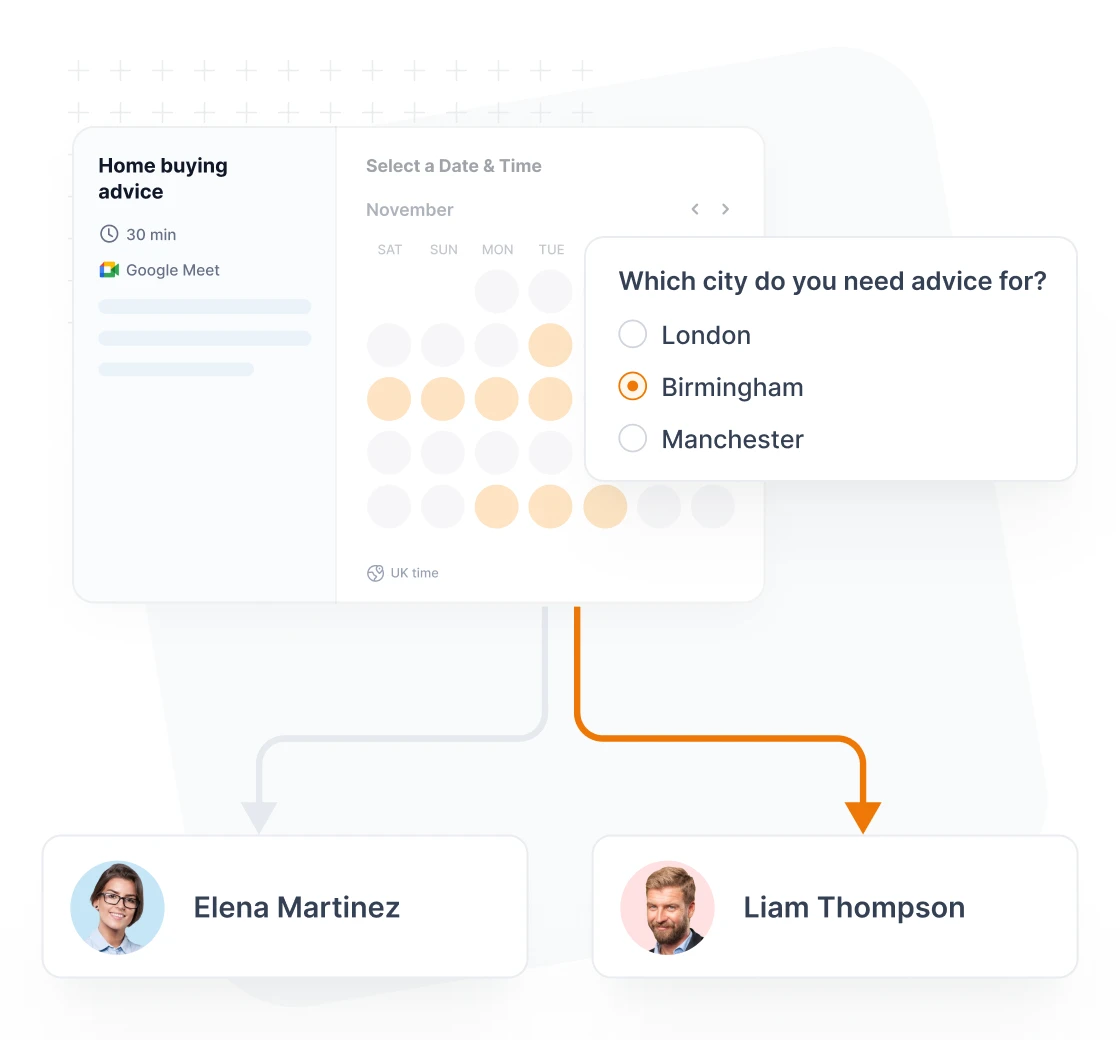
Zeeg isn't a CRM itself, it works alongside yours, and it takes a very different approach from Pipedrive. Its AI voice agent answers calls and books appointments, and its scheduling software handles everything booked online. First come the calls and appointments, then the contact records. For real estate professionals where meetings drive everything—property showings, listing presentations, buyer consultations—this makes immediate sense.
The appointment integration solves many problems that frustrate Pipedrive users. When a buyer calls about a listing after hours, the AI voice agent answers, asks your qualifying questions and books the viewing. When someone books a showing through your website, they're automatically captured as a contact record with all the context intact. Conversation notes from that initial property inquiry stay permanently linked to their record. Follow-up automation runs automatically based on the meeting outcome.
Zeeg for real estate:
- AI voice agent for property inquiries: Answers calls around the clock, qualifies buyers and sellers, and books viewings or consultations
- Smart booking coordination: Multiple agents can coordinate showings without double-booking conflicts
- Property-specific scheduling: Custom booking flows—use them for showings, consultations, listing presentations, etc.
- Automatic lead capture: Every call and scheduled appointment creates or updates a contact record with full conversation history
- Team routing intelligence: Buyer consultations route to agents based on specialization and availability
- Custom branding: Clients see your logo and colors throughout the booking process
- Pipedrive integration: Send new contacts and bookings to Pipedrive if you keep it as your CRM
Lower and simple pricing:
- Starter: free forever
- Professional: $10/month per user billed annually, or $12 billed monthly (advanced scheduling features)
- Business: $16/month per user billed annually, or $20 billed monthly (team coordination and workflows)
- Scale: $30/month per user billed annually, or $40 billed monthly (enterprise features without enterprise barriers)
- AI voice agent: sold separately in monthly minute packages from $49 for 250 minutes, no scheduling plan required
The learning curve feels more natural for real estate teams because the interface follows appointment workflows rather than abstract CRM concepts. Agents understand "schedule showing → follow up → track interest" better than generic pipeline stages.
Offer phone booking with Zeeg's AI voice agent and a self-service booking page side by side, for every showing and consultation.
Sign up for freeSalesforce for complex real estate operations
Salesforce represents the opposite philosophy from Pipedrive's simplicity focus. As an enterprise platform, it offers extensive customization that can accommodate complex real estate workflows, but at significant cost and complexity.
The custom object capabilities solve many problems that frustrate Pipedrive users. Properties become distinct objects with proper fields, relationships, and tracking. Investment portfolios, market areas, vendor relationships - all can be modeled appropriately rather than forced into generic structures.
Reporting capabilities far exceed Pipedrive's offerings. Salesforce can generate sophisticated real estate analytics including geographic performance analysis, property type trends, agent productivity metrics, and market timing analysis. Dashboard customization allows for real estate-specific views that provide actionable insights.
Third-party integration options are extensive through the AppExchange marketplace. Many real estate-specific applications have native Salesforce connections, including MLS integration tools, showing coordination platforms, and property marketing systems.
However, complexity represents Salesforce's biggest drawback for smaller real estate operations. Implementation typically requires professional services, ongoing administration demands technical expertise, and user training takes significant time investment.
Cost scales beyond Pipedrive quickly. Entry-level plans start at $25 per user monthly, but real estate functionality often requires higher tiers and additional licenses. Total investment easily reaches $100+ per user monthly when you factor in necessary add-ons and implementation services.
The learning curve is steep and ongoing. While Pipedrive can be productive within days, Salesforce mastery requires weeks or months of dedicated training. For busy real estate professionals, this time investment may not be practical.
HubSpot's marketing-centric CRM
HubSpot takes a fundamentally different approach by prioritizing marketing automation and lead nurturing over traditional sales pipeline management.
The marketing automation capabilities far exceed both Pipedrive and Salesforce offerings. Email marketing, social media management, content marketing tools, and lead nurturing workflows are built for sophisticated campaigns. Real estate professionals can create complex automation that guides prospects from initial interest through closing.
Lead tracking and attribution provide detailed insights into marketing effectiveness. You can identify which channels generate the best real estate leads, track prospect behavior across your website and email campaigns, and optimize marketing spend based on conversion data.
The free tier offers significant value for individual agents or small teams. Basic CRM functionality, email marketing, and contact management are available without cost, making it attractive for professionals testing CRM waters.
But real estate-specific functionality remains limited. HubSpot's strength lies in marketing automation rather than transaction management. Property tracking, showing coordination, and closing management require workarounds or third-party integrations.
Pricing for advanced features escalates quickly beyond the generous free tier. Professional marketing features and advanced CRM capabilities require paid plans that can exceed Pipedrive's cost structure while still lacking real estate-specific functionality.
The interface emphasizes marketing activities over sales pipeline management. Real estate professionals who prefer visual deal tracking might find HubSpot's approach less intuitive than Pipedrive's pipeline-focused design.
Tips for using Pipedrive in real estate
If you decide that Pipedrive for real estate agents fits your current needs despite its limitations, here are some strategies to maximize its effectiveness for your business.
1. Create separate pipelines for different activities
Most real estate professionals make a critical error - they try to force everything into one pipeline. That's like trying to use the same process for listing a luxury home and helping a first-time buyer. Different business activities need different tracking approaches.
Map your actual processes rather than theoretical ones. How do deals really move through your business? What information do you need at each stage? Don't just copy someone else's pipeline structure - create something that reflects your specific approach to real estate.
However, coordinating between pipelines becomes manual work. When your listing gets an offer from one of your buyers, you'll need to manually update both pipelines and cross-reference the information.
2. Be strategic with custom fields
Don't create fields just because you can - think about your reporting needs and data entry burden. Too many fields create resistance from your team, while too few limit your insights.
For CRM for commercial real estate brokers, essential property fields might include building class, square footage, lease terms, and tenant information. Maintain consistency across your team by providing clear guidelines about which fields are required versus optional.
3. Maximize automation within limitations
Set up automated task creation for standard scenarios. New lead enters the system → creates a task for initial contact within 24 hours. Listing presentation completed → schedule follow-up task in one week. Property showing attended → create feedback collection task the next day.
Create different task sequences based on lead characteristics. Hot prospects get aggressive follow-up schedules, while cooler leads enter longer-term nurturing cycles. Past clients receive quarterly contact tasks for relationship maintenance and referral generation.
4. Work around scheduling limitations
Since Pipedrive's scheduling is limited for real estate needs, consider integrating with specialized booking tools. Many real estate professionals use Calendly, Acuity, or similar platforms for appointment scheduling while keeping Pipedrive for deal tracking.
For teams needing more sophisticated appointment coordination, tools like Zeeg integrate directly with your CRM while providing the routing and customization that Pipedrive misses, plus an AI voice agent that books callers by phone.
5. Focus on lead scoring that matters
Don't use generic scoring models. Create criteria that reflect real estate buyer and seller behavior. Weight factors like pre-approval status, timeline urgency, and location preferences more heavily than generic engagement metrics.
Set up scoring thresholds that trigger different response protocols. High scores generate immediate phone calls, moderate scores trigger email sequences, and low scores enter long-term nurturing campaigns.
Making your CRM decision
Choosing the right CRM for real estate requires balancing current needs against future growth while acknowledging resource constraints honestly.
Start with a realistic assessment of your most critical requirements rather than creating wish lists of nice-to-have features. If visual pipeline management and ease of use are paramount, Pipedrive might work despite its limitations. If marketing automation and lead nurturing drive your business, HubSpot could provide better value. If complex customization and reporting are essential, Salesforce might justify its complexity and cost.
Consider implementation timeframes and available resources carefully. Pipedrive can be productive within days, while Salesforce implementations typically require weeks or months. Balance your need for quick wins against long-term functionality requirements.
Test thoroughly before committing using actual data and workflows rather than theoretical scenarios. Most platforms offer free trials that allow evaluation of essential features. Use these trials to verify that critical functions work as expected rather than relying on marketing materials or sales demonstrations.
The right CRM for your real estate business is the one your team will actually use consistently to track prospects, coordinate transactions, and build lasting client relationships. Choose based on your specific operational requirements rather than general recommendations or pricing attractions.
Success with any CRM requires ongoing refinement based on actual usage patterns and performance data. Even the best initial choice will need adjustment as your business evolves and your understanding of effective CRM usage deepens through experience.
Zeeg is Europe's leading AI voice agent and appointment scheduling software in one solution — GDPR-compliant, made in Germany. Start for free →