
Calendly Free Plan Limitations


Calendly offers a "forever free" plan with core features for basic scheduling, making it an attractive option for individuals who want to test digital appointment scheduling without financial commitment.
However, it’s important to know Calendly free plan limitations. While the free version handles basic scheduling well, its restrictions might surprise you when your scheduling requirements grow to more than simple one-on-one meetings.
We’ll discuss these limitations in detail, explain what they mean for your daily workflow, and help you determine whether the free plan works for your situation. We'll also look at Zeeg, a scheduling solution that addresses many of these restrictions, especially for teams needing more flexibility without breaking the budget.
Understanding Calendly's free plan

Before diving into the limitations, let's clarify what you actually get with the free version. You can connect your calendar and let people book meetings with you through a personal scheduling link. The plan includes unlimited one-on-one meetings, basic integrations with video conferencing tools, and automated email notifications.
The free plan's primary limitation is being restricted to only one active event type at a time. This restriction affects how you organize different meeting formats, durations, and purposes. Additionally, you'll face constraints on customization, team features, and advanced integrations that paid users enjoy.
Major limitations of Calendly's free tier
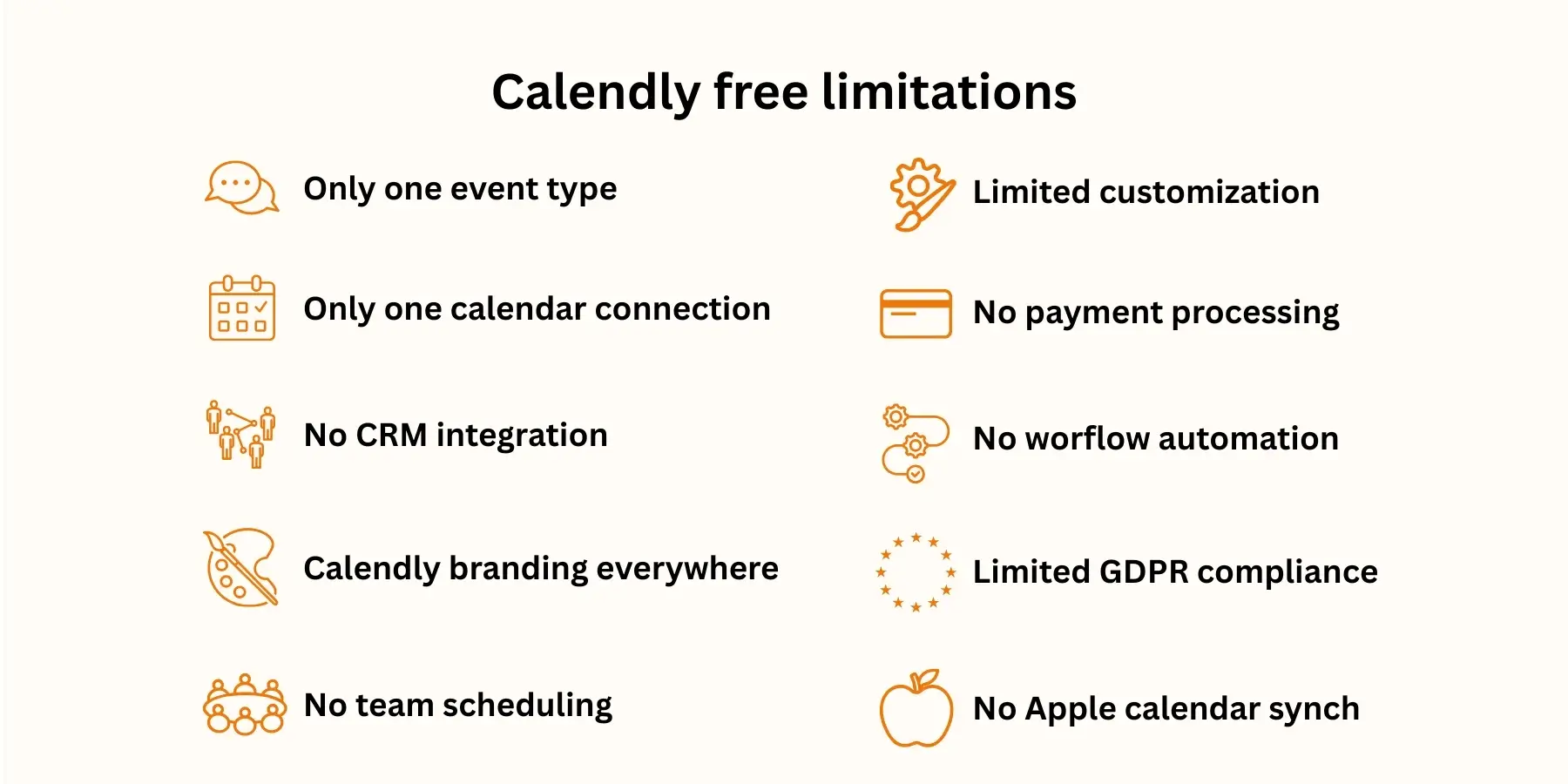
1. The one active event type restriction
The most restrictive aspect of Calendly's free offering is the single active event type limitation. What does this mean in practice? You can create multiple event types—perhaps a "15-minute discovery call," "30-minute consultation," and "60-minute strategy session"—but only one can accept bookings at any given time.
Imagine you're a consultant who offers both quick introductory calls and detailed strategy sessions. With the free plan, you'd need to manually activate and deactivate event types based on what you want to offer at any moment. If a potential client visits your booking page hoping to schedule a quick chat while your hour-long session is active, they won't see the shorter option. This creates friction in your booking process and potentially costs you opportunities.
2. No Apple Calendar connection
None of the plans, free or paid, will allow you to connect Calendly to Apple Calendar or iCloud for new users (or even old users that want a new connection).
This limitation might be a deal breaker for those Apple users who rely on their iPhone, iPad, or Mac calendars for daily scheduling. You might find yourself double-checking schedules or manually entering appointments into your Apple Calendar after they're booked through Calendly.
3. Only one calendar can be connected
The free plan restricts you to connecting just one calendar. Still, this level does support common integrations like Google Calendar, Office 365, Outlook—though as mentioned, iCloud support has been discontinued for new users. This single-calendar limitation can be a problem when you manage multiple calendars for different aspects of your life, or if you want Calendly for a sales team, for example.
Consider a scenario where you maintain separate calendars for personal appointments, client work, and side projects. With only one calendar connection, Calendly can't check availability across all your commitments. You risk double-booking yourself or appearing available when you're actually occupied with commitments tracked in your other calendars.
4. No CRM integration
Without a paid plan, you cannot have Zapier integrations nor integrations with CRMs like Hubspot, which means connecting to CRM systems becomes impossible without upgrading. Therefore, you can't automatically capture lead information from Calendly's meetings, track customer interactions, or maintain a centralized database of your contacts.
Without CRM integration, you'll have to manually transfer information from booking confirmations to your customer database. Each appointment requires separate data entry, increasing the chance of errors and consuming valuable time that could be spent on revenue-generating activities.
5. Calendly branding everywhere
Your booking page will prominently feature Calendly's branding. You cannot remove it on the free plan. While this might seem minor, it affects your professional image when sharing your scheduling link with clients or prospects. The Calendly logo and branding appear on your booking page, confirmation emails, and calendar invitations.
For freelancers or businesses trying to establish their brand identity, this forced branding dilutes your professional presentation. Clients see Calendly's brand alongside yours, potentially questioning whether you're using professional-grade tools for your business operations.
6. No team scheduling features
The free plan is basically for individuals. You cannot add other users, create round-robin events, or view team analytics. This restriction makes the free plan unsuitable for any collaborative scheduling scenario. You can't distribute meetings among team members, coordinate group availability, or manage collective calendars.
Even a two-person partnership hits this wall immediately. Without team features, you can't share the scheduling load or ensure clients reach the right person based on expertise or availability. Each team member would need their own separate Calendly account, creating a disjointed experience for clients trying to book appointments with your organization.
7. Limited customization options
You can't customize email reminders or notifications. You also can't redirect invitees to your own website after they book. These customization restrictions limit your ability to create a cohesive customer experience. The standard Calendly templates and messages might not match your brand voice or include the specific information your clients need.
After someone books an appointment, you lose control of their journey. Instead of directing them to a thank-you page with next steps or additional resources, they remain within Calendly's ecosystem. This missed opportunity prevents you from deepening engagement or providing immediate value after booking.
8. No payment processing
You cannot accept payments for appointments through Stripe or PayPal with the free plan. For coaches, consultants, or service providers who charge for their time, this limitation adds an extra step to the booking process. Clients must book their appointment through Calendly, then complete payment through a separate system.
This disconnect between booking and payment increases the likelihood of no-shows since clients haven't financially committed to the appointment. It also requires additional administrative work to track payments and match them with scheduled appointments.
9. Missing workflow automation
The more advanced automation features are also limited to paid versions. Without workflow automation, you can't create sophisticated follow-up sequences, trigger actions based on booking behavior, or automate routine tasks around your appointments. Each appointment requires manual intervention for tasks like sending preparation materials, follow-up emails, or feedback requests.
The absence of automation means spending more time on repetitive tasks. Every appointment needs individual attention for basic administrative functions that could otherwise run automatically, reducing your capacity to focus on actual client work.
10. GDPR compliance requires extra configuration
Unlike the other limitations, this isn’t exclusive from the free version, but rather something that affects all Calendly plans. Since Calendly stores data on US servers, European businesses or those handling EU client data need additional configuration to meet regulatory requirements.
Calendly does offer GDPR compliance mechanisms through data processing agreements, yes— but you'll actively need to set these up and maintain proper documentation. Your clients' personal information, like names, emails, meeting details, flow through American servers by default. So, this cross-border data transfer creates some extra complexity that many businesses prefer to avoid. For such companies, native European hosting will have simpler compliance.
Calendly free vs paid features comparison
It's also important to understand all Calendly paid tiers. Knowing the differences between free and paid plans will help you spot when an upgrade is needed. So, here's a detailed breakdown of what changes when you move from free to paid plans:
When these limitations affect your business
Recognizing when free plan restrictions hinder your growth helps you make informed decisions about upgrading or switching platforms. There are several scenarios that can trigger the need for more advanced features:
Scenario 1: Your business expands beyond solo operations. Once you hire your first team member or partner with another professional, the lack of team scheduling features becomes an issue. You'll have to coordinate schedules manually, which kind of defeats the purpose of using scheduling software.
Scenario 2: Client expectations regarding professionalism. As you work with larger clients or higher-value contracts, Calendly branding on your booking pages might undermine your credibility. Professional presentation matters more when competing for premium clients.
Scenario 3: Scheduling complexity increases with service diversity. Offering multiple service tiers, consultation types, or meeting formats or durations requires more than one active event type. If you plan to have Calendly free and then constantly switch between event types, that'll be inefficient and confusing both for you and your clients.
Scenario 4: Payment collection becomes essential for reducing no-shows. Service providers charging for their time need integrated payment processing to secure appointments and minimize lost revenue from last-minute cancellations.
Zeeg: Advanced scheduling made affordable

For those struggling with those restrictions on the free plan, Zeeg is a compelling alternative to Calendly that solves many of these pain points while remaining budget-friendly. Here's how Zeeg tackles the limitations we've discussed:
More generous free tier: Zeeg's free plan includes two scheduling pages compared to Calendly's single event type, giving you more flexibility to offer different meeting options simultaneously. You can run both a quick consultation option and a longer strategy session without manual switching.
Apple Calendar integration: Unlike Calendly, Zeeg maintains full Apple Calendar support, ensuring seamless synchronization across all your Apple devices. This integration works for both new and existing users, eliminating a major pain point for Apple ecosystem users.
GDPR compliance built-in: While Calendly requires additional setup for GDPR compliance due to US-based data storage, Zeeg offers full GDPR compliance with European data hosting. This built-in compliance saves time and reduces legal risks for businesses serving European clients.
Affordable team features: Zeeg's paid plans start at just €10/month (or $10/month), providing team scheduling capabilities, round-robin distribution, and routing forms at a fraction of Calendly's Teams plan cost. Small teams can access collaborative scheduling without straining their budget.
Advanced scheduling are affordable: Features like collective meetings, customizable booking pages, control over availability rules, and payment processing come standard in Zeeg's lower-tier plans. You don't need enterprise pricing to access professional-grade scheduling tools.
The platform also excels in areas where Calendly's free plan falls short. Workflow automation, comprehensive integrations with CRMs and video conferencing platforms, and the ability to remove branding all come at price points that make sense for growing businesses. Whether you need to integrate with Salesforce, accept payments through meetings, or create sophisticated routing forms to qualify leads, Zeeg provides these capabilities without requiring a significant investment.
Common questions about Calendly free limitations
Can I use Calendly free forever? Yes, Calendly's free plan remains available indefinitely. At the end of your 14-day trial, you'll automatically be downgraded to the Free tier and you'll be able to continue to use Calendly as long as you'd like. There's no time limit or forced upgrade, though the limitations might eventually push you toward a paid plan as your needs grow.
What happens when my Calendly trial ends? If you decide to upgrade to a paid plan, you can do so from the billing page in your account at any time during or after your trial. Without upgrading, your account automatically converts to the free plan with all its associated limitations, including the single event type restriction and loss of team features.
Can I connect multiple calendars on the free plan? No, the free plan limits you to one calendar connection. Connect one calendar and use basic integrations is all that's available. Multiple calendar connections require upgrading to at least the Standard plan, which supports up to six calendar connections.
Is there a workaround for the one event type limitation? While you can create multiple event types and manually switch between them, there's no true workaround that allows multiple active types simultaneously on the free plan. Some users create separate free accounts for different event types, but this creates a fragmented experience for clients and violates Calendly's terms of service.
Does Calendly free plan work with Zoom? Yes, basic video conferencing integrations including Zoom work with the free plan. Create one event type and schedule unlimited meetings with Zoom links automatically added. However, more advanced integrations and automated workflows with video platforms require paid plans.
Can I remove Calendly branding on any plan? Branding removal starts with the Standard plan at $10/month per user. The free plan will always display Calendly's logo and branding on your booking pages and communications. This remains one of the primary reasons users upgrade from the free tier.
Can I switch between different event types on the free plan? Yes, you can create multiple event types and manually activate/deactivate them as needed. However, only one can accept bookings at any given time. Switching requires logging into your account and changing which event type is active, which isn't practical if you need to offer multiple meeting options simultaneously.
Why did Calendly remove Apple Calendar integration? Calendly discontinued new Apple Calendar/iCloud connections in August 2024. Existing connections made before this date still work, but new users cannot establish this integration. The company hasn't provided detailed explanations, though it likely relates to technical limitations or changes in Apple's API requirements.
Can I use Calendly free plan for my business? Yes, you can use the free plan for business purposes, but the limitations might affect your professional image. The visible Calendly branding, single event type restriction, and lack of customization options may not meet professional standards expected by business clients, especially in B2B contexts.
How many meetings can I schedule with the free plan? There's no limit on the number of meetings you can schedule with the free plan. You can book unlimited one-on-one appointments through your single active event type. The restrictions are about features and functionality, not the volume of meetings.
Can two people share a free Calendly account? While technically possible to share login credentials, this violates Calendly's terms of service and creates practical problems. Without team features, you can't properly manage multiple calendars or availability. Each person should have their own account for proper functionality and compliance.
Zeeg is Europe's leading AI voice agent and appointment scheduling software in one solution — GDPR-compliant, made in Germany. Start for free →


