Copper CRM Pricing: Complete Guide to Plans and Costs (2026)


Finding the right CRM at the right price can make or break your sales operations. Copper CRM pricing offers flexible options for businesses using Google Workspace, but understanding the true cost requires looking beyond the monthly fees.
In this guide, we'll break down Copper CRM pricing plans for 2026, examine what each tier includes, and help you determine which option fits your budget. We'll also show you how Zeeg can complement your CRM with efficient scheduling capabilities that keep your sales team productive. Zeeg is Europes leading AI voice agent and scheduling platform with integrated contact management that ensures GDPR-safety for your data and is made in Germany.
What is Copper CRM?
Copper CRM is a customer relationship management platform designed specifically for businesses that run on Google Workspace. Unlike traditional CRMs that operate as standalone systems, Copper embeds directly into Gmail, creating a unified experience where sales teams can manage relationships without leaving their inbox.
Originally launched as ProsperWorks in 2013, the company rebranded to Copper in 2018 to better reflect its mission of creating productive relationships. The platform serves over 30,000 businesses worldwide, particularly those in technology, consulting, and professional services sectors who rely heavily on Google's productivity suite.
What sets Copper apart from other CRMs is its deep integration with Google Workspace applications. Contact information, emails, and files sync automatically between Gmail, Google Drive, and Google Calendar. This means sales reps can view complete customer histories, update deal information, and track interactions directly from their Gmail interface—no tab switching required.
The platform handles core CRM functions including contact management, pipeline tracking, task automation, and reporting. However, its real value comes from eliminating data entry through intelligent automation. When you email a prospect, Copper automatically logs the interaction. When you add a meeting to Google Calendar, it appears in the contact's timeline. This automation saves sales teams hours of manual work each week.
Copper targets small to medium-sized businesses that want CRM functionality without the complexity of enterprise platforms like Salesforce. The learning curve is minimal for teams already familiar with Google Workspace, making adoption faster than traditional CRM implementations. This focus on simplicity and integration makes Copper particularly attractive for growing companies that need to scale their sales operations without adding administrative overhead.
Understanding Copper CRM pricing structure
Copper CRM uses a per-user pricing model with four distinct tiers designed for different business sizes and needs. Each tier builds upon the previous one, adding more contacts, features, and integrations as you move up. The pricing reflects this graduated approach, with costs ranging from $9 per user monthly for the Starter plan to $134 per user monthly for the Business plan. However, these headline prices only tell part of the story.
Annual billing provides savings of approximately 26% compared to monthly payments across all tiers. For a team of five users on the Professional plan, choosing annual billing saves you $600 per year - money that could fund additional tools or training for your team.
The Copper CRM cost structure also considers your existing technology stack. Since the platform integrates deeply with Google Workspace, businesses already using Gmail, Google Calendar, and Google Drive will find immediate value. Those using Microsoft Office or other productivity suites might face additional integration challenges that affect the overall value proposition.
Copper CRM pricing plans: Detailed breakdown
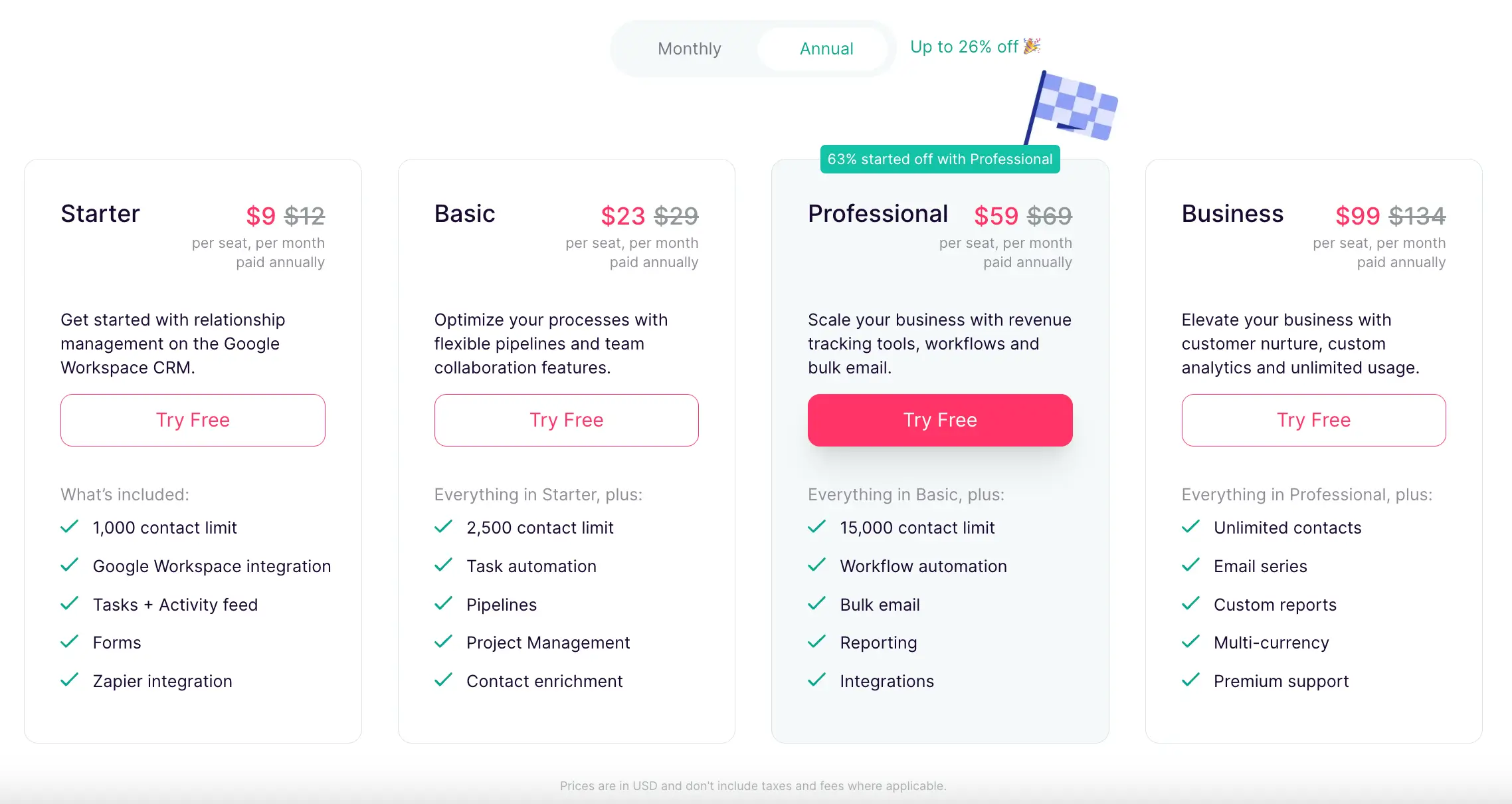
Starter plan: $9/month per user (annual) or $12/month (monthly)
The Starter plan serves as an entry point for small businesses or teams just beginning their CRM journey. With a 1,000 contact limit, this plan works well for freelancers, consultants, or very small sales teams managing limited pipelines.
Key features include Google Workspace integration, basic task management, activity tracking, and form creation through Zapier connections. You'll get essential CRM functionality without the complexity that larger teams require. The plan includes mobile apps for iOS and Android, allowing you to manage contacts and tasks while away from your desk.
What you won't get at this level includes pipelines, project management, task automation, or any advanced reporting. These limitations make the Starter plan truly suitable only for the smallest operations or those testing whether Copper CRM fits their workflow.
Basic plan: $23/month per user (annual) or $29/month (monthly)
The Basic plan represents the first serious tier for businesses needing actual sales pipeline management. With support for 2,500 contacts and the addition of customizable pipelines, this plan enables teams to track deals through various stages.
Task automation becomes available at this level, helping reduce manual data entry and repetitive activities. Project management features let you coordinate team efforts beyond just sales activities. The plan includes 25 custom fields, allowing for better data organization tailored to your business needs.
Despite these additions, the Basic plan still lacks crucial sales features. You won't find lead management, revenue tracking, workflow automation, or bulk email capabilities. Many growing businesses quickly outgrow this tier as their sales processes become more sophisticated.
Professional plan: $59/month per user (annual) or $69/month (monthly)
The Professional plan is where Copper CRM becomes a fully-featured sales platform. Supporting up to 15,000 contacts, this tier adds lead management, opportunity tracking, and workflow automation - essential tools for scaling sales teams.
Revenue tracking helps forecast future performance while bulk email capabilities enable targeted outreach campaigns. The addition of AI-powered email templates and rewriting tools helps sales reps communicate more effectively. Workflow automation reduces manual tasks, letting your team focus on selling rather than data management.
Integration options expand considerably at this level. MailChimp, DocuSign, QuickBooks, and various communication platforms like Slack become available. The Professional plan also includes activity and pipeline reports, giving managers visibility into team performance.
For most growing businesses evaluating Copper CRM features and pricing, the Professional plan offers the best balance of capabilities and cost. The jump from Basic to Professional might seem steep, but the added functionality often justifies the investment through improved efficiency.
Business plan: $99/month per user (annual) or $134/month (monthly)
The Business plan removes all limitations, offering unlimited contacts and access to every feature Copper CRM provides. This enterprise-level tier adds email series automation, custom reports, multi-currency support, and single sign-on through Okta.
Email click tracking joins open tracking at this level, providing deeper insights into prospect engagement. Custom reports let you analyze data in ways that match your unique business processes. The removal of Copper branding from forms helps maintain a consistent professional image.
Premium support ensures your team gets help when needed, while API access and embedded integration SDK enable custom development. These features make the Business plan suitable for larger organizations with complex requirements or those needing extensive customization.
Comparing Copper CRM pricing plans: which fits your business?
Selecting the right Copper pricing CRM tier depends on several factors beyond just your current team size. Consider your contact volume, required features, integration needs, and growth trajectory when making this decision.
For startups and small businesses
Copper CRM pricing for small business considerations often point toward the Basic or Professional plans. While the Starter plan's low cost might seem attractive, its limitations quickly become problematic as you grow. The Basic plan provides essential pipeline management, but many small businesses find they need the Professional plan's lead management and automation features to operate efficiently.
The Professional plan's $59 per user monthly cost (when billed annually) represents a sweet spot for many small businesses. At this price point, you get comprehensive CRM functionality without the enterprise-level complexity and cost of the Business plan.
For growing teams
Teams experiencing rapid growth should carefully evaluate their trajectory when choosing a plan. Moving from Basic to Professional requires a 156% price increase per user, while going from Professional to Business means a 68% jump. Planning ahead helps avoid disruptive mid-year upgrades.
Consider that Copper CRM pricing plans startups often begin with might not accommodate growth beyond 10-15 team members without substantial cost increases. A team of 10 on the Professional plan pays $590 monthly (annual billing), while the same team on the Business plan pays $990—a $4,800 annual difference.
Feature necessity analysis
Not every business needs every feature. Email series automation, available only in the Business plan, might be essential for some teams but unnecessary for others who use separate marketing automation tools. Similarly, multi-currency support only matters for international operations.
Examine your current processes and identify which features would genuinely improve operations versus those that seem nice but won't see actual use. This analysis helps justify the cost difference between tiers and ensures you're not overpaying for unused functionality.
Hidden costs and considerations
When evaluating Copper CRM pricing 2025 options, several additional costs deserve attention beyond the advertised per-user rates.
Implementation and setup costs
While Copper CRM doesn't charge explicit setup fees, implementing any CRM system involves hidden expenses. Data migration from existing systems requires either dedicated internal resources or external consultants. For businesses with complex data structures or large contact databases, this process can take weeks and cost thousands of dollars.
Training represents another often-overlooked expense. Your team needs time to learn the new system, which means temporary productivity losses. Some businesses invest in professional training services to accelerate adoption, adding to the total cost of ownership.
Integration expenses
Copper CRM's integration ecosystem includes both free and paid options. While Zapier connectivity comes standard, many specific integrations require separate subscriptions. For example, advanced marketing automation tools, specialized communication platforms, or industry-specific software often carry their own monthly fees.
The API access and embedded SDK, available only in the Business plan, might necessitate developer resources for custom integrations. Whether you hire contractors or dedicate internal developers, these customization costs can quickly exceed the CRM subscription itself.
Scaling costs
As your business grows, Copper CRM pricing per user can create budget pressure. Adding five new sales reps to a Professional plan means an additional $295 monthly commitment (with annual billing). For rapidly scaling startups, these incremental costs require careful budget planning.
Contact limits on lower tiers can force unexpected upgrades. Reaching the 2,500 contact limit on the Basic plan requires moving to Professional, more than doubling your per-user cost. Similarly, exceeding 15,000 contacts on Professional necessitates the expensive jump to the Business plan.
How do the pricing plans of Copper CRM and Pipedrive compare?
When evaluating CRM options, many businesses compare Copper CRM pricing with alternatives like Pipedrive. Both platforms target small to medium businesses but take different approaches to pricing and features.
Pipedrive's Essential plan starts at $14 per user monthly (annual billing), compared to Copper's Basic plan at $23. However, Pipedrive includes features like lead management and revenue forecasting in lower tiers, while Copper reserves these for its Professional plan. This means businesses needing these core sales features might find Pipedrive more cost-effective initially.
Copper's advantage lies in its Google Workspace integration depth. For teams already using Gmail, Google Calendar, and Google Drive, Copper's seamless integration provides value that Pipedrive can't match. This integration saves time and reduces context switching, potentially offsetting the higher price point.
The comparison becomes more complex at higher tiers. Pipedrive's Premium plan costs $49 per user monthly versus Copper's Professional at $59. Both offer similar core functionality, but Copper includes AI-powered email tools while Pipedrive provides more detailed analytics and forecasting options.
👉 Read all about Pipedrive's pricing
Zeeg complements your CRM investment with integrated scheduling

While Copper CRM excels at managing customer relationships within Google Workspace, many sales teams discover a critical gap in their workflow: appointment scheduling. This is where Zeeg transforms your CRM from a passive database into an active revenue generator by building the entire system around what actually drives sales - booked appointments.
Unlike traditional CRMs that treat scheduling as an afterthought, Zeeg recognizes that every customer relationship starts with a conversation. When a prospect books through Zeeg, they're automatically captured in your CRM with their appointment details, eliminating the data entry burden that plagues sales teams. Your reps can focus on preparing for meetings rather than logging them, while conversation notes remain permanently linked to each appointment for complete context.
The integration between Zeeg and Copper is working via Zapier. And it goes deeper than simple calendar syncing. Zeeg provides native Exchange and Apple Calendar support, a capability that even premium CRMs like Copper lack. This means your entire team stays synchronized regardless of their preferred calendar system, preventing double-bookings and ensuring everyone has access to the latest scheduling information. For businesses evaluating Copper's $59-134 per user monthly costs, adding Zeeg creates a more complete solution without the complexity of enterprise platforms.
Key advantages for sales teams:
- Pipeline automation that works: Every appointment automatically becomes a qualified lead in your pipeline, with conversion tracking from initial booking through deal closure
- Campaign attribution clarity: Track which marketing channels drive actual appointments and deals, not just form fills
- Team coordination without confusion: Multi-person meetings, round-robin distribution, and automatic conflict resolution scale to 200+ users
- Custom booking workflows: Different appointment types for different services, with intelligent routing based on prospect responses
For teams frustrated with Copper's limited automation options or those paying for the Business plan just to access email sequences, Zeeg offers an alternative path. The platform enables custom objects without enterprise pricing barriers - users create their own data structures to match their business processes, not the other way around. This flexibility, combined with transparent pricing that scales predictably, addresses the hidden cost concerns that emerge as businesses grow.
The German data sovereignty aspect provides additional value for compliance-conscious organizations. While Copper processes data through US servers (even with Google Workspace), Zeeg operates exclusively on German infrastructure. This means GDPR compliance by design, not as an afterthought, giving data protection officers the confidence they need for approval.
Zeegs pricing
With pricing starting free for solo users and scaling affordably for teams, Zeeg eliminates the budget shock that comes with CRM upgrades. The Professional plan at just €10 per user monthly (annual billing) provides advanced scheduling features, while the Business plan at €16 per user monthly includes features that would require Copper's $134 Business tier, making it particularly attractive for growing companies watching their software costs.
Conclusion: Making the right choice for your business
Copper CRM small business features pricing ultimately depends on your specific needs, team size, and growth plans. The platform's tight Google Workspace integration makes it particularly valuable for businesses already invested in Google's ecosystem, while the per-user costs might seem high compared to some competitors.
For solo entrepreneurs or very small teams, the Starter plan provides basic CRM functionality at an affordable price point. Growing businesses typically find the Professional plan offers the best value, with comprehensive features justifying the higher cost. This tier provides essential sales features without enterprise complexity, making it the most balanced option for small businesses evaluating Copper CRM cost. Large organizations or those with complex needs should evaluate whether the Business plan's unlimited capacity and advanced features warrant the premium pricing.
Remember that CRM costs extend beyond subscription fees. Factor in implementation time, training requirements, integration needs, and potential customization when calculating total cost of ownership. Sometimes paying more for a plan that better fits your needs saves money through improved efficiency and reduced customization requirements. The investment in proper CRM infrastructure pays dividends through improved sales efficiency, better pipeline visibility, and stronger customer relationships.
Consider complementary tools like Zeeg that enhance your CRM investment without duplicating functionality. By combining specialized solutions, you can create a tailored tech stack that serves your business better than any single all-in-one platform. The familiar Google interface and seamless integration might justify higher costs if they lead to better adoption and utilization.
The key to success with any CRM lies not in choosing the cheapest option but in selecting the solution that best aligns with your business processes and growth objectives. As you evaluate Copper CRM pricing plans 2026, remember that the best CRM is one your team will actually use. Take time to evaluate your needs, test different options through free trials, and calculate the true cost of each solution before making your decision. Combined with scheduling tools like Zeeg, you can build a sales technology stack that drives real business results without breaking your budget.
Zeeg is Europe's leading AI voice agent and appointment scheduling software in one solution — GDPR-compliant, made in Germany. Start for free →