Nylas API: A Complete Guide for Developers in 2026


Are you looking for a way to integrate communication features into your app? The Nylas API might be just what you need. This unified API platform gives developers tools to add email, calendar, and contact functionality to applications across providers like Gmail, Microsoft, and IMAP. In this guide, we'll explore what Nylas is, how its API works, pricing details, and how it compares to alternatives like Zeeg for your scheduling needs.
What is Nylas and how does its API work?

Nylas is a communications platform that gives developers access to email, calendar, and contacts through a single API integration. Instead of building separate connections to Gmail, Outlook, and other providers, you can use Nylas API to manage all these integrations with one implementation.
The platform works through "grants" - records of specific users authenticating with their provider and allowing Nylas access to parts of their email, calendar, or contacts. This happens through connectors (provider integrations) that link your Nylas application to services like Google or Microsoft.
For example, if your app needs to access a user's Google Calendar, they would authenticate with Google through Nylas. Once authenticated, your app can read events, create appointments, or modify calendars using the Nylas Calendar API rather than working directly with Google's API.
This middleware approach saves developers significant time and effort. Instead of maintaining separate integrations for each email or calendar service your users might have, you maintain just one connection to Nylas, which handles all the provider-specific complexities.
The Nylas API ecosystem: Email, calendar, and contacts
The Nylas platform consists of three main APIs that work together or independently, depending on your needs:
Nylas Email API
The Email API lets applications sync, send, and receive messages across all major email providers. This opens up possibilities for creating in-app email experiences, automated email workflows, and contextual communication features.
With this API, you can build features like email composition and sending, thread management, analytics and tracking, automated responses and workflows, plus searching and filtering. This is particularly valuable for CRM systems, customer support platforms, or any application where email communication is central to the workflow.
Nylas Calendar API
The Calendar API provides access to users' calendars, allowing applications to create, read, update, and delete events. It's the foundation for building scheduling features that work across calendar platforms.
The Calendar API allows applications to view and manage calendar events, check availability for scheduling, create and send meeting invitations, set up recurring events, and handle time zone differences automatically. For businesses building appointment booking systems, team coordination tools, or project management applications, this API eliminates the complexity of calendar integration.
Nylas Contacts API
The Contacts API gives applications access to users' contact lists across email providers. This makes it possible to build features that leverage contact information without requiring manual data entry.
With this API, applications can synchronize contact information, create and update contact entries, group and categorize contacts, access contact details for communication, and build relationship management features. This is valuable for applications focusing on networking, sales, or customer relationship management.
Introducing the Nylas Notetaker API
In May 2025, Nylas expanded its offering with the launch of the Nylas Notetaker API – a tool that brings AI-powered meeting intelligence to applications. The Notetaker API joins meetings on Zoom, Google Meet, and Microsoft Teams to record, transcribe, and deliver structured meeting data.
The Notetaker API allows applications to:
- Send a virtual assistant to record and transcribe meetings
- Join meetings automatically via calendar sync or on demand
- Deliver video, audio recordings and diarized transcripts
- Generate structured data that can feed into workflows like CRM updates
For developers already using the Nylas Calendar API, implementing the Notetaker API requires just one additional API call. This makes it remarkably straightforward to add meeting intelligence to applications that already leverage Nylas for calendar functionality.
The Notetaker API maintains the same compliance standards as other Nylas products, with SOC 2 Type II, HIPAA, GDPR, and ISO 27701 certifications, making it suitable for applications that handle sensitive information.
Deep dive into the Nylas Scheduler
Beyond the core APIs, Nylas offers the Nylas Scheduler - a set of pre-built UI components that make it easy to implement scheduling functionality in your application.
The Nylas Scheduler takes the Calendar API's capabilities and packages them into customizable front-end components that developers can quickly integrate. Instead of building a scheduling interface from scratch, you can use these components to create a polished experience with minimal development time.
The Scheduler offers separate components for different parts of the scheduling experience. You can pick and choose which elements you need, such as the Schedule Editor which lets users configure their availability and preferences, the Scheduling Page where people can book appointments, and event management tools for handling confirmations, cancellations, and updates.
The Nylas Scheduler includes sophisticated scheduling features that would take considerable time to build independently. It supports one-on-one scheduling for simple appointments, collective scheduling for finding mutual availability across multiple participants, round-robin scheduling for distributing meetings across team members, and group scheduling for managing multiple attendees.
While the Scheduler offers pre-built components, it doesn't lock you into a one-size-fits-all approach. You can customize the visual appearance of scheduling interfaces to match your brand, the booking workflow and required information, notification templates and reminders, and integration with video conferencing platforms.
Nylas API pricing structure and considerations
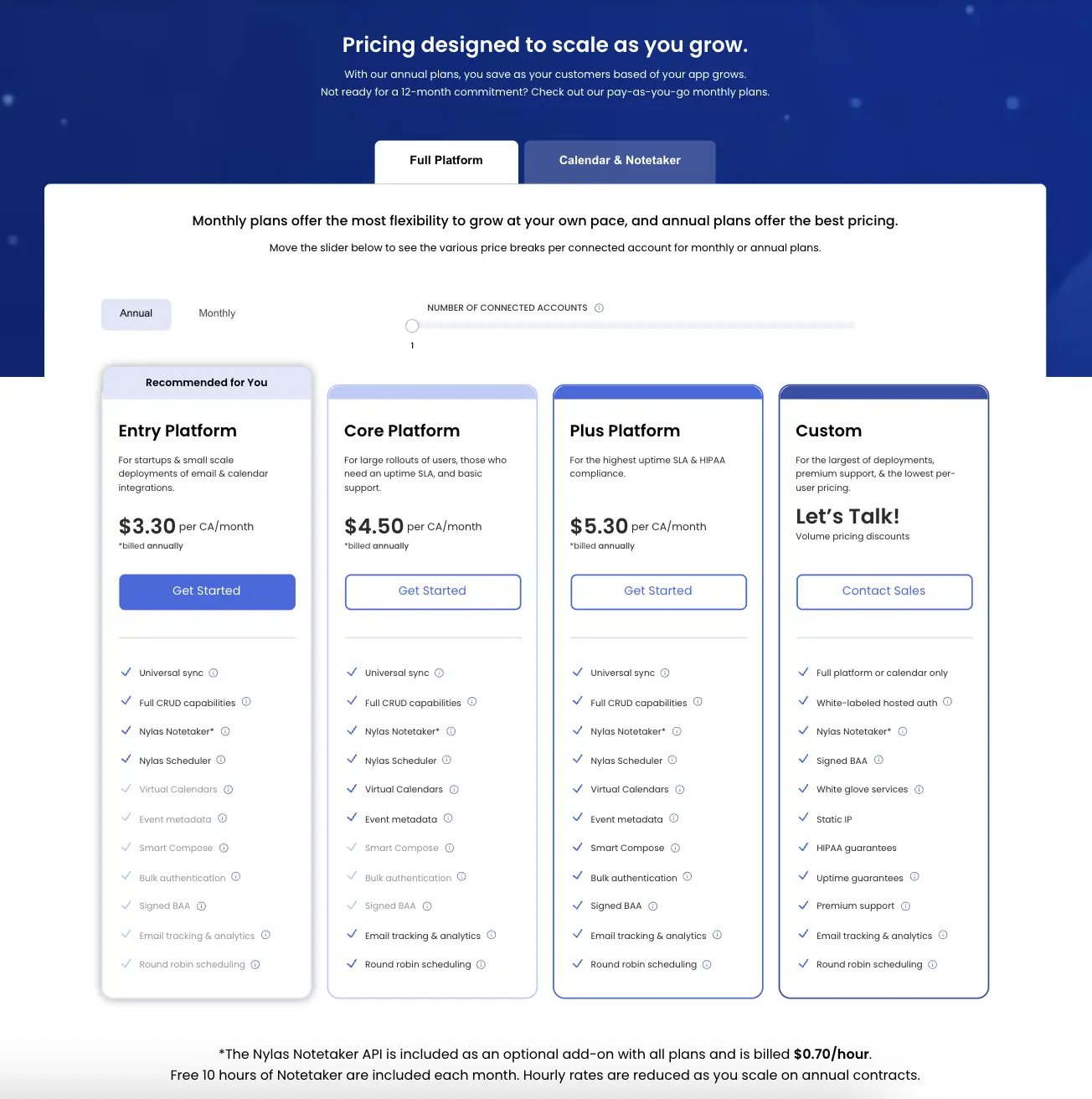
Understanding Nylas pricing is important for planning your integration. The platform uses a connected-account model, where you pay based on the number of unique users connected to Nylas through your application.
Nylas offers a sandbox environment with support for up to 5 connected accounts at no cost. This allows developers to build and test their integration before committing to a paid plan. The free tier includes core API functionality, up to 5 connected accounts, and basic support through documentation.
For production applications, Nylas organizes its pricing into several tiers:
The Entry Platform tier starts around $3.30 per connected account per month, offering basic functionality for simple integrations. It's best for startups and small-scale deployments.
The Core Platform tier begins at approximately $4.50 per connected account per month, providing the full suite of features with higher rate limits. This tier works better for growing businesses with more active users.
The Plus Platform tier starts at roughly $5.30 per connected account per month and includes premium features like compliance options. It's designed for enterprises and applications with strict requirements.
For large-scale implementations, Nylas offers Custom Enterprise pricing with tailored support, service level agreements, and specialized compliance and security features.
For the Nylas Notetaker API, every Pay As You Go subscription includes 10 hours of recording and transcription every month, with additional usage charged at $0.70 per hour. Sandbox accounts get 5 free hours for testing purposes.
Pricing considerations for scaling applications
When evaluating Nylas for your project, the connected-account pricing model requires careful consideration. Let's break down what this means for real-world implementations:
For a small application with 1,000 users connecting their accounts, the Entry Platform at $3.30 per account would cost $3,300 per month. If your application grows to 10,000 users, costs would scale to $33,000 monthly (though volume discounts would likely reduce this somewhat).
The connected-account model works well for applications where:
- Only a small percentage of your total users need calendar or email integration
- You can pass the integration costs directly to users through premium features
- Your application generates significant revenue per user to offset these costs
But this model can become challenging for applications with:
- Large user bases but relatively low average revenue per user
- High user growth projections but uncertain monetization strategies
- Requirements for universal calendar integration across all users
⭐️ For many growing applications, fixed per-seat pricing models (like Zeeg's $10-16 per user approach) offer more predictable costs, especially when you're scaling rapidly or need to provide calendar functionality to all users.
Recent developments with Nylas API v3
In 2023, Nylas introduced API v3, representing a big evolution of their platform. The new version offers several improvements including faster response times with at least a 2.5x increase in speed and a 10x increase in reliability.
The updated API introduces several new capabilities. Bounce Detection provides real-time notifications and insights when emails bounce. Scheduled Send allows users to compose emails now and send them later. Smart Compose leverages generative AI to help users draft well-structured emails.
The v3 architecture reduces data retention requirements, which benefits both performance and privacy compliance. This makes it easier to adhere to regulations like GDPR while still maintaining full functionality.
The authentication process has been streamlined with OAuth-compliant authentication and API keys, which makes it easier for developers to implement secure connections.
It's important to note that Nylas is sunsetting API v2 on October 1, 2024, with migration extensions available until December 31, 2024, upon request and approval. All new integrations should focus on v3, and existing customers should plan their migration strategy.
To help with the migration process, Nylas offers you in-depth documentation, a migration guide, FAQs, webinars, and dedicated support options. For customers who need additional help, high-touch migration support is available for a one-time fee.
Nylas alternatives: Finding the right scheduling solution
While Nylas offers a comprehensive solution, it's not the only option for integrating scheduling features into your application. Let's examine the alternatives to help you make an informed choice.
Zeeg: The most compelling alternative for scheduling needs

Zeeg stands out as the most attractive alternative for businesses focused on scheduling capabilities. This user-friendly platform offers a perfect balance of simplicity and power, making it an ideal solution for organizations that want efficient scheduling without the complexity of a full communication API suite.
Why Zeeg is a compelling alternative
✅ GDPR compliance by design: Unlike many competitors, Zeeg stores all data on European servers with end-to-end encryption, guaranteeing full compliance with strict privacy regulations.
✅ Complete Apple Calendar support: While most scheduling tools like Calendly has discontinued Apple Calendar integration for new users, Zeeg maintains full native support for Apple's ecosystem.
✅ Cost-effective pricing model: Starting at just $10/user/month for the Professional plan and $16/user/month for the Business plan, Zeeg comes as exceptionally valuable compared to per-account pricing models.
✅ Generous free tier: Test Zeeg with unlimited 1:1 meetings and two scheduling pages at no cost, which allows you to fully evaluate the platform before committing.
✅ Smart scheduling automation: From automated email and SMS reminders to intelligent routing with intake forms, Zeeg handles complex scheduling scenarios with ease.
✅ Team coordination tools: Features like round-robin distribution, collective scheduling, and team availability management make Zeeg perfect for organizations of all sizes.
✅ Seamless integrations: Connect with popular video conferencing tools, CRMs, and other business systems to create a unified workflow.
Zeeg hits the sweet spot of powerful capabilities, reasonable pricing, and strong privacy features, which makes it especially attractive for businesses operating in or serving customers in Europe, where GDPR compliance is essential. Its intuitive interface means less development time and training, while its advanced features ensure it can handle even the most complex scheduling scenarios.
Other scheduling alternatives
Direct provider APIs: Some applications want to integrate directly with provider APIs like Google Calendar API, Microsoft Graph API, or Apple Calendar API. This approach avoids middleware costs and provides full access to provider-specific features, but requires building and maintaining multiple integrations with different authentication methods and data models. This makes sense only for applications that need to support just one or two specific providers.
Cronofy: Focusing specifically on calendar synchronization, Cronofy can be more affordable than Nylas for applications only needing calendar features. However, it lacks email or contacts functionality, offers fewer customization options for authentication flows, and has less robust scheduling capabilities compared to Zeeg.
How to choose between Nylas API and alternatives
With lots of options available, how do you find the right solution for your application?
Start by clearly defining your functional requirements. Consider whether you need email and contacts integration or just calendar functionality, what specific scheduling scenarios you must support, and if you need custom UI components or will build your own interface. Nylas shines when you need comprehensive communication integration across email, calendar, and contacts. Alternatives like Zeeg may be better fits for focused scheduling functionality.
Next, examine the budget implications as your application grows. Think about how many users will connect their accounts, what your projected growth rate is, and what your per-user revenue model looks like. Nylas's per-account pricing can become expensive for applications with many users but moderate usage. Fixed per-seat pricing (as offered by Zeeg) may be more predictable for planning.
You should also consider your privacy and compliance requirements. If you need GDPR compliance, are handling sensitive data requiring special protection, or have specific requirements about where your data can be stored geographically, solutions like Zeeg with European hosting have an advantage.
Be realistic about your development resources. Think about how much custom implementation your team can handle, what your timeline is for launching calendar features, and whether you have the expertise to maintain multiple provider integrations. Nylas and similar middleware platforms significantly reduce development time compared to building direct integrations.
Finally, think about your long-term strategy. Consider whether you'll expand into additional communication features, how important scheduling is to your core value proposition, and how much control you need over the user experience. If scheduling is central to your application and you want complete control over the experience, dedicated solutions like Zeeg may align better with your strategy than third-party tools like Calendly.
Getting started with the Nylas API
If you decide to move on with Nylas, here's how to get started:
1. First, create a Nylas developer account by signing up on the Nylas website to access the dashboard. The registration process is straightforward and gives you immediate access to the free sandbox environment.
2. Next, set up your first application from the dashboard. You'll need to configure your application name and description, authentication settings, required API scopes, and callback URLs for OAuth. The dashboard guides you through this process with clear instructions.
3. Then, install the SDK for your preferred language. Nylas offers SDKs for several programming languages including Node.js, Python, Ruby, and Java/Kotlin. These SDKs simplify integration by providing language-specific methods for accessing the API. If your preferred language isn't supported, you can still use the RESTful API directly.
4. After that, implement authentication by adding the authentication flow to your application, allowing users to connect their email or calendar accounts. Nylas provides pre-built components or you can create a custom implementation.
5. Finally, start building features with authentication in place. You can begin implementing features using the Nylas APIs to fetch email messages or calendar events, create new calendar appointments, synchronize contacts, and implement scheduling workflows. The Nylas documentation provides code examples for common scenarios to help you get started quickly.
Real-world use cases: Nylas API vs. simpler alternatives
Let's explore some common business scenarios and compare how Nylas and alternatives like Zeeg address them:
Recruiting and applicant tracking
Recruiting platforms need efficient interview scheduling to prevent candidate drop-off. While Nylas provides comprehensive calendar integration for this purpose, it may be more complex than necessary.
Zeeg offers a simpler approach to recruitment scheduling:
- Direct calendar integration with all major providers including Apple Calendar
- Automated reminders to reduce candidate no-shows
- Built-in intake forms to gather candidate information during booking
- Round-robin scheduling to distribute interviews across team members
- Seamless integration with popular ATS and CRM systems
💡 For most recruiting platforms, Zeeg provides all the scheduling functionality needed without the overhead of implementing a full communication API suite.
Sales meeting coordination
Sales teams require efficient meeting scheduling with prospects and clients. While Nylas can connect to user calendars and enable scheduling, Zeeg offers a more streamlined solution:
- Quick implementation with minimal development resources
- Customizable booking pages that match your brand
- Smart routing to direct high-value prospects to senior sales staff
- CRM integration to automatically log meeting details
- Time zone intelligence to handle international sales
💡 For most sales applications, Zeeg provides the optimal balance of functionality and simplicity, with direct integration into existing CRM systems.
Customer support scheduling
Support teams need to schedule follow-up calls and consultation sessions. Both Nylas and Zeeg offer solutions, but Zeeg's approach is often more cost-effective:
- Simple interface for scheduling support sessions
- Automated confirmation and reminder emails
- Integration with support ticketing systems
- Buffer times to prevent back-to-back sessions
- Rescheduling options that respect team availability
💡 For support applications, Zeeg's straightforward scheduling capabilities and predictable pricing model make it an attractive alternative to Nylas's more comprehensive but complex API.
In each of these scenarios, while Nylas offers the additional capabilities of email and contacts integration, many applications find that Zeeg's focused scheduling functionality provides everything they need at a lower cost and with simpler implementation.
Conclusion: Is the Nylas API right for your application?
The Nylas API offers a powerful solution for applications that need deep integration with email, calendar, and contact systems. Its universal provider support and comprehensive feature set can save significant development time and deliver a seamless experience for users. The recent addition of the Notetaker API extends these capabilities into meeting intelligence, providing even more ways to automate workflows and capture valuable information.
However, it's not the only option, and may not be the best fit for every project. If your focus is primarily on scheduling and calendar functionality, alternatives like Zeeg may offer better value with similar capabilities at a lower price point. This is especially true for applications where privacy compliance and European data hosting are priorities.
When making your decision, consider your specific requirements, budget constraints, and long-term strategy. The right choice will depend on your unique situation and priorities.
Whichever path you choose, modern API-based solutions have made it easier than ever to add sophisticated communication and scheduling features to applications without rebuilding capabilities that already exist in email and calendar platforms. By leveraging these APIs, you can focus your development resources on the unique value your application provides rather than reinventing basic functionality.
So whether you opt for the comprehensive capabilities of Nylas API, the scheduling focus of Zeeg, or another alternative, you're making a smart choice by using these platforms to accelerate your development and deliver a better experience for your users.
Zeeg is Europe's leading AI voice agent and appointment scheduling software in one solution — GDPR-compliant, made in Germany. Start for free →