How to Build a CRM in Notion: A Complete Guide


Customer relationship management doesn't have to break the bank. Many growing businesses struggle with expensive CRM subscriptions while needing simple yet effective ways to track contacts and manage relationships. Creating a Notion CRM offers an affordable solution that grows with your business needs.
This guide walks you through building a comprehensive customer management system using Notion as CRM, plus we'll show you how Zeeg, the European leader for AI voice agents and scheduling softwares that is made in Germany and GDPR-compliant, can automate your scheduling within this setup.
Advantages and disadvantages of using Notion as CRM

Before committing to a Notion-based customer management system, it's important to weigh the benefits against the limitations. Understanding both sides helps you make an informed decision about whether this approach fits your business needs.
Advantages of Notion CRM
Cost-effective solution
Building a Notion CRM eliminates recurring subscription fees that traditional platforms charge. While commercial CRMs can cost hundreds of dollars monthly for teams, Notion's free tier accommodates most small business needs. Even paid Notion plans remain significantly cheaper than dedicated CRM subscriptions while offering unlimited customization possibilities.
Complete customization flexibility
Unlike rigid commercial CRMs that force you to adapt your processes to their structure, Notion allows you to build exactly what your business needs. You can create custom properties, design unique workflows, and organize data in ways that match your specific industry or business model. This flexibility means your CRM grows and evolves with your business rather than limiting your options.
Workspace integration
Your Notion CRM connects naturally with notes, project management, documentation, and daily workflows within the same platform. When you mention a contact in meeting notes or project pages, Notion automatically creates backlinks, building a web of connected information. This integration eliminates the need to switch between multiple tools for customer-related work.
No user limitations
Most commercial CRMs charge per user, making team growth expensive. Notion's pricing structure allows unlimited team members to access your CRM data without additional per-seat costs. This scalability advantage becomes more pronounced as your organization grows.
Rich contact profiles
Each contact in your Notion CRM becomes a full page where you can store unlimited information. Unlike traditional CRMs with restrictive field limits, you can document detailed communication history, personal notes, project collaborations, and relationship context in whatever format works best for your team.
Disadvantages of Notion CRM
Limited automation capabilities
Traditional CRMs excel at automation, but Notion CRM systems require mostly manual processes. You won't get automated email sequences, sophisticated lead scoring, or complex workflow triggers that commercial platforms provide. This limitation means more manual work for follow-ups, lead nurturing, and sales process management.
Performance issues at scale
As your contact database grows beyond a few thousand entries, you might experience slower loading times and performance issues. Notion wasn't designed for high-volume data processing, so large CRM databases can become sluggish. Complex views with multiple filters and formulas may take several seconds to load, which affects daily productivity.
Limited integration ecosystem
Commercial CRMs offer hundreds of pre-built integrations with marketing tools, email platforms, and business applications. Notion's integration options are more restricted, and often require manual data entry or third-party automation tools to connect with other systems. This limitation can create data silos and reduce operational efficiency.
No specialized mobile experience
While Notion has a mobile app, it lacks specialized mobile CRM features that sales teams often need. You can't easily make calls from contact records, update deal stages efficiently, or access mobile-optimized interfaces designed for field sales activities. Mobile performance also tends to be slower than desktop versions.
Basic reporting and analytics
Notion provides limited reporting capabilities compared to commercial CRMs that offer sophisticated analytics, sales forecasting, and performance dashboards. Creating detailed business intelligence reports requires significant manual work and technical expertise that many teams don't possess.
No CRM-specific support
When issues arise, you'll rely on general Notion support rather than CRM-specialized expertise. Commercial CRM vendors provide support teams trained in sales processes, best practices, and industry requirements. This limitation becomes significant when optimizing complex sales workflows or implementing advanced CRM strategies.
Time investment for setup
Unlike commercial CRMs with pre-built templates and workflows, creating a Notion CRM means you will need a lot of time for it. You need to design database structures, create views, build formulas, and establish processes before the system becomes functional. This setup time can be nerve-wracking for complex business requirements.
Setting up your Notion CRM database
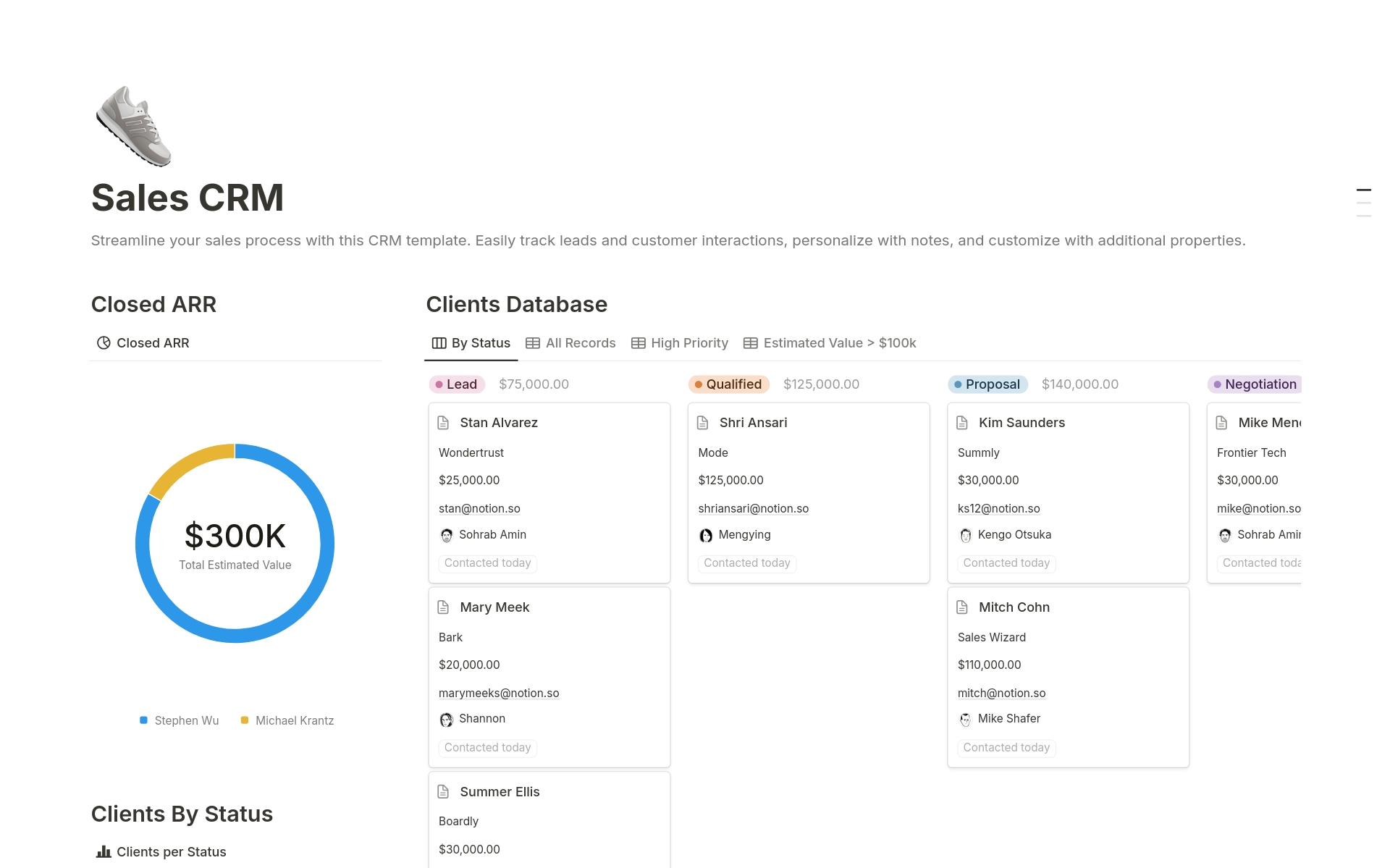
Creating your Notion CRM starts with establishing the foundation. Open a new page in your Notion workspace and give it a descriptive name like "Customer Management" or "My CRM." Adding an icon and header image makes the space feel more professional and easier to navigate.
The core of your system is a database table that stores all contact information. Type "/table" and select the "Table - Database" option to create this foundation. This becomes your contact management hub where every relationship gets documented and tracked.
Essential properties for your CRM
Your Notion CRM needs specific properties to capture meaningful customer data. Start with these fundamental properties:
Contact Information Properties:
- Full Name (Title property - this becomes the page title for each contact)
- Email (Email property type - enables click-to-email functionality)
- Phone Number (Phone property type - enables click-to-call on mobile)
- Company (Text property for business affiliations)
- Website (URL property for quick access to contact's online presence)
Relationship Management Properties:
- Status (Select property with options like "Lead," "Prospect," "Active Customer," "Past Customer," "Partner")
- Last Contact Date (Date property for tracking interaction history)
- Next Follow-up (Date property with reminders for scheduled outreach)
- Communication Method (Select property for "Email," "Phone," "Video Call," "In-Person")
- Relationship Strength (Select property with "Cold," "Warm," "Hot" classifications)
Business Intelligence Properties:
- Customer Value (Number property for tracking revenue potential or actual value)
- Industry (Select property for business categorization)
- Source (Select property tracking how you met: "Referral," "Website," "Social Media," "Event")
- Tags (Multi-select property for flexible categorization)
- Priority Level (Select property with "High," "Medium," "Low" options)
Using Notion as a CRM becomes more powerful with sophisticated property setups. Formula properties can calculate metrics like "days since last contact" or automatically assign priority levels based on customer value and last interaction date. These automated calculations help identify contacts who need attention without manual tracking.
Designing effective contact pages
Every contact entry in your Notion CRM opens into a full page where you can store all the information. This is where Notion truly excels compared to traditional CRM systems. You're not limited to predefined fields or rigid layouts - each contact page becomes a customizable workspace for that relationship.
Create a dedicated section for communication history that chronologically tracks every interaction. Use a simple table or bulleted list format that includes date, communication method, summary, and next steps. This running log provides context for future conversations and helps team members understand relationship history.
For contacts involved in ongoing projects, create dedicated sections that link to project databases or specific project pages. This connection provides immediate visibility into active collaborations and project status without switching between systems.
Document personal details that help build stronger relationships. Include information about family, hobbies, interests, or personal milestones. These details might seem unimportant for business purposes, but they're crucial for building authentic relationships that last beyond individual transactions.
Creating powerful views and filters
Your Notion CRM becomes truly valuable when you create multiple views of the same contact data. Database views allow you to see your contacts through different lenses depending on your current needs, turning a simple contact list into a dynamic business tool.
Create a "Sales Pipeline" view using the board format, grouped by your Status property. This visual representation shows contacts moving through your sales process, from initial lead to closed customer. You can drag contacts between columns as their status changes, providing an intuitive way to manage your sales funnel.
Build a "Follow-up Required" view that filters contacts with upcoming or overdue follow-up dates. Sort this view by the Next Follow-up date to see the most urgent contacts first. This view becomes your daily dashboard for relationship maintenance, ensuring no important contacts slip through the cracks.
Design a "Recent Activity" view sorted by Last Contact Date in descending order. This shows you which relationships are most active and which might be growing cold. Regular review of this view helps you identify contacts who haven't heard from you recently and might benefit from outreach.
Building team collaboration features
As your business grows, your Notion CRM needs to support multiple team members accessing and updating contact information. Notion's collaboration features allow teams to work together while maintaining data consistency and avoiding conflicts.
Set up appropriate permissions for different team members based on their roles and responsibilities. Sales team members might need full edit access to contact records, while support staff only need read access with the ability to add communication logs.
Create clear guidelines for data entry and contact ownership. Establish rules about who can update contact status, assign follow-up activities, or modify important contact details. These guidelines prevent conflicts and maintain data quality as your team grows.
Use Notion's comment system to facilitate team communication about specific contacts. Team members can leave notes, ask questions, or provide updates directly on contact pages, keeping all communication in context.
Advanced automation and formulas
Using Notion as a CRM becomes more efficient when you leverage Notion's formula and automation capabilities. While not as sophisticated as dedicated CRM automation, these features provide valuable insights and reduce manual work.
Create formula properties that automatically calculate relationship metrics. A "Days Since Contact" formula subtracts the Last Contact Date from today's date, showing how long it's been since your last interaction. This metric helps identify relationships that need attention.
Build priority scoring formulas that consider multiple factors like customer value, relationship strength, and time since last contact. These calculated priorities help you focus efforts on the most important relationships without manual assessment.
Use formula properties to automatically categorize contacts based on multiple criteria. For example, combine customer value and last contact date to automatically assign priority levels. High-value contacts with recent activity might automatically receive "High" priority, while lower-value contacts with stale communication get "Low" priority.
Maintaining data quality in your Notion CRM
A successful Notion CRM requires consistent data entry practices and ongoing maintenance. Without proper data management, even the most sophisticated system becomes cluttered and unreliable over time.
Establish clear guidelines for how information gets recorded in your Notion CRM. Create standards for formatting phone numbers, addresses, and company names. Consistent formatting makes searching and filtering more reliable while presenting a professional appearance.
Create scheduled reviews for updating contact statuses and cleaning up outdated information. Quarterly reviews might focus on identifying inactive contacts, updating relationship strengths, or refreshing outdated contact information.
Build processes for handling duplicate contacts and merging conflicting information. As your database grows, duplicate entries become more common and can confuse relationship history and communication records.
Comparing Notion CRM with traditional solutions
Using Notion as a CRM offers distinct advantages over traditional platforms, but also has limitations worth considering. Understanding these trade-offs helps you make informed decisions about whether a Notion-based approach fits your business needs.
The financial advantage of Notion CRM becomes more pronounced as your team grows. While platforms like Salesforce or HubSpot charge per user monthly, Notion's pricing remains relatively flat regardless of how many people access your CRM data.
Commercial CRMs offer sophisticated automation, reporting, and integration capabilities that Notion cannot match. Advanced features like automated email sequences, complex sales process automation, or deep integration with marketing platforms require specialized tools.
However, Notion's flexibility often compensates for missing features by allowing creative solutions that fit your specific needs. Rather than adapting your processes to software limitations, you can design exactly the customer management approach your business requires.
Integrating scheduling with your Notion CRM

While Notion handles contact management beautifully, scheduling meetings directly within the platform has limitations. Traditional calendar integration requires manual coordination, which leads to email ping-pong that slows sales cycles and frustrates potential customers.
You can embed scheduling links directly in your Notion CRM contact pages, which makes it simple to schedule follow-up meetings. But most scheduling tools exist in isolation from your customer data, and create gaps where valuable information gets lost between booking and follow-up.
Why booking and CRM belong together
For businesses serious about customer relationships, scheduling shouldn't be an afterthought. Every appointment booked should automatically capture customer data, with conversation notes permanently linked and follow-up automation running.
Zeeg solves this by functioning as both professional scheduling and contact management functionalities built around appointments. Rather than managing contacts in Notion and scheduling elsewhere, handle the entire customer journey from booking to deal closure in one integrated platform.
This approach offers key advantages:
- Automatic lead capture: Every appointment becomes a qualified lead without manual data entry
- Campaign attribution: Track which marketing channels bring actual deals, not just website visits
- Zero-loss funnel: No prospects slip between booking and contact management systems
- German data sovereignty: GDPR-compliant servers eliminate compliance headaches with US platforms
Starting at $10 per user monthly, the integrated solution often costs less than maintaining separate scheduling and CRM tools while offering you conversion tracking from marketing to closed deals.
Conclusion
Creating a Notion CRM provides businesses with powerful customer relationship management without the ongoing costs of traditional platforms. The flexibility to customize every aspect of your system means it grows and adapts as your business evolves.
Using Notion as a CRM offers particular advantages for small to medium-sized businesses that need sophisticated customer management without enterprise-level complexity or costs. The platform's flexibility allows you to create exactly the system your business needs rather than adapting to software limitations.
Start with the basic contact database and essential properties outlined in this guide. Add complexity gradually as you understand how your team actually uses the system. Remember that the best CRM is the one your team consistently uses and maintains.
For businesses ready to take their customer relationships to the next level, combining Notion's management capabilities with Zeeg's professional scheduling creates a comprehensive system that handles everything from initial contact to ongoing relationship management. This integrated approach keeps your customer interactions smooth and professional while maintaining the flexibility and cost-effectiveness that growing businesses need.
The investment in building a thoughtful Notion CRM pays dividends through improved customer relationships, better team coordination, and deeper insights into your business development efforts. While the initial setup requires time and attention, the result is a customer management system that truly fits your business rather than forcing your business to fit the software.
Frequently asked questions
Can I use Notion for CRM?
Yes, you can absolutely use Notion for CRM purposes. Notion's database functionality makes it well-suited for managing customer relationships, tracking contact information, and organizing sales pipelines. While it's not a traditional CRM platform, its flexibility allows you to create a customized customer management system that fits your specific business needs. You can store contact details, track communication history, manage follow-ups, and create different views for sales pipeline management. The main advantage is cost savings and customization options, though you'll need to build the system yourself rather than using pre-built CRM templates.
Is Notion a CRM or CMS?
Notion is neither a dedicated CRM nor a CMS by design - it's an all-in-one workspace platform that can function as both. Notion is fundamentally a productivity and organization tool that combines notes, databases, wikis, and project management features. However, its database capabilities make it possible to create custom CRM systems for managing customer relationships. Similarly, its content creation and organization features can serve CMS functions for internal documentation or simple websites. The platform's strength lies in its versatility, allowing users to adapt it for various purposes including customer relationship management, content management, or project tracking based on their specific requirements.
What is the difference between HubSpot and Notion?
HubSpot and Notion serve different primary purposes, though they can overlap in some areas. HubSpot is a dedicated CRM and marketing automation platform designed specifically for sales, marketing, and customer service teams. It offers built-in features like email marketing, lead scoring, sales pipeline management, and detailed analytics out of the box. Notion, on the other hand, is a flexible workspace tool that can be customized to create CRM functionality but requires manual setup. HubSpot provides more advanced automation and reporting capabilities, while Notion offers greater customization flexibility and lower costs. HubSpot works better for teams wanting ready-made CRM features, while Notion suits businesses preferring to build custom solutions that integrate with their broader workspace.
What is the best free CRM?
The best free CRM depends on your specific needs and team size. HubSpot offers one of the most comprehensive free CRM plans with unlimited contacts, basic automation, and email tracking for up to 1 million contacts. Notion CRM provides excellent customization options and can accommodate teams of any size for free, though it requires manual setup. Zoho CRM offers a free plan for up to 3 users with basic features, while Freshsales provides free access for unlimited users with limited functionality. For scheduling integration, combining a Notion CRM with Zeeg's free scheduling plan creates a powerful, cost-effective solution. The choice depends on whether you prefer ready-made features (HubSpot), maximum customization (Notion), or specific functionality needs like team collaboration or industry-specific requirements.
Zeeg is Europe's leading AI voice agent and appointment scheduling software in one solution — GDPR-compliant, made in Germany. Start for free →